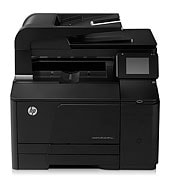
Small offices that print color and black documents at modest volume suit the HP LaserJet Pro 200 color MFP M276n. It prints, copies, scans and faxes, with a 35-sheet document feeder. HP recommends 250 to 1500 pages per month, and the duty cycle reaches 30,000.
HP LaserJet Pro 200 Color M276 Full Feature Software and Drivers
Win 10 64-bitWin 7 64-bit
On Windows, download HP LaserJet Pro 200 Color M276 Full Feature Software and Drivers (103.4 MB). On a Mac, choose Install HP Easy Start (6.3 MB).
Quick install: download the recommended file above, run it, and connect the USB cable only when the installer asks, then print a test page. Full steps
HP LaserJet Pro 200 color MFP M276n driver for Windows
Full software and drivers
Win 10 64-bitWin 7 64-bit
Details
- File name
LJ-Pro-200-color-MFP-M276-full-solution-15189.exe- MD5 checksum (from HP)
2617c52373682e427f8ede9574982be0- Software ID (HP)
- kj-107661-7 · verify on HP
Firmware
Win 10 64-bitWin 7 64-bit
Details
- Description
- This utility is for use on Microsoft Windows 32 and 64 bit operating systems. The utility can be used with a USB connection or network connection. Be…
- File name
HP_LaserJet_M276_colorMFP_Series_FW_Update_20190401.exe- MD5 checksum (from HP)
3ef40524b6f8566973e35f1a105e82be- Software ID (HP)
- kj-108130-9 · verify on HP
- Release notes
- Read on HP
Utilities and other software
Win 10 64-bitWin 7 64-bit
Details
- Description
- The PCL6 driver is recommended for most users for printing. It provides the best overall speed, print quality and printer feature support for most…
- File name
LJ-Pro-200-color-MFP-M276-driver-only-15188_1.exe- MD5 checksum (from HP)
321c102a58a1e404e6187996726d8ca9- Software ID (HP)
- kj-107843-6 · verify on HP
Win 10 64-bitWin 7 64-bit
Details
- Description
- The driver installer file automatically installs the PCL6 driver for your printer. This is a driver-only software solution intended for users who…
- File name
LJ-Pro-200-color-MFP-M276-driver-installer-15189.exe- MD5 checksum (from HP)
d0b51e1ee22ede63e8262312ce8a72dd- Software ID (HP)
- kj-107662-5 · verify on HP
Win 10 64-bitWin 7 64-bit
Details
- File name
HPEPrintAppSetupx64.exe- MD5 checksum (from HP)
f47f746e9f3a0bf359c06d3a4d889b43- Software ID (HP)
- lj-166432-4 · verify on HP
More HP LaserJet Pro 200 color MFP M276n driver downloads: Utilities and other software
Win 7 64-bit
Details
- Description
- This utility fixes an issue when sending a fax from a PC. If " HP Send Fax " is used to send a fax from a computer and this computer comes with "…
- File name
HPLJ_M276_Fax.exe- MD5 checksum (from HP)
7cb3e1cb7d8e8b831086554d24817984- Software ID (HP)
- kj-138840-1 · verify on HP
Win 7 64-bit
Details
- File name
HPUFDDriver.zip- MD5 checksum (from HP)
2674ed357413a1ebe343f9d326ed548e- Software ID (HP)
- lj-147894-1 · verify on HP
Win 7 64-bit
Details
- File name
HPReadIrisDownloader.exe- MD5 checksum (from HP)
8a8558f65ff4c1cc41ff0b21bc5f5405- Software ID (HP)
- kj-127410-3 · verify on HP
HP LaserJet Pro 200 color MFP M276n driver for macOS
macOS 26macOS 15
Details
- File name
HP_Easy_Start.app.zip- MD5 checksum (from HP)
19c1a5f786f5f93f9f778ad71ee444a3- Software ID (HP)
- mp-166618-27 · verify on HP
macOS 26macOS 15macOS 13
Details
- File name
HP_Easy_Admin.app.zip- MD5 checksum (from HP)
32c3c4edfb4e3bc519c3c1731542360e- Software ID (HP)
- mp-218629-7 · verify on HP
All files come straight from HP (ftp.hp.com). We checked them against HP’s list on Oct 25, 2026. Systems checked: Win 11, Win 10 64-bit, Win 7 64-bit, macOS 26, macOS 15, macOS 13, Linux. Older systems may have more files on HP’s page for this model.
HP LaserJet Pro 200 color MFP M276n driver support by operating system
64-bit
64-bit
Latest HP LaserJet Pro 200 color MFP M276n driver and firmware updates
- HP LaserJet Pro Series Firmware Update Utility v20190401 (May 21, 2019): Contains all previous fixes and enhancements. Fix a vulnerability issue in EWS that the Wireless Unique…
- Fax issue with IE 11 fix utility v1.0 (Oct 27, 2014): This utility fixes an issue when sending a fax from a PC. If " HP Send Fax " is used to send a fax from a…
Which HP LaserJet Pro 200 color MFP M276n driver should I choose?
Full software and drivers installs everything, so most Windows owners should start there at 103.4 MB. The Setup app, HP Easy Start at 6.3 MB, handles setup on a Mac. Utilities cover single jobs: the PCL6 driver without an installer (22.7 MB) or HP ePrint Software (31.2 MB). Firmware is a separate 14.5 MB utility; update only to fix the EWS vulnerability issue HP describes.
Duplex printing is manual, with driver support. The tray holds 150 sheets and the output bin 125. Black toner comes as HP 131A (CF210A) or HP 131X (CF210X); HP ePrint needs the printer online.
How to install the HP LaserJet Pro 200 color MFP M276n driver
- Close open programs, confirm 150 MB of free disk space, and turn on the printer.
- Keep the USB cable unplugged until the installer prompts for it.
- Download HP LaserJet Pro 200 Color M276 Full Feature Software and Drivers (103.4 MB), then click Run.
- Click Run again to extract the files. Installation then starts automatically.
- Follow the on-screen instructions to complete the installation.
- On a Mac, download Install HP Easy Start (6.3 MB) and follow its prompts to set up the printer.
Adding the printer by hand or installing on Linux? See our printer driver install guide.
Optimize copy quality
The M276n offers four copy-quality settings: Auto Select, Mixed, Text and Picture. Auto Select is the default, so it applies until you change it. Mixed suits pages with both text and graphics. However, choose Text for mostly text pages and Picture for mostly graphics.
Place the original on the scanner glass or in the document feeder. Then touch Copy on the Home screen, touch Settings, and scroll to Optimize. Use the arrow buttons to move through the options and touch the one you want. Finally, touch Black or Color to start copying.
Toner: HP LaserJet Pro 200 color MFP M276n
Open the front door and pull out the toner cartridge drawer. Grasp the handle on the old cartridge and lift it straight up. Then unpack the new cartridge and rock it gently from front to back, which spreads the toner evenly inside. Remove the plastic shield from its bottom.
Keep your fingers off the imaging drum on the bottom, because fingerprints can cause print-quality problems. Insert the new cartridge, then pull the tab on its left side straight up to remove the sealing tape and discard it. Close the drawer and the front door. Finally, box the old cartridge and shield, and follow the recycling instructions inside.
Change color options in Windows
In the print dialog of your program, select the product, click Properties or Preferences, and open the Color tab. There you can choose Automatic or Manual. Automatic is the right pick for most color jobs. Manual lets you adjust color settings independently of other settings.
However, manual changes can affect output, and HP recommends them only for color graphics experts. The Print in Grayscale option prints a color document in black and shades of gray. It suits documents meant for photocopying or faxing, and it also works for draft copies or saving color toner. Click OK to apply.
Booklets: HP LaserJet Pro 200 color MFP M276n
Open the Print dialog in your program, select the product, and click Properties or Preferences. On the Finishing tab, tick the Print on Both Sides (Manually) check box. Then pick a binding option from the Booklet Printing drop-down list. The Pages Per Sheet setting switches to 2 Pages Per Sheet on its own.
Pages per sheet offers 1, 2, 4, 6, 9 and 16, with 1 as the default. Extra pages shrink and follow normal print order. However, booklet printing is unavailable with any choice other than 2 pages per sheet. Print page borders draws a line around each page image.
Open the HP Device Toolbox
HP Device Toolbox lets you control product settings from a Web browser, and it opens the HP Embedded Web Server. On Windows, it appears only after a full software install. To start it, click Start, then Programs or All Programs, HP, your product group, and HP Device Toolbox.
Besides that route, a network-connected product accepts its IP address typed into a browser's address bar. The control panel shows the address when you touch Network. If that display is disabled, touch Setup, then Reports, then Configuration Report, and read the address from the printed page.
Event Log and System tab settings
The Event Log page in HP Device Toolbox tracks events that occur on the product, so it is the place to look when you want a record of what happened. It sits on the Home tab. Besides that, the System tab lets you view and change settings for several features.
System tab pages include Device Information, Paper Setup, Print Quality, EcoSMART Console, Print Density, Paper Types, System Setup, Service, Save and Restore, and Administration. For example, Device Information shows the installed product version, and lets you set an asset number and company name.
HP LaserJet Pro 200 color MFP M276n specifications
HP LaserJet Pro 200 color MFP M276n driver specs: printing
HP LaserJet Pro 200 color MFP M276n driver specs: paper handling
HP LaserJet Pro 200 color MFP M276n driver specs: connectivity, supplies and size
Source: HP product specifications for the HP LaserJet Pro 200 color MFP M276.
Each file lists the MD5 checksum HP publishes. Our guide to checking a driver download shows how to compare it. If an HP link is down, try the Microsoft Update Catalog search for the HP LaserJet Pro 200 color MFP M276n.
HP LaserJet Pro 200 color MFP M276n driver troubleshooting
HP ePrint jobs do not reach the printer
Confirm the printer has an internet connection, since HP ePrint requires one. Then send from an internet- and e-mail-capable device. Details are at hp.com/go/ePrintCenter.
Color pages print faded or light
Check toner levels, then replace any low cartridge with the matching HP 131A or 131X. Actual yields vary with the images printed, so a cartridge can run low sooner than expected.
Sending a fax from the PC with HP Send Fax fails on a computer with Internet Explorer 11
Install Fax issue with IE 11 fix utility version 1.0 (10.2 MB) on Windows 7 64-bit. HP lists it for faxing through HP Send Fax.
For “driver is unavailable”, offline printers and stuck print jobs, see our printer driver troubleshooting guide.
HP LaserJet Pro 200 color MFP M276n driver FAQ
Which Windows versions do the drivers support?
HP lists Win 10 64-bit and Win 7 64-bit for the Windows downloads, including the Full Feature Software and Drivers and the PCL6 drivers.
Which macOS versions work with HP Easy Start?
Install HP Easy Start (6.3 MB, version 2.16.7.260722) lists macOS 26 and macOS 15. HP Easy Admin also lists macOS 13.
How large is the Full Feature download?
It is 103.4 MB, version 15.0.15189.2008, dated Mar 05, 2021. HP says it fixed a security vulnerability, and the installer needs about 150 MB of free disk space.
What does the firmware update utility fix?
Version 20190401 (14.5 MB, May 21, 2019) contains all previous fixes. It also fixes a vulnerability issue in the EWS, according to HP's notes.
Drivers for similar HP printers
Owners of related models can find the matching downloads here: HP Color LaserJet Pro M254nw driver, HP Color LaserJet Pro M255dw driver, HP Color LaserJet Pro MFP M277dw driver, HP Color LaserJet Pro MFP M277n driver, HP Color LaserJet Pro MFP M281cdw driver, HP Color LaserJet Pro MFP M283fdw driver.
Last checked: Oct 25, 2026. HP and HP LaserJet Pro 200 color MFP M276n are trademarks of HP Inc. This site is not affiliated with HP.