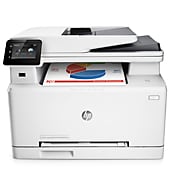
Hi-Speed USB 2.0 and a built-in 10/100/1000 Ethernet port give you two wired ways to set this printer up. The HP Color LaserJet Pro MFP M277n prints, copies, scans and faxes in color. HP recommends 250 to 2500 pages a month, which fits a small office or a busy home desk.
HP Color LaserJet Pro M277 Printer series Full Software and PCL 6 Driver
Win 10 64-bitWin 7 64-bit
On Windows, download HP Color LaserJet Pro M277 Printer series Full Software and PCL 6 Driver (116.5 MB). On macOS, download Install HP Easy Start (6.3 MB).
Quick install: download the recommended file above, run it, and connect the USB cable only when the installer asks, then print a test page. Full steps
HP Color LaserJet Pro MFP M277n driver for Windows
Full software and drivers
Win 10 64-bitWin 7 64-bit
Details
- File name
HP_Color_LJ_Pro_MFP_M277-full-solution-22047.exe- MD5 checksum (from HP)
e3465e83193375148cac621e7a2013cb- Software ID (HP)
- kj-135352-9 · verify on HP
HP Universal Print Driver
Win 7 64-bit
Details
- File name
upd-pcl5-x64-6.1.0.20062.exe- MD5 checksum (from HP)
7cc935b12a16541804eeecec3be4de66- Software ID (HP)
- lj-95994-9 · verify on HP
Win 10 64-bitWin 7 64-bit
Details
- File name
upd-pcl6-x64-6.4.1.22169.exe- MD5 checksum (from HP)
723459303c4642f0f7a13a36a1d0583e- Software ID (HP)
- lj-95981-17 · verify on HP
Win 10 64-bitWin 7 64-bit
Details
- File name
upd-ps-x64-6.4.1.22169.exe- MD5 checksum (from HP)
66b3723808d7796995b792a94d2debb2- Software ID (HP)
- lj-95991-16 · verify on HP
Firmware
Win 10 64-bitWin 7 64-bit
Details
- Description
- This utility is for use on Microsoft Windows 32 and 64 bit operating systems. The utility can be used with a USB connection or network connection. Be…
- File name
M277_MFP_Series_FW_Update-20220414.nativeofficefonts.exe- MD5 checksum (from HP)
4ef8fc4b8a5ffe56f0f3c4bef8dea91a- Software ID (HP)
- kj-159319-12 · verify on HP
- Release notes
- Read on HP
Utilities and other software
Win 10 64-bit
Details
- Description
- This solution provides only the PCL-6 driver without an installer. To install the print driver use the Add Printer Wizard. Optimized for use with…
- File name
HP_LaserJet_M277_PCL6_Win8_Plus_Print_Driver_no_Installer_15343_1.exe- MD5 checksum (from HP)
2bb94ba3fb53ab5c60d857c07efac244- Software ID (HP)
- kj-145876-4 · verify on HP
Win 10 64-bitWin 7 64-bit
Details
- Description
- The driver installer file automatically installs the PCL 6 driver for your printer. This is a driver-only software solution intended for users who…
- File name
HP_Color_LJ_Pro_MFP_M277-basic-solution-15345.exe- MD5 checksum (from HP)
ca3e2cf5017d10259445da4e9881b40b- Software ID (HP)
- kj-135353-8 · verify on HP
Win 10 64-bitWin 7 64-bit
Details
- Description
- This solution provides only the PCL 6 driver without an installer. To install the print driver use the Add Printer Wizard. The following are…
- File name
HP_LaserJet_M277_PCL6_Print_Driver_no_Installer_15343_1.exe- MD5 checksum (from HP)
f779b7b6365ee0171cabdae5c84c05a5- Software ID (HP)
- kj-145875-4 · verify on HP
More HP Color LaserJet Pro MFP M277n driver downloads: Utilities and other software
Win 7 64-bit
Details
- File name
HPUFDDriver.zip- MD5 checksum (from HP)
2674ed357413a1ebe343f9d326ed548e- Software ID (HP)
- lj-147894-1 · verify on HP
HP Color LaserJet Pro MFP M277n driver for macOS
macOS 26macOS 15
Details
- File name
HP_Easy_Start.app.zip- MD5 checksum (from HP)
19c1a5f786f5f93f9f778ad71ee444a3- Software ID (HP)
- mp-166618-27 · verify on HP
macOS 26macOS 15macOS 13
Details
- File name
HP_Easy_Admin.app.zip- MD5 checksum (from HP)
32c3c4edfb4e3bc519c3c1731542360e- Software ID (HP)
- mp-218629-7 · verify on HP
HP Color LaserJet Pro MFP M277n driver for Linux
Linux
Details
- Software ID (HP)
- mp-163323-1 · verify on HP
All files come straight from HP (ftp.hp.com). We checked them against HP’s list on Oct 25, 2026. Systems checked: Win 11, Win 10 64-bit, Win 7 64-bit, macOS 26, macOS 15, macOS 13, Linux. Older systems may have more files on HP’s page for this model.
HP Color LaserJet Pro MFP M277n driver support by operating system
64-bit
64-bit
Latest HP Color LaserJet Pro MFP M277n driver and firmware updates
- HP LaserJet Pro M277 series Firmware Update Utility v20220414 (May 20, 2022): HP Color LaserJet Pro MFP M274 and M277 Series Firmware Enhancements and Fix List for datecode 20220414…
Which HP Color LaserJet Pro MFP M277n driver should I choose?
Full software and drivers (116.5 MB) installs the driver plus HP's complete software, and suits most Windows owners. Utility downloads are driver-only. The no-installer PCL 6 packages are 11.6 MB and 8.9 MB, and you add them through the Add Printer Wizard. Universal Print Driver packages are generic drivers for IT-managed setups. HP Easy Start, a 6.3 MB setup app, prepares a Mac for printing. Update the 28.3 MB firmware only when it fixes a problem you actually have.
Paper handling is a 150-sheet input tray plus a multipurpose tray, with a 100-sheet output tray. Supported sizes are letter, legal, executive, A4 and A5. Replacement cartridges include the HP 201A black CF400A (~1500 yield) and the HP 201X black CF400X (~2800 yield).
How to install the HP Color LaserJet Pro MFP M277n driver
- Download HP Color LaserJet Pro M277 Printer series Full Software and PCL 6 Driver (116.5 MB) to your Windows 10 or Windows 7 64-bit PC.
- Run the downloaded installer file and let it start.
- Connect the printer with a USB cable, or plug its Ethernet cable into your network.
- Follow the installer's on-screen prompts until the printer setup finishes.
- Print a test page from any app to confirm the driver works.
- On a Mac, download Install HP Easy Start (6.3 MB) instead and run it.
Adding the printer by hand or installing on Linux? See our printer driver install guide.
Scan to a USB Flash Drive
Place the document on the scanner glass, matching the indicators on the product. Then put a USB flash drive into the walk-up USB port. On the Home screen of the control panel, touch Scan, and choose the Scan to USB Drive screen.
Touch the Scan button to scan and save the file. The printer creates a folder called HPSCANS on the drive and stores the scan as a PDF or JPG with an automatically generated name. Also, the summary screen can be touched to adjust settings, and you can change the folder name.
Save Toner with EconoMode
EconoMode is meant for printing drafts of documents, and it can use less toner. However, it can also lower print quality. HP does not recommend running it all the time. Therefore, keep it for drafts only.
To turn it on, choose Print in your software, select the product, and click Properties or Preferences. Open the Paper/Quality tab and tick the EconoMode check box. If your print driver lacks the option, set it in the HP Embedded Web Server. Full-time use might wear out the cartridge's mechanical parts before the toner runs out.
Update HP Color LaserJet Pro MFP M277n Firmware
HP releases product updates from time to time, along with new Web Services apps and new features for existing ones. Updating the firmware is therefore worth doing now and then. Also, the Web Services apps update automatically when the firmware is updated, so you do not need to handle them separately.
The steps cover one product at a time, so repeat them for each device you own. This product supports two methods for a firmware update. However, use only one of them, not both. Choose whichever method suits you, then follow its steps through to the end.
Set an Administrator Password in the EWS
An administrator password keeps unauthorized users from changing the product settings. It protects access to both the product and the HP Embedded Web Server. Start by touching Connection Information on the Home screen, then Network Connected or Network Wi-Fi ON, to see the IP address or host name.
Type the address into a browser exactly as the panel shows it and press Enter. If a security certificate warning appears, click Continue to this website; HP says this will not harm the computer. Then open the Security tab, General Security, and fill in the username, New Password and Verify Password fields. Click Apply, and store the password safely.
Load Envelopes in Tray 2
Open Tray 2 and slide the paper guides to match the size of your envelopes. Load the envelopes, then check that the stack lies flat at all four corners. Slide the length and width guides until they touch the stack.
Do not overfill the tray, because that causes jams. Keep the top of the stack below the tray full indicator. In addition, never load more than five envelopes in Tray 2, as more can result in jams. Once the stack sits below the indicator, close the tray.
Restore HP Color LaserJet Pro MFP M277n Defaults
Restoring defaults returns all product and network settings to factory values. However, it does not reset the page count, tray size or language. It also deletes any pages held in memory. To do it, touch Setup, scroll to the Service menu, touch Restore Defaults, then touch OK. The product restarts by itself.
A Cartridge is low message does not mean you must replace the toner cartridge now. Keep printing until print quality is no longer acceptable. Also, you can remove the cartridge and gently rock it end to end to redistribute the toner, then reinsert it and close the cover. Keep a replacement ready.
HP Color LaserJet Pro MFP M277n specifications
HP Color LaserJet Pro MFP M277n driver specs: printing
HP Color LaserJet Pro MFP M277n driver specs: paper handling
HP Color LaserJet Pro MFP M277n driver specs: connectivity, supplies and size
Source: HP product specifications for the HP Color LaserJet Pro MFP M277n.
Each file lists the MD5 checksum HP publishes. Our guide to checking a driver download shows how to compare it. If an HP link is down, try the Microsoft Update Catalog search for the HP Color LaserJet Pro MFP M277n.
HP Color LaserJet Pro MFP M277n driver troubleshooting
Computer cannot find the printer
Reseat the USB cable or try another USB port. For a network connection, confirm the Ethernet cable is firmly attached. Restart both the printer and the computer, then run the installer again.
Color prints look faded or streaky
Check the cartridges first, since a low or empty laser cartridge often causes this. Replace it with an HP 201A or 201X cartridge for this model, then print a test page again.
Security vulnerability in an older PCL 6 driver
Install HP Color LaserJet Pro M277 Multifunction Printer series PCL 6 Printer Driver, version 14.0.15345.533 (80.2 MB, Mar 04, 2021). HP lists this release as fixing a security vulnerability.
For “driver is unavailable”, offline printers and stuck print jobs, see our printer driver troubleshooting guide.
HP Color LaserJet Pro MFP M277n driver FAQ
Which Windows versions does HP support for this printer?
HP offers drivers for Windows 10 64-bit and Windows 7 64-bit. The v4 PCL-6 driver is Windows 10 64-bit only. HP lists no 32-bit Windows downloads for this model here.
Which macOS versions work with the Mac download?
Install HP Easy Start supports macOS 26 and macOS 15. HP Easy Admin, a 4.9 MB tool for downloading driver packages, supports macOS 26, 15 and 13.
How big is the recommended Windows download?
HP Color LaserJet Pro M277 Printer series Full Software and PCL 6 Driver is 116.5 MB, version 14.0.22047.562, dated Mar 21, 2022. HP marks it as recommended.
What does the firmware update include?
HP's firmware utility, datecode 20220414, is 28.3 MB. HP says it contains all previous fixes and includes a network stack update. It runs on Windows 10 and Windows 7 64-bit.
Drivers for similar HP printers
Owners of related models can find the matching downloads here: HP Color LaserJet Pro MFP M277dw driver, HP Color LaserJet Pro M254nw driver, HP Color LaserJet Pro M255dw driver, HP Color LaserJet Pro MFP M281cdw driver, HP Color LaserJet Pro MFP M283fdw driver, HP LaserJet M208dw driver.
Last checked: Oct 25, 2026. HP and HP Color LaserJet Pro MFP M277n are trademarks of HP Inc. This site is not affiliated with HP.
Thanks for the printer driver it was an unexpected surprise after installing win 10.