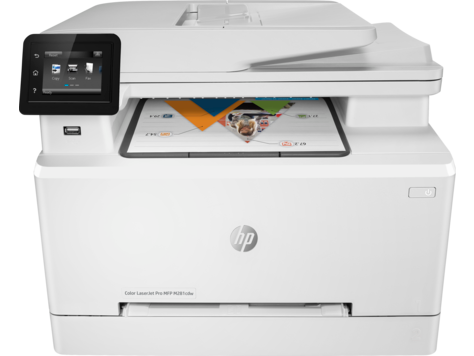
Built-in Ethernet and 802.11 b/g/n Wi-Fi give you network and wireless setup options, plus Wi-Fi Direct. The HP Color LaserJet Pro MFP M281cdw prints, copies, scans and faxes in color laser. HP rates it for 150 to 2500 pages a month, which fits small offices.
HP Color LaserJet Pro MFP M281fdw/M281cdw Printer Full Software Solution
Win 11Win 10 64-bitWin 7 64-bit
On Windows, download HP Color LaserJet Pro MFP M281fdw/M281cdw Printer Full Software Solution (212.2 MB). On macOS, download Install HP Easy Start (6.3 MB).
Quick install: download the recommended file above, run it, and choose Wi-Fi or USB when the installer asks, then print a test page. Full steps
HP Color LaserJet Pro MFP M281cdw driver for Windows
Full software and drivers
Win 11
Details
- File name
Full_Webpack-63.8.6459_ARM64-SJ0001_Full_Webpack.exe- MD5 checksum (from HP)
6d62a1c7a02013ab7ada7c43595e721c- Software ID (HP)
- cs-352016-3 · verify on HP
Win 11Win 10 64-bit
Details
- File name
Full_Webpack-63.8.6459-SJ0001_Full_Webpack.exe- MD5 checksum (from HP)
7e76f43e3ae4d4638f9271aa6235f8dc- Software ID (HP)
- cs-308742-11 · verify on HP
Win 11Win 10 64-bitWin 7 64-bit
Details
- File name
Full_Webpack-44.11.2787-LJM278-M281_UWWL_4_1_Full_Webpack.exe- MD5 checksum (from HP)
28aff8d3d652408473cd9809ceae59a8- Software ID (HP)
- Im-189394-12 · verify on HP
Win 7 64-bit
Details
- File name
Full_Webpack-51.7.5630-SJ0001_Full_Webpack.exe- MD5 checksum (from HP)
d5d076d9ab58d6bba996ab4af1149055- Software ID (HP)
- cs-270897-6 · verify on HP
- Release notes
- Read on HP
Basic driver only
Win 11
Details
- File name
Basic_Webpack_x64-63.8.6459_ARM64-SJ0001_Basicx64_Webpack.exe- MD5 checksum (from HP)
ff10299f0401ee28a1e09f0aecef6c3c- Software ID (HP)
- cs-351979-3 · verify on HP
Win 11Win 10 64-bit
Details
- File name
Basic_Webpack_x64-63.8.6459-SJ0001_Basicx64_Webpack.exe- MD5 checksum (from HP)
24c79852645f3dea63bb0a61b2ebd87d- Software ID (HP)
- cs-308743-11 · verify on HP
Win 11Win 10 64-bitWin 7 64-bit
Details
- File name
Basic_Webpack_x64-44.11.2787-LJM278-M281_UWWL_4_1_Basicx64_Webpack.exe- MD5 checksum (from HP)
fd5147fc89c7b14c16754754cb594bf9- Software ID (HP)
- bi-189344-12 · verify on HP
Win 7 64-bit
Details
- File name
Basic_Webpack_x64-51.7.5630-SJ0001_Basicx64_Webpack.exe- MD5 checksum (from HP)
4a9275e44fbf3ad68f0edec713718f99- Software ID (HP)
- cs-270898-6 · verify on HP
Setup apps
Win 11Win 10 64-bit
Details
- Software ID (HP)
- mp-366135-1 · verify on HP
HP Universal Print Driver
Win 10 64-bitWin 7 64-bit
Details
- File name
upd-pcl6-win10-x64-8.2.0.26778.zip- MD5 checksum (from HP)
1311b735d1ada9b02676d32b5ba5b232- Software ID (HP)
- ds-99374-36 · verify on HP
- Release notes
- Read on HP
Win 10 64-bitWin 7 64-bit
Details
- File name
upd-ps-win10-x64-8.2.0.26778.zip- MD5 checksum (from HP)
626ec0b8d41d3be40357b3c825c3502d- Software ID (HP)
- ds-99376-35 · verify on HP
- Release notes
- Read on HP
Win 11
Details
- File name
upd-pcl6-win11-x64-8.2.0.26819.zip- MD5 checksum (from HP)
5660c16a00e21f11736fd003063d6d13- Software ID (HP)
- ds-365647-1 · verify on HP
- Release notes
- Read on HP
Win 11
Details
- File name
upd-ps-win11-x64-8.2.0.26819.zip- MD5 checksum (from HP)
d27ad643905526df8cc9a89b556dbf42- Software ID (HP)
- ds-365648-1 · verify on HP
- Release notes
- Read on HP
Win 11Win 10 64-bitWin 7 64-bit
Details
- File name
HP-PARK-v1.9.2.zip- MD5 checksum (from HP)
b7f948771a52c13721d963c6830ac7b5- Software ID (HP)
- ds-99433-30 · verify on HP
- Release notes
- Read on HP
More HP Color LaserJet Pro MFP M281cdw driver downloads: HP Universal Print Driver
Win 11 ARM64
Details
- File name
upd-pcl6-win11-ARM64-8.2.0.26778.zip- MD5 checksum (from HP)
e270ca97f4ddb5139217621ccc205506- Software ID (HP)
- ds-359027-2 · verify on HP
- Release notes
- Read on HP
Firmware
Win 11Win 10 64-bitWin 7 64-bit
Details
- File name
M280_Series_FW_Update-20230822.exe- MD5 checksum (from HP)
00bc060b2b553dc58c45fbefcab37351- Software ID (HP)
- Im-194878-15 · verify on HP
- Release notes
- Read on HP
Utilities and other software
Win 11Win 10 64-bit
Details
- File name
Win7plus-1.0.1020-HPOCR_Win7plus.exe- MD5 checksum (from HP)
cce55cb23d2580d7de22c10203b771dd- Software ID (HP)
- cs-323861-1 · verify on HP
Win 11Win 10 64-bit
Details
- File name
Readiris17-17.4.211_HP-cd25n005.exe- MD5 checksum (from HP)
f3e28efbe291bcfe97ecc279fc813dde- Software ID (HP)
- bi-355536-1 · verify on HP
Win 11Win 10 64-bit
Details
- File name
Readiris_PDF-27.0.577.2-HP.msi- MD5 checksum (from HP)
fefe270010c198ba0f4eaf0fa4b500d6- Software ID (HP)
- bi-355537-3 · verify on HP
Win 7 64-bit
Details
- File name
Win7plus-1.0.1019-HPOCR_Win7plus.exe- MD5 checksum (from HP)
3f49c91f29c83aa812b631234e305936- Software ID (HP)
- cs-324236-1 · verify on HP
HP Color LaserJet Pro MFP M281cdw driver for macOS
Setup apps
macOS 26macOS 15
Details
- File name
HP_Easy_Start.app.zip- MD5 checksum (from HP)
19c1a5f786f5f93f9f778ad71ee444a3- Software ID (HP)
- mp-166618-27 · verify on HP
macOS 26macOS 15macOS 13
Details
- Software ID (HP)
- mp-351535-1 · verify on HP
Utilities and other software
macOS 26macOS 15macOS 13
Details
- File name
HP_Easy_Admin.app.zip- MD5 checksum (from HP)
32c3c4edfb4e3bc519c3c1731542360e- Software ID (HP)
- mp-218629-7 · verify on HP
HP Color LaserJet Pro MFP M281cdw driver for Linux
Linux
Details
- Software ID (HP)
- mp-54524-1 · verify on HP
All files come straight from HP (ftp.hp.com). We checked them against HP’s list on Oct 25, 2026. Systems checked: Win 11, Win 10 64-bit, Win 7 64-bit, macOS 26, macOS 15, macOS 13, Linux. Older systems may have more files on HP’s page for this model.
HP Color LaserJet Pro MFP M281cdw driver support by operating system
64-bit
64-bit
Latest HP Color LaserJet Pro MFP M281cdw driver and firmware updates
- HP Color LaserJet Pro M280-M281 Multifunction Printer series Firmware Update Utility v20230822 (Nov 27, 2023): HP Color LaserJet Pro M280-M281 series Multifunction Printer Firmware Enhancements and Fix List for date code…
Which HP Color LaserJet Pro MFP M281cdw driver should I choose?
HP offers several kinds of downloads for this printer. Full software and drivers is the complete package, and the Windows one is 212.2 MB. Basic driver installs only the driver and essentials, and the Windows version is 94.0 MB. Universal Print Driver is a generic driver, mainly for IT-managed setups. Firmware is a separate utility, so update it only to fix a listed problem, such as the 79 error fix.
Automatic duplex printing is standard, and the output bin holds 100 sheets. Wi-Fi Direct, AirPrint and Mopria let phones print without extra drivers. Replacement toner includes HP 202A and 203A cartridges, plus higher-yield 202X and 203X versions.
How to install the HP Color LaserJet Pro MFP M281cdw driver
- Close all software programs on your computer, then turn on the printer.
- Connect the network cable first if you use a wired network. Keep the USB cable unplugged until the installer asks for it.
- Click Download on this page, then click the downloaded file.
- Let the files extract. The installation starts automatically, so follow the on-screen instructions to finish.
- Choose Save instead if you want to install later. Pick a location, then double-click the file when ready.
- On a Mac, run Install HP Easy Start (6.3 MB), the macOS download HP recommends.
Adding the printer by hand or installing on Linux? See our printer driver install guide.
HP Color LaserJet Pro MFP M281cdw specifications
HP Color LaserJet Pro MFP M281cdw driver specs: printing
HP Color LaserJet Pro MFP M281cdw driver specs: paper handling
HP Color LaserJet Pro MFP M281cdw driver specs: connectivity, supplies and size
Source: HP product specifications for the HP Color LaserJet Pro MFP M281cdw.
Each file lists the MD5 checksum HP publishes. Our guide to checking a driver download shows how to compare it. If an HP link is down, try the Microsoft Update Catalog search for the HP Color LaserJet Pro MFP M281cdw.
HP Color LaserJet Pro MFP M281cdw driver troubleshooting
Computer cannot find the printer on the network
Confirm the printer is on and joined to the same network as your computer. Restart the printer and your router. For a wired connection, check the network cable is firmly seated. Then run the installer again.
Faded or streaky color pages
Check the toner levels first. Remove each cartridge, reseat it firmly, and print again. If the problem stays, replace the weak cartridge with a matching HP 202A, 202X, 203A or 203X toner cartridge.
Printer shows a 79 error
Turn the printer off and on again. If the error returns, install the Firmware Update Utility, version 20230822 (34.5 MB). HP lists a fix for the 79 error in that release.
For “driver is unavailable”, offline printers and stuck print jobs, see our printer driver troubleshooting guide.
HP Color LaserJet Pro MFP M281cdw driver FAQ
Which Windows versions does the recommended driver support?
The Full Software Solution, version 44.11.2787, supports Windows 11, Windows 10 64-bit and Windows 7 64-bit. It is 212.2 MB and dates from Oct 19, 2022.
Which download do I need on a Mac?
Download Install HP Easy Start, version 2.16.7.260722. It is 6.3 MB and supports macOS 26 and macOS 15. HP Easy Admin also supports macOS 13.
What does the firmware update fix?
HP lists the Firmware Update Utility, version 20230822, with a fix for a 79 error. It also contains all previous fixes. The file is 34.5 MB and supports Windows 11, 10 64-bit and 7 64-bit.
Can this printer print on both sides automatically?
Yes. HP lists automatic duplex printing as standard. It prints up to 22 ppm in black and in color, with a monthly duty cycle of up to 40,000 pages.
Drivers for similar HP printers
Owners of related models can find the matching downloads here: HP Color LaserJet Pro MFP M281fdn driver, HP Color LaserJet Pro M254nw driver, HP Color LaserJet Pro M255dw driver, HP Color LaserJet Pro M282-M285 Multifunction series driver, HP Color LaserJet Pro MFP M277dw driver, HP Color LaserJet Pro MFP M277n driver.
Last checked: Oct 25, 2026. HP and HP Color LaserJet Pro MFP M281cdw are trademarks of HP Inc. This site is not affiliated with HP.