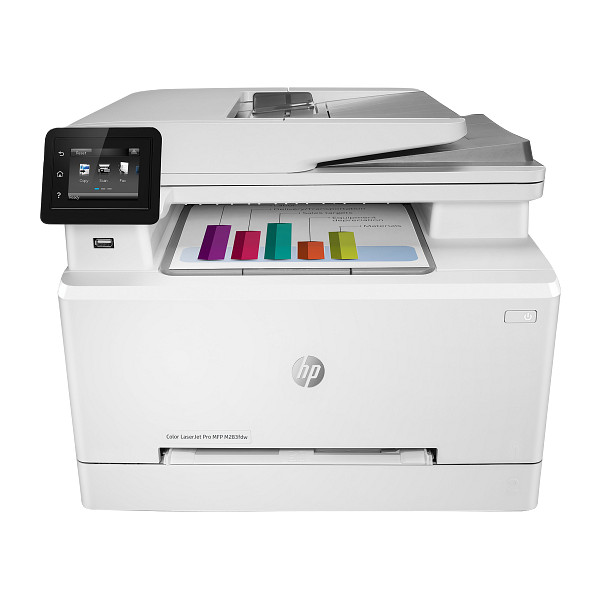
Laser printing means this machine runs on toner cartridges instead of ink. The HP Color LaserJet Pro M282-M285 series prints color at up to 22 ppm, and it scans with a flatbed or an ADF. HP rates it for 150 to 2500 pages a month, which fits small offices and busy home setups.
HP Color LaserJet Pro MFP M283cdw/M283fdw Printer Full Software Solution
Win 11Win 10 64-bitWin 7 64-bit
For Windows, download the HP Color LaserJet Pro MFP M283cdw/M283fdw Printer Full Software Solution. The file is 207.7 MB and installs everything you need for the printer.
Quick install: download the recommended file above, run it, and choose Wi-Fi or USB when the installer asks, then print a test page. Full steps
HP Color LaserJet Pro M282-M285 series driver for Windows
Full software and drivers
HP Universal Scan - Full Feature Software and Driver (ARM 64)Win 11
Details
- File name
Full_Webpack-63.8.6459_ARM64-SJ0001_Full_Webpack.exe- MD5 checksum (from HP)
6d62a1c7a02013ab7ada7c43595e721c- Software ID (HP)
- cs-352016-3 · verify on HP
HP Universal Scan - Full Feature Software and Driver (for Win 11, Win 10 64-bit)Win 11Win 10 64-bit
Details
- File name
Full_Webpack-63.8.6459-SJ0001_Full_Webpack.exe- MD5 checksum (from HP)
7e76f43e3ae4d4638f9271aa6235f8dc- Software ID (HP)
- cs-308742-11 · verify on HP
HP Color LaserJet Pro MFP M283cdw/M283fdw Printer Full Software SolutionWin 11Win 10 64-bitWin 7 64-bit
Details
- File name
Full_Webpack-44.11.2784-LJM282-M285_UWWL_4_1_Full_Webpack.exe- MD5 checksum (from HP)
dc50a67dc003b34d1a3032a3787fa5e6- Software ID (HP)
- Im-241330-5 · verify on HP
HP Universal Scan - Full Feature Software and Driver (for Win 7 64-bit)Win 7 64-bit
Details
- File name
Full_Webpack-51.7.5630-SJ0001_Full_Webpack.exe- MD5 checksum (from HP)
d5d076d9ab58d6bba996ab4af1149055- Software ID (HP)
- cs-270897-6 · verify on HP
- Release notes
- Read on HP
Basic driver only
HP Universal Scan - Basic Feature Software and Driver (ARM 64)Win 11
Details
- File name
Basic_Webpack_x64-63.8.6459_ARM64-SJ0001_Basicx64_Webpack.exe- MD5 checksum (from HP)
ff10299f0401ee28a1e09f0aecef6c3c- Software ID (HP)
- cs-351979-3 · verify on HP
HP Universal Scan - Basic Feature Software and Driver (for Win 11, Win 10 64-bit)Win 11Win 10 64-bit
Details
- File name
Basic_Webpack_x64-63.8.6459-SJ0001_Basicx64_Webpack.exe- MD5 checksum (from HP)
24c79852645f3dea63bb0a61b2ebd87d- Software ID (HP)
- cs-308743-11 · verify on HP
HP Color LaserJet Pro MFP M283cdw/M283fdw Printer Basic Software SolutionWin 11Win 10 64-bitWin 7 64-bit
Details
- File name
Basic_Webpack_x64-44.11.2784-LJM282-M285_UWWL_4_1_Basicx64_Webpack.exe- MD5 checksum (from HP)
54613c2ac409ebcb165e875803258f2b- Software ID (HP)
- Im-241413-5 · verify on HP
HP Universal Scan - Basic Feature Software and Driver (for Win 7 64-bit)Win 7 64-bit
Details
- File name
Basic_Webpack_x64-51.7.5630-SJ0001_Basicx64_Webpack.exe- MD5 checksum (from HP)
4a9275e44fbf3ad68f0edec713718f99- Software ID (HP)
- cs-270898-6 · verify on HP
Setup apps
HP Easy Start Printer Setup Software (Internet connection required for driver installation)Win 11Win 10 64-bitWin 7 64-bit
Details
- File name
HPEasyStart_17_6_15.exe- MD5 checksum (from HP)
d3c5840776dec9f1f7e1ba23499a15e8- Software ID (HP)
- mp-366487-3 · verify on HP
Install HP app to complete setup and supportWin 11Win 10 64-bit
Details
- Software ID (HP)
- mp-366135-1 · verify on HP
HP Universal Print Driver
HP Universal Print Driver for Windows PCL6 (64-bit) (for Win 10 64-bit, Win 7 64-bit)Win 10 64-bitWin 7 64-bit
Details
- File name
upd-pcl6-win10-x64-8.2.0.26778.zip- MD5 checksum (from HP)
1311b735d1ada9b02676d32b5ba5b232- Software ID (HP)
- ds-99374-36 · verify on HP
- Release notes
- Read on HP
HP Universal Print Driver for Windows PostScript (64-bit)Win 10 64-bitWin 7 64-bit
Details
- File name
upd-ps-win10-x64-8.2.0.26778.zip- MD5 checksum (from HP)
626ec0b8d41d3be40357b3c825c3502d- Software ID (HP)
- ds-99376-35 · verify on HP
- Release notes
- Read on HP
HP Universal Print Driver for Windows PCL6 (64-bit) (for Win 11)Win 11
Details
- File name
upd-pcl6-win11-x64-8.2.0.26819.zip- MD5 checksum (from HP)
5660c16a00e21f11736fd003063d6d13- Software ID (HP)
- ds-365647-1 · verify on HP
- Release notes
- Read on HP
HP Universal Print Driver for Windows PS (64-bit)Win 11
Details
- File name
upd-ps-win11-x64-8.2.0.26819.zip- MD5 checksum (from HP)
d27ad643905526df8cc9a89b556dbf42- Software ID (HP)
- ds-365648-1 · verify on HP
- Release notes
- Read on HP
HP Print Administrator Resource KitWin 11Win 10 64-bitWin 7 64-bit
Details
- File name
HP-PARK-v1.9.2.zip- MD5 checksum (from HP)
b7f948771a52c13721d963c6830ac7b5- Software ID (HP)
- ds-99433-30 · verify on HP
- Release notes
- Read on HP
More hP Universal Print Driver
HP Universal Print Driver for Windows PCL6 (ARM64-bit)Win 11 ARM64
Details
- File name
upd-pcl6-win11-ARM64-8.2.0.26778.zip- MD5 checksum (from HP)
e270ca97f4ddb5139217621ccc205506- Software ID (HP)
- ds-359027-2 · verify on HP
- Release notes
- Read on HP
Firmware
HP Color LaserJet Pro M282-M285 Multifunction Printer series Firmware Update UtilityWin 11Win 10 64-bitWin 7 64-bit
Details
- File name
HP_Color_LaserJet_Pro_MFP_M282_M285_Series-20260622.nativeofficefonts.exe- MD5 checksum (from HP)
4b8a1dcc1f61da9cd5beb56c76b2382e- Software ID (HP)
- Im-250250-18 · verify on HP
- Release notes
- Read on HP
Utilities and other software
HP Scan OCR Add-on Software (for Win 11, Win 10 64-bit)Win 11Win 10 64-bit
Details
- File name
Win7plus-1.0.1020-HPOCR_Win7plus.exe- MD5 checksum (from HP)
cce55cb23d2580d7de22c10203b771dd- Software ID (HP)
- cs-323861-1 · verify on HP
ReadIRIS Advanced OCRWin 11Win 10 64-bit
Details
- File name
Readiris17-17.4.211_HP-cd25n005.exe- MD5 checksum (from HP)
f3e28efbe291bcfe97ecc279fc813dde- Software ID (HP)
- bi-355536-1 · verify on HP
ReadIRIS Advanced PDFWin 11Win 10 64-bit
Details
- File name
Readiris_PDF-27.0.577.2-HP.msi- MD5 checksum (from HP)
fefe270010c198ba0f4eaf0fa4b500d6- Software ID (HP)
- bi-355537-3 · verify on HP
HP Universal Fax Driver for WindowsWin 11Win 10 64-bitWin 7 64-bit
Details
- File name
UFD_8.2-8.2.89-HPUFDDriver.exe- MD5 checksum (from HP)
5e75dcabe30aa70b34cf4f2319568616- Software ID (HP)
- ds-203195-19 · verify on HP
- Release notes
- Read on HP
HP Scan OCR Add-on Software (for Win 7 64-bit)Win 7 64-bit
Details
- File name
Win7plus-1.0.1019-HPOCR_Win7plus.exe- MD5 checksum (from HP)
3f49c91f29c83aa812b631234e305936- Software ID (HP)
- cs-324236-1 · verify on HP
HP Color LaserJet Pro M282-M285 series driver for macOS
Install HP app to complete setup and supportmacOS 26macOS 15macOS 13
Details
- Software ID (HP)
- mp-351535-1 · verify on HP
HP Color LaserJet Pro M282-M285 Multifunction Printer series Firmware Update Utility.macOS 26macOS 15macOS 13
Details
- File name
HP_Color_LaserJet_Pro_MFP_M282_M285_Series-20260622.dmg- MD5 checksum (from HP)
a915f46eca2be95c04173fc19dc82ebd- Software ID (HP)
- Im-250251-17 · verify on HP
- Release notes
- Read on HP
HP Color LaserJet Pro M282-M285 series driver for Linux
Linux printer driversLinux
Details
- Software ID (HP)
- mp-163323-1 · verify on HP
All files come straight from HP (ftp.hp.com). We checked them against HP’s list on Oct 25, 2026. Systems checked: Win 11, Win 10 64-bit, Win 7 64-bit, macOS 26, macOS 15, macOS 13, Linux. Older systems may have more files on HP’s page for this model.
HP Color LaserJet Pro M282-M285 series driver support by operating system
DownloadWin 11Win 10
64-bitWin 7
64-bitmacOSFull software and drivers✓✓✓–Basic driver only✓✓✓–Setup apps✓✓✓–HP Universal Print Driver✓✓✓–Firmware✓✓✓✓Utilities and other software✓✓✓–Which HP Color LaserJet Pro M282-M285 series driver should I choose?
HP sorts downloads into several categories. Full software and drivers install the complete package, so choose the 207.7 MB Full Software Solution for most setups. The Basic driver is smaller at 89.1 MB and covers only the essentials. Setup app downloads, like HP Easy Start at 26.5 MB, guide you through setup and need an internet connection. Utilities add extras such as OCR. HP also offers Universal Print Drivers for IT-managed setups. Update firmware only to get the security updates HP lists.
The printer has built-in 802.11 b/g/n Wi-Fi, WPS and Wi-Fi Direct. The output bin holds 100 sheets, and the screen is a 2.7-inch color display. Black replacement cartridges are HP 206A or 207A, depending on your region, with higher-yield X versions available.
How to install the HP Color LaserJet Pro M282-M285 series driver
- Close all software programs on your computer, then turn on the printer.
- Keep the USB cable unplugged until the installer prompts you to connect it.
- If you connect by network cable, plug it in before you run the installer.
- Click Download on this page, then click the downloaded file to extract it and start installation.
- Follow the on-screen instructions, including the connection options, to finish installing.
- To install later, choose Save and pick a folder, then double-click the file when ready.
Adding the printer by hand or installing on Linux? See our printer driver install guide.
HP Color LaserJet Pro M282-M285 series specifications
Printing: HP Color LaserJet Pro M282-M285 series driver specs
Print speed blackNormal: Up to 22 ppm Measured using ISO/IEC 24734, excludes first set of test documents. For more information see http://www.hp.com/go/printerclaims. Exact speed varies depending on the system configuration, software application, driver…Print speed colorUp to 22 ppmFirst page out (ready)Black: As fast as 10.6 sec Measured using ISO/IEC 17629. For more information see http://www.hp.com/go/printerclaims. Exact speed varies depending on the system configuration, software application, driver, and document complexity.Print quality black (best)Black: Up to 600 x 600 dpi Color: Up to 600 x 600 dpiRecommended monthly page volume150 to 2500Print technologyLaserPrint languagesHP PCL6; HP PCL5c; HP postscript level 3 emulation; PWG raster; PDF; PCLm; PCLm-S; NativeOffice; URFScanner typeFlatbed, ADFPaper handling: HP Color LaserJet Pro M282-M285 series driver specs
Paper handling output, standard100-sheet output binMedia sizes supportedLetter(8.5 x 11); Legal(8.5 x 14); Executive(7.2 x 10.5); Oficio 8.5x13(8.5 x 13); 4 x 6(4 x 6); 5 x 8(5 x 8); A4(8.3 x 11.7); A5(5.8 x 8.3); A6(4.1 x 5.8); B5(JIS)(7.2 x 10.1); B6(JIS)(5 x 7.2); 10x15cm (3.9 x 5.9)Automatic paper sensorNoMedia sizes, custom3 x 5 to 8.5 x 14 inMaximum output capacity (sheets)Up to 100 sheets (10 mm stack height)Media typesPaper (bond, brochure, colored, glossy, heavy, letterhead, light, photo, plain, preprinted, prepunched, recycled, rough), transparencies, labels, envelopes, cardstockMedia weight, supported16 to 43 lb (Uncoated/Matte, recommended), however up to 47 lb Postcards and 53 lb HP Matte is allowed in the driver; 16 to 43 lb (Coated/Glossy, recommended), however up to 47 lb Postcards and 59 lb HP Glossy is allowed in the driver.Media weights, supported ADF16 to 24 lbConnectivity, supplies and size: HP Color LaserJet Pro M282-M285 series driver specs
Wireless capabilityBuilt-in 802.11 b/g/n; authentication via WEP, WPA/WPA2, or 802.1X; encryption via AES or TKIP; WPS; Wi-Fi DirectDisplay2.7'' color graphic screenReplacement cartridges(AMS+APJ)HP 206A Black LaserJet Toner Cartridge (~1350 yield) W2110A; HP 206A Cyan LaserJet Toner Cartridge (~1250 yield) W2111A; HP 206A Yellow LaserJet Toner Cartridge (~1250 yield) W2112AConnectivity, supplies and size (continued): HP Color LaserJet Pro M282-M285 series driver specs
Manufacturer WarrantyOne-year unit exchange warranty. Warranty and support options vary by product, country and local legal requirements. Go to http://www.hp.com/support to learn about HP award winning service and support options in your region.Memory256 MB DDR, 256 MB FlashMemory, maximum256 MB DDR, 256 MB FlashSource: HP product specifications for the HP Color LaserJet Pro MFP M283fdw.
Each file lists the MD5 checksum HP publishes. Our guide to checking a driver download shows how to compare it. If an HP link is down, try the Microsoft Update Catalog search for the HP Color LaserJet Pro M282-M285 series.
HP Color LaserJet Pro M282-M285 series driver troubleshooting
The installer cannot find the printer on Wi-Fi
Confirm the printer is on and joined to the same network as your PC. Restart both, then run the installer again. The printer also supports WPS and Wi-Fi Direct as connection options.
Color pages look faded or streaky
Check the toner levels on the control panel screen. Reseat the cartridge that matches the faded color. If that does not help, replace it with a genuine HP 206A/206X or 207A/207X cartridge.
The installer asks for USB too early or stalls
Close other programs and make sure the printer is on. Leave the USB cable unplugged until the installer prompts for it. Then run the downloaded file again.
For “driver is unavailable”, offline printers and stuck print jobs, see our printer driver troubleshooting guide.
HP Color LaserJet Pro M282-M285 series driver FAQ
Which Windows versions does the recommended download support?
The Full Software Solution supports Windows 11, Windows 10 64-bit and Windows 7 64-bit. HP lists version 44.11.2784, dated Aug 31, 2022.
How big is the Full Software Solution?
It is 207.7 MB. The Basic Software Solution is 89.1 MB, and HP Easy Start is 26.5 MB.
What does the firmware update fix?
HP lists security updates and says the update contains all previous fixes and enhancements. It is version 20260622, dated Aug 18, 2026, and comes for both Windows and macOS.
How fast does this printer print?
HP rates it at up to 22 ppm in black and in color. The first black page can come out in as little as 10.6 seconds.
Drivers for similar HP printers
Owners of related models can find the matching downloads here: HP Color LaserJet Pro M254nw driver, HP Color LaserJet Pro M255dw driver, HP Color LaserJet Pro MFP M277n driver, HP Color LaserJet Pro MFP M281cdw driver, HP LaserJet M208dw driver, HP LaserJet M209d driver.
Last checked: Oct 25, 2026. HP and HP Color LaserJet Pro M282-M285 series are trademarks of HP Inc. This site is not affiliated with HP.