 The newest Pantum P3010 Plus driver is 1.0.14 for Windows, 1.0.11 for Mac, 1.1.167 for Linux, as listed on Pantum’s download page. Moreover, the same packages cover P3300 Plus. Besides, each button below downloads the file straight from Pantum’s own server.
Download the Pantum P3010 Plus & P3300 Plus driver
All files come from Pantum’s official download server. Therefore, because one driver serves every model listed below, choose the file by your computer’s system, not by the printer’s model suffix. Pantum’s own driver download page shows the same list.
Pantum’s own wording: series, not single models
In Pantum’s download list the P3010 and the P3300 appear as the “P3010 Plus Series” and the “P3300 Plus Series”. Each series has its own Windows installer, whereas the Mac driver and the Linux package are the same file for both. No single model names are given, so first look for “Plus” on your printer’s label.
Every Plus file was published on 14 June 2023. In the meantime the standard P3010 and P3300 drivers have reached later versions, so a standard driver is the wrong download for a Plus printer. The same holds in the other direction. Owners of the standard models should go to the Pantum P3010DW or Pantum P3300DW page.
Systems the Plus files run on
- Windows XP, 7, 8.1, 10 and 11, plus Windows Server 2012, 2016, 2019, 2022 and 2025, for either series.
- macOS 10.13 through 15 with the shared Mac driver.
- Ubuntu 18.04, 22.04 and 24.04 with the shared Linux package.
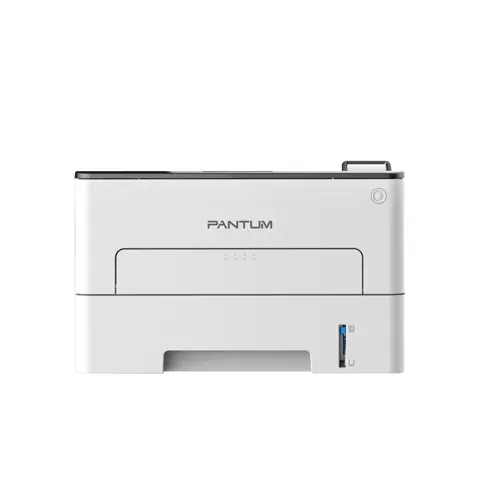
The photo above shows the standard P3010DW, because Pantum publishes no separate picture of the Plus series.
Install the Pantum P3010 Plus & P3300 Plus driver
Pantum recommends its one-click installer for the Pantum P3010 Plus driver, the same program you start after downloading the file above. In the printer’s user guide the steps for a USB connection are:
- First, connect the printer to the computer with the USB cable and switch both on.
- Then start the installer: run the downloaded .exe on Windows, or open the .dmg and double-click the install tool on macOS. (The guide describes the CD that ships with the printer; the downloaded file does the same job.)
- Next, accept the license agreement and privacy policy and click Next. On macOS, enter your computer password when asked.
- After that, choose One-click installation under USB and wait. However, Pantum notes that the time depends on your computer.
However, if the one-click installer fails, start it again and choose More setup methods at the bottom of the window, then select your language, the printer model and Connect via USB.
Finally, for installer errors on Windows, see the driver installation guide for Windows 11 and the driver installation error guide.
Last checked: Nov 16, 2026. Pantum is a trademark of Zhuhai Pantum Electronics Co., Ltd. This site is not affiliated with Pantum.