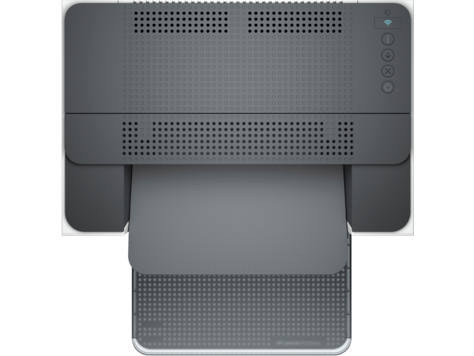
USB, Ethernet and dual-band Wi-Fi give the HP LaserJet M209dwe three ways to connect, so you can plug it into one PC or share it over a network. It is a black-and-white laser printer with automatic duplex. HP recommends 200 to 2,000 pages a month, which suits a home office or small team.
HP Easy Start Printer Setup Software (Internet connection required for driver installation)
Win 11Win 10 64-bitWin 7 64-bit
On Windows 11 or Windows 10 64-bit, download HP Easy Start Printer Setup Software (26.5 MB). It runs guided setup and installs the driver for you.
Quick install: download the recommended file above, run it, and choose Wi-Fi or USB when the installer asks, then print a test page. Full steps
HP LaserJet M209dwe driver for Windows
HP Easy Start Printer Setup Software (Internet connection required for driver installation)Win 11Win 10 64-bitWin 7 64-bit
Details
- File name
HPEasyStart_17_6_15.exe- MD5 checksum (from HP)
d3c5840776dec9f1f7e1ba23499a15e8- Software ID (HP)
- mp-366488-3 · verify on HP
HP LaserJet M207e-M212e Printer series Firmware Update Utility(not compatible with HP LaserJet M207dw/M209d Printer)Win 11Win 10 64-bitWin 7 64-bit
Details
- Description
- NOTE: This firmware utility DOES NOT support HP LaserJet M207dw and M209d Printer . Please make sure to download the Firmware Update Utility specific…
- File name
M207-M212_Series_FW_Update-20260530.exe- MD5 checksum (from HP)
ad80027a614a2a50c5ee318f57d426af- Software ID (HP)
- bi-285259-16 · verify on HP
- Release notes
- Read on HP
HP LaserJet M209dwe driver for macOS
HP LaserJet M207e-M212e Printer series Firmware Update Utility(not compatible with HP LaserJet M207dw/M209d Printer)macOS 15macOS 13
Details
- Description
- NOTE: This firmware utility DOES NOT support HP LaserJet M207dw and M209d Printer . Please make sure to download the Firmware Update Utility specific…
- File name
M207-M212_Series_FW_Update-20260530.dmg- MD5 checksum (from HP)
b0a6c6e2cafdd77a8d6058ce8aa41735- Software ID (HP)
- bi-285260-15 · verify on HP
- Release notes
- Read on HP
HP LaserJet M209dwe driver for Linux
Linux printer driversLinux
Details
- Software ID (HP)
- mp-163323-1 · verify on HP
All files come straight from HP (ftp.hp.com). We checked them against HP’s list on Oct 25, 2026. Systems checked: Win 11, Win 10 64-bit, Win 7 64-bit, macOS 26, macOS 15, macOS 13, Linux. Older systems may have more files on HP’s page for this model.
HP LaserJet M209dwe driver support by operating system
DownloadWin 11Win 10
64-bitWin 7
64-bitmacOSSetup apps✓✓✓–Firmware✓✓✓✓Which HP LaserJet M209dwe driver should I choose?
HP lists two kinds of download here: a setup app and firmware. The setup app, HP Easy Start at 26.5 MB, gives you guided setup and the driver. It needs an internet connection during installation. Firmware utilities come in at 5.5 MB for Windows and 11.0 MB for macOS. HP states they do not support the M209d, so skip them. Update firmware only to fix a specific problem, and only with a utility HP lists for your model.
This model prints on both sides automatically. It holds 150 sheets in the input tray and 100 in the output tray. HP lists four toner cartridges: 134A, 134X, 135A and 135X. Check the label on your installed cartridge before you reorder.
How to install the HP LaserJet M209dwe driver
- Download HP Easy Start Printer Setup Software (26.5 MB) from this page.
- Connect the computer to the internet. HP requires it for driver installation.
- Run the downloaded file and let HP Easy Start open.
- Follow the guided setup on screen to install the driver for your printer.
- Print a test page from any Windows application once setup finishes.
Adding the printer by hand or installing on Linux? See our printer driver install guide.
HP LaserJet M209dwe specifications
Printing: HP LaserJet M209dwe driver specs
Print speed blackNormal: Up to 30 ppm Measured using ISO/IEC 24734, excludes first set of test documents. For more information see http://www.hp.com/go/printerclaims. Exact speed varies depending on the system configuration, software application, driver…First page out (ready)Black: As fast as 6.9 sec Measured using ISO/IEC 17629. For more information see http://www.hp.com/go/printerclaims. Exact speed varies depending on the system configuration, software application, driver, and document complexity.Print quality black (best)Black: Up to 600 x 600 dpiDuty cycle (monthly, letter)Up to 20,000 pages Duty cycle is defined as the maximum number of pages per month of imaged output. This value provides a comparison of product robustness in relation to other HP LaserJet or HP Color LaserJet devices, and enables…Recommended monthly page volume200 to 2,000 HP recommends that the number of printed pages per month be within the stated range for optimum device performance, based on factors including supplies replacement intervals and device life over an extended warranty period.Print languagesPCLmS, URF, PWGPaper handling: HP LaserJet M209dwe driver specs
Duplex printingAutomatic (standard)Paper handling input, standard150-sheets input trayPaper handling output, standard100-sheet output trayMedia sizes supportedLetter, Legal, Executive, EnvelopesMedia sizes, custom4x6 to 8.5x14 inMaximum output capacity (sheets)Up to 100 sheetsMedia typesPaper (laser, plain, rough, vellum), Envelopes, Labels, Cardstock, PostcardMedia weight, supported16 to 43 lbConnectivity, supplies and size: HP LaserJet M209dwe driver specs
Connectivity, standard1 Hi-Speed USB 2.0 (device); Ethernet 10/100 Base-TX; Wireless 802.11a/b/g/n, Dual band 2.4GHz/5GHzWireless capability1 built-in Wi-Fi 802.11b/g/nMobile printing capabilityApple AirPrint™; Mopria™ certified; HP app; Wi-Fi Direct® printing Wireless operations are compatible with 2.4 GHz and 5.0 GHz operations only. Learn more at hp.com/go/mobileprinting . Apple Airprint -Mobile device must have AirPrint® .…DisplayLEDConnectivity, supplies and size (continued): HP LaserJet M209dwe driver specs
Replacement cartridgesDM1: HP 134A Original Black LaserJet Toner Cartridge, W1340A (1100); HP 134X Original Black LaserJet Toner Cartridge, W1340X (2400); DM2: HP 135A Original Black LaserJet Toner Cartridge, W1350A (1100)Dimensions (W x D x H)13.98 X 11 X 8.07 inWeight12.35 lbManufacturer WarrantyTwo-year limited warrantySource: HP product specifications for the HP LaserJet M209dwe Printer.
Each file lists the MD5 checksum HP publishes. Our guide to checking a driver download shows how to compare it. If an HP link is down, try the Microsoft Update Catalog search for the HP LaserJet M209dwe.
HP LaserJet M209dwe driver troubleshooting
The computer cannot find the printer over Wi-Fi
Put the printer and computer on the same network. Restart both and the router, then run HP Easy Start again. USB is a fallback if the wireless connection keeps failing.
Pages print faint, streaked or with gray background
Take out the toner cartridge and look for damage or a loose seal. Reseat it firmly. If the problem stays, replace it with an HP cartridge that matches your printer's label.
Paper jams or feeds badly
Clear the jam gently and check your media. HP lists Letter, Legal, Executive and envelopes, at 16 to 43 lb. Load no more than 150 sheets in the tray.
For “driver is unavailable”, offline printers and stuck print jobs, see our printer driver troubleshooting guide.
HP LaserJet M209dwe driver FAQ
Which Windows versions does the HP Easy Start download support?
HP lists Windows 11 and Windows 10 64-bit for one build. A separate build covers Windows 7 64-bit, which needs Service Pack 1 as a minimum. Both are version 17.6.15.
How big is the driver download?
HP Easy Start Printer Setup Software is 26.5 MB. It dates from Oct 14, 2026. An internet connection is required while the driver installs.
Can I use the M207e-M212e firmware update on this printer?
No. HP states the utility does not support the HP LaserJet M207dw or M209d. Its listed fixes include security updates and USB support for the PSA driver.
How fast does the M209dwe print?
HP rates it at up to 30 pages per minute in black, with the first page out in as little as 6.9 seconds. Actual speed varies with system, software and document.
Drivers for similar HP printers
Owners of related models can find the matching downloads here: HP Color LaserJet Pro M254nw driver, HP Color LaserJet Pro M255dw driver, HP Color LaserJet Pro MFP M277n driver, HP Color LaserJet Pro MFP M281cdw driver, HP Color LaserJet Pro MFP M283fdw driver, HP LaserJet M208dw driver.
Last checked: Oct 25, 2026. HP and HP LaserJet M209dwe are trademarks of HP Inc. This site is not affiliated with HP.