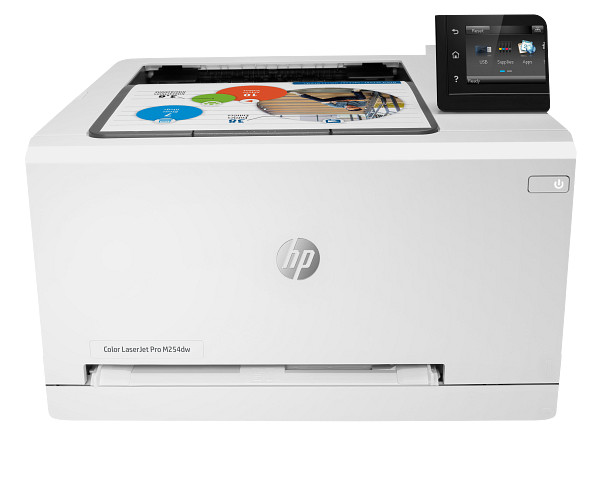
Everyday color office documents, at 150 to 2500 pages a month, suit the HP Color LaserJet Pro M254nw. This color laser printer prints up to 22 ppm in black and in color at 600 x 600 dpi. Built-in Wi-Fi and a 250-sheet tray fit a small office or shared desk.
HP Color LaserJet Pro M254dw/M254nw Printer Full Software Solution
Win 11Win 10 64-bitWin 7 64-bit
On Windows, download the HP Color LaserJet Pro M254dw/M254nw Printer Full Software Solution (152.5 MB). On a Mac, download Install HP Easy Start (6.3 MB).
Quick install: download the recommended file above, run it, and choose Wi-Fi or USB when the installer asks, then print a test page. Full steps
HP Color LaserJet Pro M254nw driver for Windows
Full software and drivers
Win 11Win 10 64-bitWin 7 64-bit
Details
- File name
Full_Webpack-44.11.2787-LJM253-M254_UWWL_Full_Webpack.exe- MD5 checksum (from HP)
a06a2e2cb179d58308954b034e59cbab- Software ID (HP)
- bi-188924-11 · verify on HP
Basic driver only
Win 11Win 10 64-bitWin 7 64-bit
Details
- File name
Basic_Webpack_x64-44.11.2787-LJM253-M254_UWWL_Basicx64_Webpack.exe- MD5 checksum (from HP)
e06e17048f5b3aca890ac3945bc1a74c- Software ID (HP)
- bi-188950-11 · verify on HP
Setup apps
Win 11Win 10 64-bitWin 7 64-bit
Details
- File name
HPEasyStart_17_6_15.exe- MD5 checksum (from HP)
d3c5840776dec9f1f7e1ba23499a15e8- Software ID (HP)
- mp-366488-3 · verify on HP
Win 11Win 10 64-bit
Details
- Software ID (HP)
- mp-366135-1 · verify on HP
HP Universal Print Driver
Win 10 64-bitWin 7 64-bit
Details
- File name
upd-pcl6-win10-x64-8.2.0.26778.zip- MD5 checksum (from HP)
1311b735d1ada9b02676d32b5ba5b232- Software ID (HP)
- ds-99374-36 · verify on HP
- Release notes
- Read on HP
Win 10 64-bitWin 7 64-bit
Details
- File name
upd-ps-win10-x64-8.2.0.26778.zip- MD5 checksum (from HP)
626ec0b8d41d3be40357b3c825c3502d- Software ID (HP)
- ds-99376-35 · verify on HP
- Release notes
- Read on HP
Win 11
Details
- File name
upd-pcl6-win11-x64-8.2.0.26819.zip- MD5 checksum (from HP)
5660c16a00e21f11736fd003063d6d13- Software ID (HP)
- ds-365647-1 · verify on HP
- Release notes
- Read on HP
Win 11
Details
- File name
upd-ps-win11-x64-8.2.0.26819.zip- MD5 checksum (from HP)
d27ad643905526df8cc9a89b556dbf42- Software ID (HP)
- ds-365648-1 · verify on HP
- Release notes
- Read on HP
Win 11Win 10 64-bitWin 7 64-bit
Details
- File name
HP-PARK-v1.9.2.zip- MD5 checksum (from HP)
b7f948771a52c13721d963c6830ac7b5- Software ID (HP)
- ds-99433-30 · verify on HP
- Release notes
- Read on HP
More HP Color LaserJet Pro M254nw driver downloads: HP Universal Print Driver
Win 11 ARM64
Details
- File name
upd-pcl6-win11-ARM64-8.2.0.26778.zip- MD5 checksum (from HP)
e270ca97f4ddb5139217621ccc205506- Software ID (HP)
- ds-359027-2 · verify on HP
- Release notes
- Read on HP
Firmware
Win 11Win 10 64-bitWin 7 64-bit
Details
- Description
- This utility is for use on Microsoft Windows 32 and 64 bit operating systems. The utility can be used with a USB connection or network connection. Be…
- File name
M154_M254_nw_Series_FW_Update-20230822.exe- MD5 checksum (from HP)
168285ec387d1cc44002cae241ea9475- Software ID (HP)
- bi-194965-15 · verify on HP
- Release notes
- Read on HP
HP Color LaserJet Pro M254nw driver for macOS
Setup apps
macOS 26macOS 15
Details
- File name
HP_Easy_Start.app.zip- MD5 checksum (from HP)
19c1a5f786f5f93f9f778ad71ee444a3- Software ID (HP)
- mp-166618-27 · verify on HP
macOS 26macOS 15macOS 13
Details
- Software ID (HP)
- mp-351535-1 · verify on HP
Utilities and other software
macOS 26macOS 15macOS 13
Details
- File name
HP_Easy_Admin.app.zip- MD5 checksum (from HP)
32c3c4edfb4e3bc519c3c1731542360e- Software ID (HP)
- mp-218629-7 · verify on HP
HP Color LaserJet Pro M254nw driver for Linux
Linux
Details
- Software ID (HP)
- mp-54524-1 · verify on HP
All files come straight from HP (ftp.hp.com). We checked them against HP’s list on Oct 25, 2026. Systems checked: Win 11, Win 10 64-bit, Win 7 64-bit, macOS 26, macOS 15, macOS 13, Linux. Older systems may have more files on HP’s page for this model.
HP Color LaserJet Pro M254nw driver support by operating system
64-bit
64-bit
Latest HP Color LaserJet Pro M254nw driver and firmware updates
- HP Color LaserJet Pro M254 dn/nw Printer Firmware Update Utility v20230822 (Nov 27, 2023): HP Color LaserJet Pro M254 dn nw Printer Firmware Enhancements and Fix List for date code 20230822 Contains…
Which HP Color LaserJet Pro M254nw driver should I choose?
The Full Software Solution (152.5 MB) holds the complete drivers, installer and admin tools. The Basic Software Solution (69.6 MB) installs only the basic driver and software, and it supports 64-bit systems only. HP Easy Start is a 26.5 MB setup app that needs an internet connection to fetch drivers. Universal Print Drivers are generic drivers for IT-managed setups. Update firmware (14.8 MB) only to fix a problem it addresses, such as the 79 error or WPS connection failures.
Wi-Fi is 802.11 b/g/n with WPS and Wi-Fi Direct, and it supports WPA/WPA2 security. The input tray holds 250 sheets and the output bin holds 100. Replacement toner comes as HP 202A, 202X, 203A or 203X cartridges; the 202X black (CF500X) yields about 3200 pages.
How to install the HP Color LaserJet Pro M254nw driver
- Close any programs that are running, then turn on the printer.
- For a network connection, plug in the network cable before you start. Keep the USB cable unplugged until the installer asks for it.
- Click Download on this page to get the Full Software Solution, then click the downloaded file.
- The files extract and the installer starts on its own. Follow the on-screen instructions to finish.
- To install later, choose Save and pick a folder. When ready, double-click the saved file.
- On a Mac, download Install HP Easy Start (6.3 MB) instead. It installs the latest software and guides you through setup.
Adding the printer by hand or installing on Linux? See our printer driver install guide.
HP Color LaserJet Pro M254nw specifications
HP Color LaserJet Pro M254nw driver specs: printing
HP Color LaserJet Pro M254nw driver specs: paper handling
HP Color LaserJet Pro M254nw driver specs: connectivity, supplies and size
Source: HP product specifications for the HP Color LaserJet Pro M254nw.
Each file lists the MD5 checksum HP publishes. Our guide to checking a driver download shows how to compare it. If an HP link is down, try the Microsoft Update Catalog search for the HP Color LaserJet Pro M254nw.
HP Color LaserJet Pro M254nw driver troubleshooting
Printer will not connect to Wi-Fi using the WPS push button or PIN
Firmware date code 20230822 fixes failed WPS push button and PIN connections. Download the HP Color LaserJet Pro M254 dn/nw Firmware Update Utility (14.8 MB) for Windows and run it. Then try WPS again.
Computer cannot find the printer on the wireless network
Check that the printer and computer use the same network. Restart the printer and the router. The printer supports 802.11 b/g/n, so confirm your router offers one of those modes. Then rerun the installer.
Printouts show streaks, faint areas or paper jams
Turn off the printer and reseat each toner cartridge. Check that the paper size and type match what the printer supports. Do not overfill the 250-sheet tray. Remove any jammed sheet gently.
For “driver is unavailable”, offline printers and stuck print jobs, see our printer driver troubleshooting guide.
HP Color LaserJet Pro M254nw driver FAQ
Which Windows versions does HP support for this printer?
The Full Software Solution supports Win 11, Win 10 64-bit and Win 7 64-bit. HP Easy Start covers Win 11 and Win 10 64-bit, plus a separate Win 7 64-bit version.
How big is the recommended Windows download?
The Full Software Solution is 152.5 MB, version 44.11.2787, dated Oct 19, 2022. The Basic Software Solution is smaller at 69.6 MB but is not a full software solution.
What does the firmware update fix?
Firmware date code 20230822 fixes the 79 error after a firmware upgrade and failed WPS push button or PIN connections. It also fixes Resend Upgrade, and it enables a firmware downgrade restriction.
Which paper sizes can this printer use?
It handles Letter, Legal, A4, A5, A6, B5 (JIS), envelopes and more. Custom sizes run from 3 x 5 to 8.5 x 14 in. It also accepts labels, transparencies and cardstock.
Drivers for similar HP printers
Owners of related models can find the matching downloads here: HP Color LaserJet Pro M255dw driver, HP Color LaserJet Pro MFP M277n driver, HP Color LaserJet Pro MFP M281cdw driver, HP Color LaserJet Pro MFP M283fdw driver, HP LaserJet M208dw driver, HP LaserJet M209d driver.
Last checked: Oct 25, 2026. HP and HP Color LaserJet Pro M254nw are trademarks of HP Inc. This site is not affiliated with HP.
1 thought on “HP Color LaserJet Pro M254nw Driver Download”