The newest Epson WF-2865 driver is version 2.100.00 for Windows (released Mar 22, 2026) and version 13.45 for macOS (released Jun 30, 2026). Each button opens Epson’s official Download Center for your system. Checked by Günay V. (DriverPrinter Lab) on .
Epson marks the Epson WF-2865 as discontinued but still publishes its drivers.
Epson WF-2865 driver at a glance
Model
Epson WF-2865 (also sold as WF-2860)
Epson product number
C11CG28404
Print resolution
4.800 x 1.200 DPI
Print speed
14 pages/min Monochrome, 7,5 pages/min Colour
Newest Windows driver
2.100.00 (Mar 22, 2026)
Newest macOS driver
13.45 (Jun 30, 2026)
Firmware
LQ30Q6 (Jul 9, 2026)
Downloads listed
31 files for Windows and macOS
All Epson WF-2865 downloads from Epson
Epson WF-2865 Windows downloads: printer drivers, setup installer, scanner software
File
Version
Size
Printer Driver (64-bit)v2.100.00 · Mar 22, 2026 · 31.2 MBThis is software (driver) for controlling the printer connected to your PC.File: WF2860_x64_2100JAUsHomeExportAsiaML.exeWin 11Win 10 64-bitWin 7 64-bit
Printer Driver (32-bit)v2.100.00 · Mar 22, 2026 · 27.5 MBThis is software (driver) for controlling the printer connected to your PC.File: WF2860_x86_2100JAUsHomeExportAsiaML.exeWin 10 32-bitWin 7 32-bit
Drivers and Utilities Combo Package Installerv5.0 · Oct 3, 2024 · 2.4 MBThis installer contains everything you need to use your Epson product.File: Epson_WF-2860_Series_EA_50_Web.exeWin 11Win 10 64-bitWin 10 32-bitWin 7 64-bitWin 7 32-bit
Epson Event Managerv3.11.82 · Mar 31, 2025 · 30.2 MBEpson Event Manager is a software application designed to enhance the functionality of Epson scanners and multifunction printers.File: EventManager_31182_31_S.exeWin 11Win 10 64-bitWin 10 32-bitWin 7 64-bitWin 7 32-bit
Epson Scan2v6.4.4.0 · Nov 6, 2023 · 27.2 MBThis is the software (driver) that controls the scanner connected to your PC.File: EpsonScan2_WF2860_6440_e.exeWin 11Win 10 64-bitWin 10 32-bitWin 7 64-bitWin 7 32-bit
Epson Printer Connection Checkerv3.4.4 · Oct 21, 2026 · 7.9 MBThis is a tool that automatically diagnoses and resolves the printer connection status when a printing problem occurs.File: EpsonPrinterConnectionChecker_V344_42.exeWin 11Win 11 ARMWin 10 64-bitWin 10 32-bitWin 7 64-bitWin 7 32-bit
Software Updaterv5.1.0.0 · Oct 20, 2026 · 7.2 MBThis software allows you to download and update the printer's firmware, utilities, etc. from the Internet.File: CESU5100_32.exeWin 11Win 11 ARMWin 10 64-bitWin 10 32-bitWin 7 64-bitWin 7 32-bit
Printer Driverv13.45 · Jun 30, 2026 · 75.3 MBThis is software (driver) for controlling the printer connected to your PC.File: WF28x0_XP51x0_XP41x0_XP31x0_XP21x0_1345AW_41.dmgmacOS 26macOS 15macOS 13macOS 10.15
Drivers and Utilities Combo Package Installerv5.0 · Sep 26, 2023 · 24.8 MBThis installer contains everything you need to use your Epson product.File: Epson_WF-2860_Series_EA_50_Web.dmgmacOS 26macOS 15macOS 13macOS 10.15
Epson Event Managerv2.51.94 · Nov 16, 2025 · 32.0 MBEpson Event Manager is a software application designed to enhance the functionality of Epson scanners and multifunction printers.File: EM_25194_22.dmgmacOS 26macOS 15macOS 13macOS 10.15
Epson Scan2v6.7.84.0 · Sep 8, 2025 · 66.8 MBThis is the software (driver) that controls the scanner connected to your PC.File: EpsonScan2_WF2860_6784_41.dmgmacOS 26macOS 15macOS 13macOS 10.15
Software Updaterv3.0.1 · Oct 6, 2026 · 15.2 MBThis software allows you to download and update the printer's firmware, utilities, etc. from the Internet.File: Epson Software Updater_301_22.dmgmacOS 26macOS 15macOS 13macOS 10.15
Buttons open Epson’s Download Center for this model and system; Epson serves the file there. Epson publishes no checksums, so we show the version, date and size from Epson’s own list. Our guide to checking a driver download shows how to compare a file. Older systems may have more files on Epson’s page for the Epson WF-2865.
Epson WF-2865 driver version history
System
Version
Released
Windows
2.123.00
Oct 23, 2026
Windows
2.123.00
Aug 5, 2026
Windows
1.120.0
May 15, 2026
Windows
2.100.00
Mar 22, 2026
Windows
2.122.00
Feb 4, 2026
Windows
2.100.00
Nov 27, 2025
Windows
2.63.01
Nov 1, 2023
macOS
13.45
Jun 30, 2026
Advertisement
How to install the Epson WF-2865 driver
Pick the Printer Driver file for your system from the table above. Windows 11 ARM uses the Universal Print Driver.
Close any open programs, then run the downloaded file.
Follow the installer prompts until it asks you to connect the printer.
Connect the printer when asked, then print a test page to confirm it works.
On a Mac, download the macOS Printer Driver from the table and install it the same way.
33 pages/min Monochrome (plain paper 75 g/m²), 20 pages/min Colour (plain paper 75 g/m²)
Printing Resolution
4.800 x 1.200 DPI
Colours
Black, Cyan, Yellow, Magenta
Scanner type
Contact image sensor (CIS)
Paper Formats
A4 (21.0×29.7 cm), A5 (14.8×21.0 cm), A6 (10.5×14.8 cm), B5, C6 (Envelope), DL (Envelope), No. 10 (Envelope), Letter, Letter Legal, 10 x 15 cm, 13 x 18 cm, 16:9, User defined
Duplex
Yes (A4, plain paper)
Number of paper trays
1
Interfaces
Ethernet interface (100 Base-TX / 10 Base-T), Wireless LAN IEEE 802.11b/g/n, Wi-Fi Direct, Near Field Communication (NFC), Hi-Speed USB – compatible with USB 2.0 specification
Source: Epson Europe product page for the Epson WF-2865 (SKU C11CG28404).
Epson WF-2865 driver troubleshooting
Computer does not detect the printer
Reseat the cable and try another port. Restart the printer and the computer. Run Epson Printer Connection Checker from the table, which diagnoses connection problems.
Windows or macOS is newer than the systems in the table
This model is discontinued, and the listed driver versions are the newest Epson publishes for it. Install the driver for the newest system listed, then restart the computer.
Printing fails after the driver is installed
Uninstall the driver and restart the computer. Reinstall the listed Printer Driver from the table. Afterward, use Software Updater to check for updates.
We use cookies to ensure that we give you the best experience on our website. If you continue to use this site we will assume that you are happy with it.
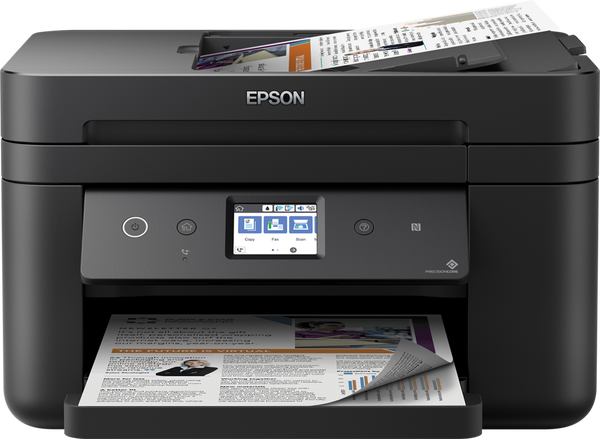 The newest Epson WF-2865 driver is version 2.100.00 for Windows (released Mar 22, 2026) and version 13.45 for macOS (released Jun 30, 2026). Each button opens Epson’s official Download Center for your system.
1 thought on “Epson WF-2865 Driver Download”