Advertisement

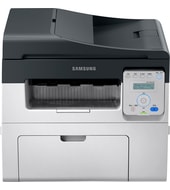
This printer connects through Hi-Speed USB 2.0 or built-in Fast Ethernet, so setup needs a cable. It has no wireless. The Samsung SCX-4621 is a laser multifunction that prints, copies and scans. It suits small offices that print 250 to 2,000 pages a month.
SCX-4021S Series Print Driver XPS
Win 7 64-bitWin 7 32-bit
Download the SCX-4021S Series Print Driver XPS (33.4 MB) for Windows. HP lists it as the recommended driver for the Samsung SCX-4621.
Quick install: download the recommended file above, run it, and connect the USB cable only when the installer asks, then print a test page. Full steps
Samsung SCX-4621 driver for Windows
Basic driver only
Win 7 64-bitWin 7 32-bit
Details
- File name
SCX-4650_4x21S_Series_WIN_XPS_V3.02.47.00.12.exe- MD5 checksum (from HP)
09ed73b666a284814b3d151821d601d0- Software ID (HP)
- fp-190749-1 · verify on HP
Utilities and other software
Win 10 64-bitWin 10 32-bitWin 7 64-bitWin 7 32-bit
Details
- File name
WIN_PCFAX_V2.02.35.exe- MD5 checksum (from HP)
aa2fd8fe2c5d3b06d3645943bb61c8a3- Software ID (HP)
- fp-191421-6 · verify on HP
Win 10 64-bitWin 10 32-bitWin 7 64-bitWin 7 32-bit
Details
- File name
WIN_OCR_V1.01.25.exe- MD5 checksum (from HP)
396f1f8f2b77e531340870a9418519ac- Software ID (HP)
- fp-194463-4 · verify on HP
Win 11Win 10 64-bitWin 10 32-bitWin 7 64-bitWin 7 32-bit
Details
- File name
SetIP_V1.05.08.3.14.exe- MD5 checksum (from HP)
ae9b0051606d60949becd6b6f3658bfa- Software ID (HP)
- fp-191426-2 · verify on HP
All files come straight from HP (ftp.hp.com). We checked them against HP’s list on Oct 25, 2026. Systems checked: Win 11, Win 10 64-bit, Win 10 32-bit, Win 7 64-bit, Win 7 32-bit, macOS 13, macOS 12, macOS 11, macOS 10.15, Linux. Older systems may have more files on HP’s page for this model.
Samsung SCX-4621 driver support by operating system
| Download | Win 11 | Win 10 64-bit |
Win 10 32-bit | Win 7 64-bit |
Win 7 32-bit |
|---|---|---|---|---|---|
| Basic driver only | – | – | – | ✓ | ✓ |
| Utilities and other software | ✓ | ✓ | ✓ | ✓ | ✓ |
Which Samsung SCX-4621 driver should I choose?
The Basic driver category holds the print driver itself: SCX-4021S Series Print Driver XPS, 33.4 MB. Install it first. Utilities are optional add-ons. Samsung Set IP (1.5 MB) sets a network IP address using the printer's MAC address. Samsung Scan OCR program (28.6 MB) saves scans as editable text. Samsung Network PC fax Utility (11.1 MB) sends faxes through Samsung multifunction printers supplied with fax.
Duplex printing is manual. Paper input includes a 1-sheet multi-purpose tray and a 250-sheet input tray, and the scanner has a flatbed plus a 40-sheet Automatic Document Feeder. Memory is 128 MB, and the print language is SPL.
How to install the Samsung SCX-4621 driver
- Confirm your PC runs Windows 7, 32-bit or 64-bit. HP lists this driver for those versions only.
- Connect the printer to your PC with USB, or to your network with an Ethernet cable.
- Download SCX-4021S Series Print Driver XPS (33.4 MB) from this page.
- Run the downloaded installer file. It installs the XPS driver automatically.
- Follow the installer prompts until it finishes, then print a test page.
Adding the printer by hand or installing on Linux? See our printer driver install guide.
Samsung SCX-4621 specifications
| Functions | Print, copy, scan |
|---|---|
| Print quality black (best) | Black: Up to 600 x 600 dpi |
| Recommended monthly page volume | 250 to 2,000 |
| Connectivity, standard | Hi-Speed USB 2.0 port; built-in Fast Ethernet 10/100 Base-TX network port |
| Wireless capability | No |
| Mobile printing capability | Mobile apps |
| Duplex printing | Manual |
| Paper handling input, standard | 1-sheet multi-purpose tray, 250-sheet input tray, 40-sheet Automatic Document Feeder |
| Paper handling output, standard | 50-sheet output bin |
| Display | 2-line LCD |
| Manufacturer Warranty | Warranty varies by country. Please contact customer service for information. |
| Multitasking supported | Yes |
| Print technology | Laser |
| Print languages | SPL |
| Automatic paper sensor | No |
| HP ePrint capability | No |
| Network ready | Standard (built-in Fast Ethernet) |
| Memory | 128 MB |
| Memory, maximum | 128 MB |
| Maximum output capacity (sheets) | Up to 100 sheets |
| Media types | Plain, Thick, Thin, Cotton, Color, Preprinted, Recycled, Lables, CardStock, Bond, Archive, Envelope |
| Scanner type | Flatbed, ADF |
Source: HP product specifications for the Samsung SCX-4621 Laser Multifunction Printer series.
Each file lists the MD5 checksum HP publishes. Our guide to checking a driver download shows how to compare it. If an HP link is down, try the Microsoft Update Catalog search for the Samsung SCX-4621.
Samsung SCX-4621 driver troubleshooting
The computer cannot find the printer on the network
Check the Ethernet cable and the printer's power. Samsung Set IP (1.5 MB) can set the printer's IP address using its MAC address. Restart the printer and PC afterward.
Prints look faint or streaky
Check the toner level first. Replace the cartridge if prints stay faint. Also confirm the paper matches a type the printer supports, such as plain or thick.
Paper jams or misfeeds
Power off the printer, then gently clear the jammed sheet. Load paper that matches the supported media types. Avoid overfilling the 250-sheet input tray.
For “driver is unavailable”, offline printers and stuck print jobs, see our printer driver troubleshooting guide.
Samsung SCX-4621 driver FAQ
Which Windows versions does the recommended driver support?
SCX-4021S Series Print Driver XPS lists Windows 7 32-bit and 64-bit. HP does not list Windows 10 or 11 for this driver. Some utilities do list Windows 10, and Set IP also lists Windows 11.
How big is the driver download?
SCX-4021S Series Print Driver XPS is 33.4 MB. Its version is 3.02.47.00.12, dated Sep 01, 2017.
Does the Samsung SCX-4621 print wirelessly?
No. HP lists no wireless capability. The printer has a Hi-Speed USB 2.0 port and a built-in Fast Ethernet 10/100 Base-TX network port. Mobile printing works through mobile apps.
What does Samsung Set IP do?
Samsung Set IP is a 1.5 MB Windows utility. It sets the network IP address using the MAC address, which is the hardware serial number of the network printer.
Drivers for similar Samsung printers
Owners of related models can find the matching downloads here: Samsung SCX-4021 Laser Multifunction series driver, Samsung SCX-4321NS Laser Multifunction driver, Samsung SCX-4521 Laser Multifunction series driver, Samsung SCX-4623 Laser Multifunction series driver, Samsung SCX-4650 Laser Multifunction series driver, Samsung SCX-4655 Laser Multifunction series driver.
Last checked: Oct 25, 2026. Samsung and Samsung SCX-4621 are trademarks of Samsung Electronics. HP Inc. hosts these downloads. This site is not affiliated with Samsung or HP.
Advertisement