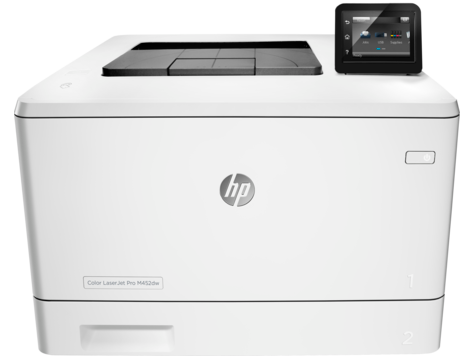
Color office documents at 750 to 4000 pages a month are what the HP Color LaserJet Pro M452dw is built for. This color laser printer prints up to 28 ppm and carries a 50,000-page monthly duty cycle. A 250-sheet tray and 50-sheet multipurpose tray suit small teams.
HP Color LaserJet Pro M452 Printer Series PCL 6 v3 Full Solution
Win 10 64-bit
On Windows, download HP Color LaserJet Pro M452 Printer Series PCL 6 v3 Full Solution (84.5 MB). On a Mac, download Install HP Easy Start (6.3 MB).
Quick install: download the recommended file above, run it, and connect the USB cable only when the installer asks, then print a test page. Full steps
HP Color LaserJet Pro M452dw driver for Windows
Full software and drivers
Win 7 64-bit
Details
- File name
HP_LJ_Pro_M452-Full_Solution-19117.exe- MD5 checksum (from HP)
899c63a83e97f78efc78aab327a2929f- Software ID (HP)
- ly-139806-10 · verify on HP
Win 10 64-bit
Details
- File name
HP_LJ_Pro_M452-PCL_6_v3_Win8plus_Full_Solution-19117.exe- MD5 checksum (from HP)
9af27555ce6de64054c19732d2e1e4e9- Software ID (HP)
- ly-149341-9 · verify on HP
Firmware
Win 10 64-bitWin 7 64-bit
Details
- Description
- This utility is for use on Microsoft Windows 32 and 64 bit operating systems. The utility can be used with a USB connection or network connection. Be…
- File name
M452_dw_Series_FW_Update-20220414.nativeofficefonts.exe- MD5 checksum (from HP)
af4c76081067f99c5dc04de097008b54- Software ID (HP)
- ly-159227-12 · verify on HP
- Release notes
- Read on HP
Utilities and other software
Win 10 64-bit
Details
- File name
HP_LJ_Pro_M452_PCL6_Win8_Plus_Print_Driver_no_Installer-19116_1.exe- MD5 checksum (from HP)
eef25b67b090fab656d89d8a21fb1ea0- Software ID (HP)
- ly-153499-5 · verify on HP
Win 10 64-bitWin 7 64-bit
Details
- File name
HP_LJ_Pro_M452-PCL6_Print_Driver_no_Installer-19116_1.exe- MD5 checksum (from HP)
14d61310b106e52b36f6203fc587969e- Software ID (HP)
- ly-153497-5 · verify on HP
Win 10 64-bitWin 7 64-bit
Details
- File name
GeminiM452dwPantoneSupportFilesWindows.zip- MD5 checksum (from HP)
FEECA613A3DC9378B641FE4C7D10D227- Software ID (HP)
- ly-165492-1 · verify on HP
Win 7 64-bit
Details
- File name
HP_LJ_Pro_M452-PCL_6_v3_Basic_Solution-19117.exe- MD5 checksum (from HP)
9a6b7593508c398eb966053100f4f0f7- Software ID (HP)
- ly-139809-10 · verify on HP
HP Color LaserJet Pro M452dw driver for macOS
macOS 26macOS 15
Details
- File name
HP_Easy_Start.app.zip- MD5 checksum (from HP)
19c1a5f786f5f93f9f778ad71ee444a3- Software ID (HP)
- mp-166618-27 · verify on HP
HP Color LaserJet Pro M452dw driver for Linux
Linux
Details
- Software ID (HP)
- mp-163323-1 · verify on HP
All files come straight from HP (ftp.hp.com). We checked them against HP’s list on Oct 25, 2026. Systems checked: Win 11, Win 10 64-bit, Win 7 64-bit, macOS 26, macOS 15, macOS 13, Linux. Older systems may have more files on HP’s page for this model.
HP Color LaserJet Pro M452dw driver support by operating system
64-bit
64-bit
Latest HP Color LaserJet Pro M452dw driver and firmware updates
- HP Color LaserJet Pro M452dw Windows Firmware Update Utility v20220414 (Jun 13, 2022): HP LaserJet Pro M452dw Firmware Enhancements and Fix List for date code 20220414 Contains all previous fix.…
Which HP Color LaserJet Pro M452dw driver should I choose?
Full software and drivers downloads install the driver plus HP's printer software. The Windows 10 version is 84.5 MB. Utility downloads are narrower. The PCL 6 driver-only packages have no installer, so you add them with the Add Printer Wizard. The Setup app, HP Easy Start, is 6.3 MB and prepares a Mac for printing. Firmware is its own category, and the Windows utility is 25.7 MB. Update firmware only to fix a problem in its fix list, such as network stack or supplies issues.
HP lists an automatic duplexer, a 250-sheet input tray and a 50-sheet multipurpose tray. The output bin holds 150 sheets, and HP offers an optional 550-sheet tray. Replacement toner uses HP 410A or 410X cartridges, for example CF410A for black.
How to install the HP Color LaserJet Pro M452dw driver
- Download the Full Solution (84.5 MB) from HP's list for Windows 10 64-bit.
- Run the downloaded file and let the installer start.
- Follow the on-screen prompts. HP says this package includes everything needed to install the printer.
- Finish the setup, then print a test document to confirm the printer works.
- On a Mac, install HP Easy Start (6.3 MB) instead. It sets up the printer and prepares the Mac for printing.
Adding the printer by hand or installing on Linux? See our printer driver install guide.
HP Color LaserJet Pro M452dw specifications
HP Color LaserJet Pro M452dw driver specs: printing
HP Color LaserJet Pro M452dw driver specs: paper handling
HP Color LaserJet Pro M452dw driver specs: connectivity, supplies and size
Source: HP product specifications for the HP Color LaserJet Pro M452dw.
Each file lists the MD5 checksum HP publishes. Our guide to checking a driver download shows how to compare it. If an HP link is down, try the Microsoft Update Catalog search for the HP Color LaserJet Pro M452dw.
HP Color LaserJet Pro M452dw driver troubleshooting
Windows does not find the printer after installation
Confirm the printer is powered on and connected to your PC or network. Restart both the printer and the computer, then run the installer again.
Faded color or streaks on printed pages
Check the toner levels first. Reseat the cartridge for the faded color. If it stays faint, replace it with the matching HP 410A or 410X toner cartridge.
Older driver software has a known security vulnerability
Install the Full Solution version 16.0.19117.636 for Windows 10. HP lists this version as fixing the security vulnerability. Windows 7 users can use the same version of the Full Software and Drivers package.
For “driver is unavailable”, offline printers and stuck print jobs, see our printer driver troubleshooting guide.
HP Color LaserJet Pro M452dw driver FAQ
Which Windows versions does HP list for this printer?
HP lists Windows 10 64-bit and Windows 7 64-bit downloads. The recommended Full Solution targets Windows 10 64-bit. A separate Full Software and Drivers package covers Windows 7 64-bit.
Which macOS versions work with HP Easy Start?
HP lists macOS 26 and macOS 15 for Install HP Easy Start, version 2.16.7.260722. The download is 6.3 MB and adds macOS 26 support.
How big are the driver downloads?
The Windows 10 Full Solution is 84.5 MB. The Windows 7 Full Software and Drivers package is 97.2 MB. The driver-only PCL 6 v4 package is 9.6 MB.
What does the latest firmware update fix?
The Windows Firmware Update Utility, date code 20220414, contains all previous fixes. HP lists a network stack update and supplies-related fixes. The download is 25.7 MB.
Drivers for similar HP printers
Owners of related models can find the matching downloads here: HP Color LaserJet Pro M452dn driver, HP Color LaserJet Pro M452nw driver, HP Color LaserJet Pro M454nw driver, HP Color LaserJet Pro MFP M476dn driver, HP Color LaserJet Pro MFP M476dw driver, HP Color LaserJet Pro MFP M477fdn driver.
Last checked: Oct 25, 2026. HP and HP Color LaserJet Pro M452dw are trademarks of HP Inc. This site is not affiliated with HP.