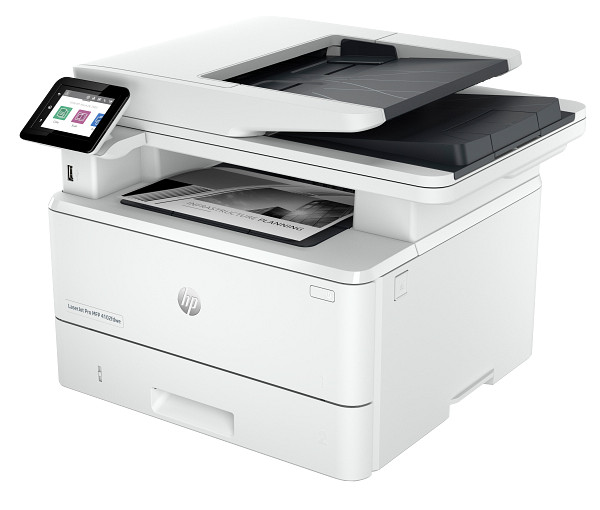
HP Easy Start guides setup and installs drivers, so you do not need to match files by hand. The HP LaserJet Pro MFP 4101fdn is a laser printer that prints, copies, scans and offers optional fax. It suits small offices printing 750 to 4,000 pages a month.
HP Universal Scan – Full Feature Software and Driver
Win 11Win 10 64-bit
For Windows, download HP Universal Scan – Full Feature Software and Driver (436.2 MB). For Mac, download HP Easy Start Pro for Mac (81.5 MB).
Quick install: download the recommended file above, run it, and connect the USB cable only when the installer asks, then print a test page. Full steps
HP LaserJet Pro MFP 4101fdn driver for Windows
Full software and drivers
HP Universal Scan - Full Feature Software and Driver (for Win 11, Win 10 64-bit)Win 11Win 10 64-bit
Details
- File name
Full_Webpack-63.8.6459-SJ0001_Full_Webpack.exe- MD5 checksum (from HP)
7e76f43e3ae4d4638f9271aa6235f8dc- Software ID (HP)
- cs-308742-11 · verify on HP
HP Universal Scan - Full Feature Software and Driver (for Win 7 64-bit)Win 7 64-bit
Details
- File name
Full_Webpack-51.7.5630-SJ0001_Full_Webpack.exe- MD5 checksum (from HP)
d5d076d9ab58d6bba996ab4af1149055- Software ID (HP)
- cs-270897-6 · verify on HP
- Release notes
- Read on HP
HP Universal Scan - Full Feature Software and Driver (ARM 64)Win 11
Details
- File name
Full_Webpack-63.8.6459_ARM64-SJ0001_Full_Webpack.exe- MD5 checksum (from HP)
6d62a1c7a02013ab7ada7c43595e721c- Software ID (HP)
- cs-352016-3 · verify on HP
Basic driver only
HP Universal Scan - Basic Feature Software and Driver (for Win 11, Win 10 64-bit)Win 11Win 10 64-bit
Details
- File name
Basic_Webpack_x64-63.8.6459-SJ0001_Basicx64_Webpack.exe- MD5 checksum (from HP)
24c79852645f3dea63bb0a61b2ebd87d- Software ID (HP)
- cs-308743-11 · verify on HP
HP Universal Scan - Basic Feature Software and Driver (for Win 7 64-bit)Win 7 64-bit
Details
- File name
Basic_Webpack_x64-51.7.5630-SJ0001_Basicx64_Webpack.exe- MD5 checksum (from HP)
4a9275e44fbf3ad68f0edec713718f99- Software ID (HP)
- cs-270898-6 · verify on HP
HP Universal Scan - Basic Feature Software and Driver (ARM 64)Win 11
Details
- File name
Basic_Webpack_x64-63.8.6459_ARM64-SJ0001_Basicx64_Webpack.exe- MD5 checksum (from HP)
ff10299f0401ee28a1e09f0aecef6c3c- Software ID (HP)
- cs-351979-3 · verify on HP
Setup apps
HP Easy Start Printer Setup SoftwareWin 11Win 10 64-bitWin 7 64-bit
Details
- File name
HPEasyStart_17_6_15.exe- MD5 checksum (from HP)
d3c5840776dec9f1f7e1ba23499a15e8- Software ID (HP)
- mp-309232-23 · verify on HP
HP Universal Print Driver
HP Universal Print Driver for Windows PCL6 (64-bit) (for Win 10 64-bit, Win 7 64-bit)Win 10 64-bitWin 7 64-bit
Details
- File name
upd-pcl6-win10-x64-8.2.0.26778.zip- MD5 checksum (from HP)
1311b735d1ada9b02676d32b5ba5b232- Software ID (HP)
- ds-99374-36 · verify on HP
- Release notes
- Read on HP
HP Universal Print Driver for Windows PostScript (64-bit)Win 10 64-bitWin 7 64-bit
Details
- File name
upd-ps-win10-x64-8.2.0.26778.zip- MD5 checksum (from HP)
626ec0b8d41d3be40357b3c825c3502d- Software ID (HP)
- ds-99376-35 · verify on HP
- Release notes
- Read on HP
HP Universal Print Driver for Windows PCL6 (64-bit) (for Win 11)Win 11
Details
- File name
upd-pcl6-win11-x64-8.2.0.26819.zip- MD5 checksum (from HP)
5660c16a00e21f11736fd003063d6d13- Software ID (HP)
- ds-365647-1 · verify on HP
- Release notes
- Read on HP
HP Universal Print Driver for Windows PS (64-bit)Win 11
Details
- File name
upd-ps-win11-x64-8.2.0.26819.zip- MD5 checksum (from HP)
d27ad643905526df8cc9a89b556dbf42- Software ID (HP)
- ds-365648-1 · verify on HP
- Release notes
- Read on HP
HP Print Administrator Resource KitWin 11Win 10 64-bitWin 7 64-bit
Details
- File name
HP-PARK-v1.9.2.zip- MD5 checksum (from HP)
b7f948771a52c13721d963c6830ac7b5- Software ID (HP)
- ds-99433-30 · verify on HP
- Release notes
- Read on HP
More HP LaserJet Pro MFP 4101fdn driver downloads: HP Universal Print Driver
HP Universal Print Driver for Windows PCL6 (ARM64-bit)Win 11 ARM64
Details
- File name
upd-pcl6-win11-ARM64-8.2.0.26778.zip- MD5 checksum (from HP)
e270ca97f4ddb5139217621ccc205506- Software ID (HP)
- ds-359027-2 · verify on HP
- Release notes
- Read on HP
Firmware
HP LaserJet Pro MFP 4101 - 4104 series Firmware Update UtilityWin 11Win 10 64-bitWin 7 64-bit
Details
- File name
HP_Laserjet_Pro_4100_Series_002.2624A.exe- MD5 checksum (from HP)
c29f6abd741bc2209c769401de341f9b- Software ID (HP)
- ma-295141-10 · verify on HP
- Release notes
- Read on HP
Utilities and other software
HP Scan OCR Add-on Software (for Win 11, Win 10 64-bit)Win 11Win 10 64-bit
Details
- File name
Win7plus-1.0.1020-HPOCR_Win7plus.exe- MD5 checksum (from HP)
cce55cb23d2580d7de22c10203b771dd- Software ID (HP)
- cs-323861-1 · verify on HP
ReadIRIS Advanced OCRWin 11Win 10 64-bit
Details
- File name
Readiris17-17.4.211_HP-cd25n005.exe- MD5 checksum (from HP)
f3e28efbe291bcfe97ecc279fc813dde- Software ID (HP)
- bi-355536-1 · verify on HP
ReadIRIS Advanced PDFWin 11Win 10 64-bit
Details
- File name
Readiris_PDF-27.0.577.2-HP.msi- MD5 checksum (from HP)
fefe270010c198ba0f4eaf0fa4b500d6- Software ID (HP)
- bi-355537-3 · verify on HP
HP Universal Fax Driver for WindowsWin 11Win 10 64-bitWin 7 64-bit
Details
- File name
UFD_8.2-8.2.89-HPUFDDriver.exe- MD5 checksum (from HP)
5e75dcabe30aa70b34cf4f2319568616- Software ID (HP)
- ds-203195-19 · verify on HP
- Release notes
- Read on HP
HP Universal Fax Driver for Windows - Driver OnlyWin 11Win 10 64-bitWin 7 64-bit
Details
- File name
UFD_8.2-8.2.89-HPUFD_Driver_Files.exe- MD5 checksum (from HP)
a2d2308c62054d997ee6fb3208829aa4- Software ID (HP)
- ds-222109-18 · verify on HP
- Release notes
- Read on HP
More HP LaserJet Pro MFP 4101fdn driver downloads: Utilities and other software
HP Scan OCR Add-on Software (for Win 7 64-bit)Win 7 64-bit
Details
- File name
Win7plus-1.0.1019-HPOCR_Win7plus.exe- MD5 checksum (from HP)
3f49c91f29c83aa812b631234e305936- Software ID (HP)
- cs-324236-1 · verify on HP
HP LaserJet Pro MFP 4101fdn driver for macOS
Setup apps
HP Easy Start Pro for MacmacOS 26macOS 15macOS 13
Details
- File name
HP_Easy_Start_Pro.pkg- MD5 checksum (from HP)
c319ad991c7098f1c5bfd77e3bedba9c- Software ID (HP)
- mp-283336-23 · verify on HP
HP appmacOS 26macOS 15macOS 13
Details
- Software ID (HP)
- mp-291838-1 · verify on HP
Install HP Easy StartmacOS 26macOS 15
Details
- File name
HP_Easy_Start.app.zip- MD5 checksum (from HP)
19c1a5f786f5f93f9f778ad71ee444a3- Software ID (HP)
- mp-286481-8 · verify on HP
Firmware
HP LaserJet Pro MFP 4101 - 4104 series Firmware Update UtilitymacOS 13
Details
- File name
LJ4100e_2226A.dmg- MD5 checksum (from HP)
700580035f687af88569546ac7806e0c- Software ID (HP)
- ma-295142-1 · verify on HP
- Release notes
- Read on HP
HP LaserJet Pro MFP 4101fdn driver for Linux
HP Printers - Driver Support for Linux OSLinux
Details
- Software ID (HP)
- mp-54524-1 · verify on HP
All files come straight from HP (ftp.hp.com). We checked them against HP’s list on Oct 25, 2026. Systems checked: Win 11, Win 10 64-bit, Win 7 64-bit, macOS 26, macOS 15, macOS 13, Linux. Older systems may have more files on HP’s page for this model.
HP LaserJet Pro MFP 4101fdn driver support by operating system
DownloadWin 11Win 10
64-bitWin 7
64-bitmacOS 26macOS 15macOS 13Full software and drivers✓✓✓–––Basic driver only✓✓✓–––Setup apps✓✓✓✓✓✓HP Universal Print Driver✓✓✓–––Firmware✓✓✓––✓Utilities and other software✓✓✓–––Which HP LaserJet Pro MFP 4101fdn driver should I choose?
A Setup app, such as HP Easy Start (26.5 MB), walks you through installation and fetches drivers. Full software and drivers add scan features like OCR; the Windows package is 436.2 MB. The Basic driver (113.9 MB) gives only basic scanning with WIA and Twain. Universal Print Drivers are generic drivers for IT-managed setups. Utilities cover fax and OCR extras. Update firmware only if its fix list matches a problem you actually have.
Duplex printing is automatic by default. Tray 1 holds 100 sheets, tray 2 holds 250, and the document feeder takes 50. An optional third 550-sheet tray is available. The output bin holds 150 sheets, and the touchscreen measures 2.7 inches.
How to install the HP LaserJet Pro MFP 4101fdn driver
- Download HP Universal Scan – Full Feature Software and Driver (436.2 MB) for Win 11 or Win 10 64-bit.
- Open the downloaded file once the transfer finishes.
- Follow the installer prompts on screen until setup completes.
- Print a test page from any application to confirm the driver works.
- On a Mac, download HP Easy Start Pro for Mac (81.5 MB) instead and run it for guided setup.
Adding the printer by hand or installing on Linux? See our printer driver install guide.
Models supported by this HP LaserJet Pro MFP 4101fdn driver page
These printers use the same driver files, so every download on this page fits each of them.
HP LaserJet Pro MFP 4101fdnLoad paper in Tray 1
Tray 1 holds up to 100 sheets of 75 g/m2 (20 lb) paper. Open it by gripping the handles on the left and right sides and pulling down, then slide out the extension. For long paper, flip the extension out so it supports the sheets. Never add or remove paper during printing, because that causes jams.
Press the tab on the right paper guide and spread the guides to fit your paper size. Load the stack so it sits under the tabs and below the maximum height indicators. Then press the tab again and set the guides to lightly touch the stack without bending it. Finally, check the driver's paper type and size.
Print several pages per sheet in Windows
Printing several pages on one sheet is a good way to save paper, for example with a very large document. You start from the Print option in your software. Choose the printer, then click Properties or Preferences to open the print driver. However, the button name differs between programs.
In the driver, open the Finishing tab and pick the number of pages per sheet from the Pages per sheet drop-down. Then choose your Print page borders, Page order and Orientation settings and click OK. With the HP PCL-6 driver, selecting More settings makes HP AiO Printer Remote download extra driver features. Finally, click Print.
Print by email with HP ePrint
HP ePrint lets you print by emailing a document as an attachment to the printer's email address from any email-enabled device. The printer must be on a wired or wireless network with Internet access. In addition, HP Web Services must be enabled and the printer registered with HP Connected.
To set up, swipe the tab at the top of the Home screen down to open the Dashboard, touch the HP ePrint icon, then touch Setup. Read the terms, touch Yes, and the printer prints an information page with the printer code needed for registration. Then go to www.hpsmart.com to create an account and finish.
Copy both sides of a page manually
You can copy a two-sided document from the scanner glass using a manual process, and the printer tells you when to place each page. Put the original face-down with its upper-left corner at the upper-left corner of the glass, then close the lid. Touch Copy on the Home screen, then Document.
Touch 2-Sided and choose an option. The 1-1 sided choice makes a single-sided copy from a single-sided original, while 1-2 sided makes single-sided copies from a two-sided original. Touch Copy, then place the next page or flip the original when prompted and touch OK. Repeat until the last page, then touch the keypad icon to finish.
Toner for HP LaserJet Pro MFP 4101fdn
The printer warns you when the toner cartridge is low and very low, though the real life remaining can vary. Therefore, keep a replacement on hand for when print quality becomes unacceptable. Keep the new cartridge in its package until you need it. Continue printing with the current one until redistributing toner no longer helps.
To redistribute toner, take the cartridge out and gently rock it back and forth end to end, then reinsert it and close the cover. For this model, HP 148A (W1480A) is the standard black cartridge and HP 148X (W1480X) is the high-yield one, which holds more toner. Check compatibility at hp.com/go/suresupply.
Print from Apple devices with AirPrint
Apple AirPrint lets you print straight to the printer from an iOS device or a Mac without installing a print driver. It works with macOS 10.7 Lion and newer. On an iPad, iPhone (3GS or later) or iPod touch (third generation or later), you can print from Mail, Photos, Safari, iBooks and select third-party apps.
The printer and the Apple device must be on the same network (sub-net). Also, check the AirPrint version before using a USB connection, because versions 1.3 and earlier do not support USB. For details on which HP printers are compatible, visit www.hp.com/go/LaserJetMobilePrinting.
Turn job storage off or on
Turning off job storage makes the feature unavailable, even when a USB drive is plugged into the printer. Turning it on makes it available again. You change it in the printer properties. In Windows, open Settings from the Start menu, click Devices, then Devices and Printers, and right-click the printer to choose Printer properties.
To disable it in Windows, go to the Device settings tab, click Job Storage and select Disable. To enable it again, set Job Storage back to Automatic. On a Mac, open System Preferences, click Printers & Scanners, select the printer and click Options & Supplies. Then clear the Job Storage check box on the Options tab.
Copy on the HP LaserJet Pro MFP 4101fdn
You can copy a document or picture from the scanner glass or the automatic document feeder. Load the original print-side down on the glass, or print-side up in the feeder. Then touch the Copy icon on the Home screen and touch the Document icon.
On the Document Copy menu, choose the settings for your job. For more options, touch the Settings icon. To change the number of copies, touch the box left of the Copy button and type the number on the keypad, then touch the keypad icon to close it. Touch Copy to begin.
HP LaserJet Pro MFP 4101fdn specifications
Printing: HP LaserJet Pro MFP 4101fdn driver specs
FunctionsPrint, copy, scan, fax (optional)Print speed blackNormal: Up to 42 ppm Measured using ISO/IEC 24734, excludes first set of test documents. For more information see: http://www.hp.com/go/printerclaims. Exact speed varies depending on the system configuration, software application, driver…First page out (ready)Black: As fast as 6.1 sec Measured using ISO/IEC 17629. For more information see: http://www.hp.com/go/printerclaims. Exact speed varies depending on the system configuration, software application, driver, and document complexity.Print quality black (best)Black: Fine Lines (1200 x 1200 dpi)Duty cycle (monthly, letter)Up to 80,000 pages Duty cycle is defined as the maximum number of pages per month of imaged output. This value provides a comparison of product robustness in relation to other HP LaserJet or HP Color LaserJet devices, and enables…Recommended monthly page volume750 to 4,000Print technologyLaserPrint languagesHP PCL 6, HP PCL 5e, HP postscript level 3 emulation, PDF, URF, Native Office, PWG RasterInternal StorageNoPaper handling: HP LaserJet Pro MFP 4101fdn driver specs
Duplex printingAutomatic (default)Paper handling input, standard100-sheet tray 1, 250-sheet input tray 2; 50-sheet Automatic Document Feeder (ADF)Paper handling output, standard150-sheet output binMedia sizes supportedTray 1: Letter; Legal; Executive; Oficio (8.5 x 13 in); 16K; Japanese Postcard; Double Japan Postcard Rotated; Envelope #10; Envelope Monarch; Envelope B5; Envelope C5; Envelope DL; Custom Size; 4 x 6 in; 5 x 8 in; StatementAutomatic paper sensorNoMedia sizes, customTray 1: 3 x 5 to 8.5 x 14 in, Tray 2, 3: 4.12 x 5.83 to 8.5 x 14 inPaper handling input, optionalOptional third 550-sheet trayMaximum output capacity (sheets)Up to 150 sheetsConnectivity, supplies and size: HP LaserJet Pro MFP 4101fdn driver specs
Display2.7" (6.86 cm) intuitive color touchscreen (CGD)Dimensions (W x D x H)16.54 x 15.35 x 12.72 inManufacturer WarrantyTwo-year Bench/Depot Repair warranty. Warranty and support options vary by product, country and local legal requirements. Contact your Contractual Vendor or go to hp.com/support to learn about HP award winning service and support options…Memory512 MBMemory, maximum512 MBSource: HP product specifications for the HP LaserJet Pro MFP 4101fdn Printer.
Each file lists the MD5 checksum HP publishes. Our guide to checking a driver download shows how to compare it. If an HP link is down, try the Microsoft Update Catalog search for the HP LaserJet Pro MFP 4101fdn.
HP LaserJet Pro MFP 4101fdn driver troubleshooting
Your computer cannot find the printer after installation
Confirm the printer is powered on and connected the same way you used during setup. Restart both the printer and the computer, then run the installer again.
Printed pages look faint or streaky
Check the toner level first. Replace the toner cartridge if it is low or empty. Then print another test page and compare the result.
Paper jams or prints with the wrong size
Match the paper size setting to the paper you loaded. Tray 1 accepts custom sizes from 3 x 5 to 8.5 x 14 in. Reload the stack flat.
For “driver is unavailable”, offline printers and stuck print jobs, see our printer driver troubleshooting guide.
HP LaserJet Pro MFP 4101fdn driver FAQ
Which Windows versions does the recommended download support?
HP Universal Scan – Full Feature Software and Driver (436.2 MB) supports Win 11 and Win 10 64-bit. A separate ARM 64 version (437.0 MB) supports Win 11 only.
Which Mac versions work with HP Easy Start Pro for Mac?
HP lists macOS 26, macOS 15 and macOS 13 for HP Easy Start Pro for Mac. The download is 81.5 MB, version 2.8.0.
What does the firmware update cover?
HP lists Windows firmware version 2624A (265.7 MB) for the 4101 – 4104 series. HP describes it as general improvements and bug fixes.
Does this printer fax?
HP lists fax as optional. HP offers the Universal Fax Driver for Windows (25.2 MB, version 8.2.89) for Win 11, Win 10 64-bit and Win 7 64-bit.
Drivers for similar HP printers
Owners of related models can find the matching downloads here: HP LaserJet Pro MFP 4101fdw driver, HP LaserJet Pro MFP 4102fdn driver, HP Color LaserJet 4610n driver, HP Color LaserJet Pro 4201dn driver, HP Color LaserJet Pro 4201dw driver, HP Color LaserJet Pro 4202dn driver.
Last checked: Oct 25, 2026. HP and HP LaserJet Pro MFP 4101fdn are trademarks of HP Inc. This site is not affiliated with HP.