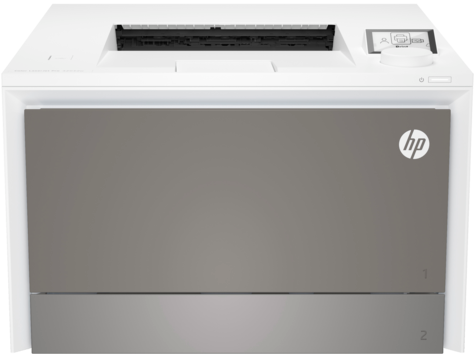
This color laser printer prints up to 35 ppm in both black and color, with automatic duplex. It suits small offices and workgroups handling 750 to 4,000 pages a month. Pair the HP Color LaserJet Pro 4201dw / 4201dn with its 250-sheet tray and 50-sheet multipurpose tray.
HP Color LaserJet Pro 4201-4203cdn/dn/dw PCL-6 V4 Printer Driver (no installer)
Win 11Win 10 64-bit
On Windows, download the HP Color LaserJet Pro 4201-4203cdn/dn/dw PCL-6 V4 Printer Driver (no installer), 14.9 MB. On Mac, download HP Easy Start Pro for Mac, 81.5 MB.
Quick install: download the recommended file above, run it, and connect the USB cable only when the installer asks, then print a test page. Full steps
HP Color LaserJet Pro 4201dw / 4201dn driver for Windows
Full software and drivers
HP Color LaserJet Pro 4201-4203cdn/dn/dw PCL-6 V4 Printer Driver (no installer)Win 11Win 10 64-bit
Details
- File name
V4_DriveronlyWebpack-56.1.1311-LJ4201-4203_V4_DriveronlyWebpack.exe- MD5 checksum (from HP)
09545e28350e1915a6747ef541b0f623- Software ID (HP)
- ma-316447-1 · verify on HP
Setup apps
HP Easy Start Printer Setup Software (Internet connection required for driver installation) (for Win 11, Win 10 64-bit)Win 11Win 10 64-bit
Details
- File name
HPEasyStart_17_4_18.exe- MD5 checksum (from HP)
3252876846de889b05b48274e8e0e269- Software ID (HP)
- mp-361591-1 · verify on HP
HP Easy Start Printer Setup Software (Internet connection required for driver installation) (for Win 11, Win 10 64-bit, Win 7 64-bit)Win 11Win 10 64-bitWin 7 64-bit
Details
- File name
HPEasyStart_17_6_15.exe- MD5 checksum (from HP)
d3c5840776dec9f1f7e1ba23499a15e8- Software ID (HP)
- mp-366421-3 · verify on HP
HP Universal Print Driver
HP Smart Universal Printing Driver for Windows V4 (64-bit) (for Win 10 64-bit)Win 10 64-bit
Details
- File name
SUPD-6.03.1.4143-V4-Win10-x64.zip- MD5 checksum (from HP)
ec8dbcd2b7dfa2cc5582335555ae3cb2- Software ID (HP)
- ds-366408-2 · verify on HP
- Release notes
- Read on HP
HP Smart Universal Printing Driver for Windows V3 (32-bit)Win 11
Details
- File name
SUPD-4.08.1.3348-V3-x86.zip- MD5 checksum (from HP)
823da1eb0ada4cf8b4cfe1de6d7896b8- Software ID (HP)
- ds-293274-6 · verify on HP
- Release notes
- Read on HP
HP Smart Universal Printing Driver for Windows V4 (64-bit) (for Win 11)Win 11
Details
- File name
SUPD-6.03.1.4143-V4-Win11-x64.zip- MD5 checksum (from HP)
d6636f9401a369de31a848ad697b52bb- Software ID (HP)
- ds-293277-10 · verify on HP
- Release notes
- Read on HP
HP Smart Print Administrator Resource KitWin 11Win 10 64-bitWin 7 64-bit
Details
- File name
HPSPARKTools-5.06.1.604.zip- MD5 checksum (from HP)
87d5eb9834b9e215749f48eb2dfe257e- Software ID (HP)
- ds-293279-11 · verify on HP
- Release notes
- Read on HP
HP Smart Universal Printing Driver for Windows V3 (64-bit)Win 11Win 10 64-bitWin 7 64-bit
Details
- File name
SUPD-4.08.1.3348-V3-x64.zip- MD5 checksum (from HP)
39759d6d262c08f232b2c914286afcdd- Software ID (HP)
- ds-293275-6 · verify on HP
- Release notes
- Read on HP
More HP Color LaserJet Pro 4201dw / 4201dn driver downloads: HP Universal Print Driver
HP Smart Universal Printing Driver for Windows V4 (ARM64-bit)Win 11 ARM64
Details
- File name
SUPD-6.03.1.4143-V4-ARM64.zip- MD5 checksum (from HP)
00df76b39a7cea25f44e5ff878ef5248- Software ID (HP)
- ds-293278-10 · verify on HP
- Release notes
- Read on HP
Firmware
HP Color LaserJet Pro 4201-4203 Series Firmware Update FileWin 11Win 10 64-bitmacOS 15macOS 13
Details
- File name
HP_Color_LaserJet_Pro_4201-4203_Firmware_6.28.3.30-202606111700.bdl- MD5 checksum (from HP)
5d3cdb7ccea74d5c9704989094674182- Software ID (HP)
- lj-311098-13 · verify on HP
- Release notes
- Read on HP
HP Color LaserJet Pro 4201-4203 Series Firmware Update Utility (with embedded firmware)Win 11Win 10 64-bitWin 7 64-bit
Details
- File name
HP_Color_LaserJet_Pro_4201-4203_Firmware_6.28.3.30-202606111700.exe- MD5 checksum (from HP)
133365c40035e9a06b9d80412f2f06fc- Software ID (HP)
- lj-312685-12 · verify on HP
- Release notes
- Read on HP
HP Color LaserJet Pro 4201dw / 4201dn driver for macOS
Setup apps
HP Easy Start Pro for MacmacOS 26macOS 15macOS 13
Details
- File name
HP_Easy_Start_Pro.pkg- MD5 checksum (from HP)
c319ad991c7098f1c5bfd77e3bedba9c- Software ID (HP)
- mp-283336-23 · verify on HP
Install HP Easy StartmacOS 26macOS 15
Details
- File name
HP_Easy_Start.app.zip- MD5 checksum (from HP)
19c1a5f786f5f93f9f778ad71ee444a3- Software ID (HP)
- mp-286481-8 · verify on HP
Utilities and other software
HP Easy AdminmacOS 26macOS 15macOS 13
Details
- File name
HP_Easy_Admin.app.zip- MD5 checksum (from HP)
32c3c4edfb4e3bc519c3c1731542360e- Software ID (HP)
- mp-218629-7 · verify on HP
All files come straight from HP (ftp.hp.com). We checked them against HP’s list on Oct 25, 2026. Systems checked: Win 11, Win 10 64-bit, Win 7 64-bit, macOS 26, macOS 15, macOS 13, Linux. Older systems may have more files on HP’s page for this model.
HP Color LaserJet Pro 4201dw / 4201dn driver support by operating system
DownloadWin 11Win 10
64-bitWin 7
64-bitmacOS 26macOS 15macOS 13Full software and drivers✓✓––––Setup apps✓✓✓✓✓✓HP Universal Print Driver✓✓✓–––Firmware✓✓✓–✓✓Utilities and other software–––✓✓✓Which HP Color LaserJet Pro 4201dw / 4201dn driver should I choose?
Full software and drivers holds the PCL 6 driver, 14.9 MB, without an installer. Setup apps like HP Easy Start guide you through setup; Windows versions need internet for driver installation. Universal Print Driver packages are generic drivers for IT-managed setups. Firmware updates, 174.9 to 177.0 MB, matter only if you hit the control panel blank screen issue they fix. HP Easy Admin is a Mac utility that downloads driver packages for a selected device.
Duplex printing is automatic on both models. Input is a 50-sheet multipurpose tray plus a 250-sheet tray, with an optional 550-sheet tray. The output bin holds 150 sheets, and the display is a 4-line backlit LCD.
How to install the HP Color LaserJet Pro 4201dw / 4201dn driver
- Download the PCL-6 V4 driver, 14.9 MB, from the downloads list on this page.
- Open the Add Printer Wizard in Windows, as HP's description for this driver directs.
- Point the wizard at the downloaded driver files and choose your 4201dw or 4201dn.
- Finish the wizard, then print a test page to confirm the driver works.
- On a Mac, download HP Easy Start Pro for Mac, 81.5 MB, and run it.
Adding the printer by hand or installing on Linux? See our printer driver install guide.
HP Color LaserJet Pro 4201dw / 4201dn specifications
Printing: HP Color LaserJet Pro 4201dw / 4201dn driver specs
Print speed blackNormal: Up to 35 ppmPrint speed colorUp to 35 ppmFirst page out (ready)Black: As fast as 9.1 secPrint quality black (best)Black: Up to 600 x 600 dpi; Up to 38,400 x 600 enhanced dpi Color: Up to 600 x 600 dpiDuty cycle (monthly, letter)Up to 50,000 pagesRecommended monthly page volume750 to 4,000Print languagesHP PCL 6, HP PCL 5e, HP PCL 5c, HP Postscript level 3 emulation, PDF, URF, PWG Raster, Native OfficePaper handling: HP Color LaserJet Pro 4201dw / 4201dn driver specs
Duplex printingAutomaticPaper handling input, standard50-sheet multipurpose tray, 250-sheet input trayPaper handling output, standard150-sheet output binMedia sizes, customTray 1: 3 x 5 to 8.5 x 14 in; Tray 2, optional Tray 3: 3.93 x 5.82 to 8.5 x 14 in; Duplex (all trays): 5.82 x 5.82 in to 8.5 x 14 inPaper handling input, optionalOptional 550-sheet trayMaximum output capacity (sheets)Up to 150 sheetsMedia typesPaper (bond, brochure, colored, glossy, letterhead, photo, plain, preprinted, prepunched, recycled, rough), postcards, labels, envelopesConnectivity, supplies and size: HP Color LaserJet Pro 4201dw / 4201dn driver specs
Display4-line back lit LCDDimensions (W x D x H)16.6 x 16.8 x 11.3 inWeight~36 lbManufacturer WarrantyOne-year, onsite repair. Warranty and support options vary by product, country and local legal requirements. Contact your Contractual Vendor or go to hp.com/support to learn about HP award winning service and support options in your region.Maximum dimensions (W x D x H)16.6 x 25 x 16.5 in (with optional 550-sheet tray 3)Source: HP product specifications for the HP Color LaserJet Pro 4201dw Printer.
Each file lists the MD5 checksum HP publishes. Our guide to checking a driver download shows how to compare it. If an HP link is down, try the Microsoft Update Catalog search for the HP Color LaserJet Pro 4201dw / 4201dn.
HP Color LaserJet Pro 4201dw / 4201dn driver troubleshooting
Computer cannot find the printer during setup
Confirm the printer is powered on and the display is lit. Restart both the printer and the computer, then run the Add Printer Wizard again. Check that the cable or network link is secure.
Color pages look faint or streaked
Check the toner supply from the printer display and replace any cartridge that is low or empty. Reseat the cartridges gently, then print another page. Contact HP support if streaks remain.
Control panel screen stays blank
HP's firmware version 6.28.3.30-202606111700 includes a fix for a control panel blank screen issue. Download the Firmware Update Utility, 177.0 MB, and run it from Windows. Update only if you see this problem.
For “driver is unavailable”, offline printers and stuck print jobs, see our printer driver troubleshooting guide.
HP Color LaserJet Pro 4201dw / 4201dn driver FAQ
Which Windows versions does the recommended driver support?
The PCL-6 V4 driver, version 56.1.1311, supports Windows 11 and Windows 10 64-bit. It comes without an installer, so you add it through the Add Printer Wizard.
Which download should Mac users choose?
HP Easy Start Pro for Mac, version 2.8.0, is the recommended download at 81.5 MB. It supports macOS 26, macOS 15 and macOS 13.
How fast does this printer print?
HP rates it at up to 35 ppm in both black and color. First page out in black can be as fast as 9.1 seconds.
What does the latest firmware fix?
Firmware version 6.28.3.30-202606111700, dated Jul 10, 2026, includes a fix for a control panel blank screen issue. HP offers it as a 177.0 MB Windows utility or a 174.9 MB update file.
Drivers for similar HP printers
Owners of related models can find the matching downloads here: HP Color LaserJet Pro MFP 4302fdn driver, HP LaserJet Pro 4002dn driver, HP LaserJet Pro 4002dwe driver, HP LaserJet Pro MFP 4101dw driver, HP LaserJet Pro MFP 4102fdne driver.
Last checked: Oct 25, 2026. HP and HP Color LaserJet Pro 4201dw / 4201dn are trademarks of HP Inc. This site is not affiliated with HP.