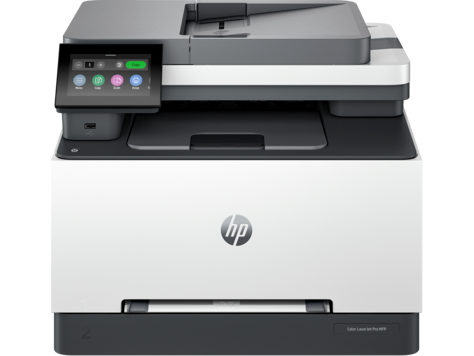
HP offers 20 downloads for the HP Color LaserJet Pro MFP 3301fdw: 19 for Windows and one for macOS. It is a color laser multifunction that prints, scans and faxes, with automatic duplex. The 150 to 2,500 recommended monthly pages suit small offices and busy home workspaces.
HP Universal Scan – Full Feature Software and Driver
Win 11Win 10 64-bit
Windows users should download HP Universal Scan – Full Feature Software and Driver (436.2 MB). Mac users should pick HP Easy Start Pro for Mac (81.5 MB).
Quick install: download the recommended file above, run it, and choose Wi-Fi or USB when the installer asks, then print a test page. Full steps
HP Color LaserJet Pro MFP 3301fdw driver for Windows
Full software and drivers
HP Universal Scan - Full Feature Software and Driver (ARM 64)Win 11
Details
- File name
Full_Webpack-63.8.6459_ARM64-SJ0001_Full_Webpack.exe- MD5 checksum (from HP)
6d62a1c7a02013ab7ada7c43595e721c- Software ID (HP)
- cs-352016-3 · verify on HP
HP Color LaserJet Pro MFP 3301-3304 3388 PCL-6 V4 Printer Driver (no installer)Win 11Win 10 64-bit
Details
- File name
V4_DriveronlyWebpack-60.0.1895-LJ3301-3304_V4_DriveronlyWebpack.exe- MD5 checksum (from HP)
74b6d2371abd75dca36bbb3f55fe4dde- Software ID (HP)
- ma-320028-2 · verify on HP
HP Color LaserJet Pro MFP 3301fdw-3303fdw and 3388fdw Driver Installation Software – Includes Print, Scan, Fax drivers.Win 11Win 10 64-bit
Details
- File name
HPEasyStart-16.2.1-LJ3301-3304_UWWL_4_1_60_0_1860_2_Webpack.exe- MD5 checksum (from HP)
5d6d6f0ed5c8813453454d842b598fc1- Software ID (HP)
- lj-319991-1 · verify on HP
HP Universal Scan - Full Feature Software and DriverWin 11Win 10 64-bit
Details
- File name
Full_Webpack-63.8.6459-SJ0001_Full_Webpack.exe- MD5 checksum (from HP)
7e76f43e3ae4d4638f9271aa6235f8dc- Software ID (HP)
- cs-308742-11 · verify on HP
Basic driver only
HP Universal Scan - Basic Feature Software and DriverWin 11Win 10 64-bit
Details
- File name
Basic_Webpack_x64-63.8.6459-SJ0001_Basicx64_Webpack.exe- MD5 checksum (from HP)
24c79852645f3dea63bb0a61b2ebd87d- Software ID (HP)
- cs-308743-11 · verify on HP
HP Universal Scan - Basic Feature Software and Driver (ARM 64)Win 11
Details
- File name
Basic_Webpack_x64-63.8.6459_ARM64-SJ0001_Basicx64_Webpack.exe- MD5 checksum (from HP)
ff10299f0401ee28a1e09f0aecef6c3c- Software ID (HP)
- cs-351979-3 · verify on HP
Setup apps
HP Easy Start Printer Setup Software (Internet connection required for driver installation) (for Win 11, Win 10 64-bit)Win 11Win 10 64-bit
Details
- File name
HPEasyStart_17_4_18.exe- MD5 checksum (from HP)
3252876846de889b05b48274e8e0e269- Software ID (HP)
- mp-361591-1 · verify on HP
HP Easy Start Printer Setup Software (Internet connection required for driver installation) (for Win 11, Win 10 64-bit)Win 11Win 10 64-bit
Details
- File name
HPEasyStart_17_6_15.exe- MD5 checksum (from HP)
d3c5840776dec9f1f7e1ba23499a15e8- Software ID (HP)
- mp-366421-3 · verify on HP
HP Universal Print Driver
HP Smart Universal Printing Driver for Windows V4 (64-bit) (for Win 10 64-bit)Win 10 64-bit
Details
- File name
SUPD-6.03.1.4143-V4-Win10-x64.zip- MD5 checksum (from HP)
ec8dbcd2b7dfa2cc5582335555ae3cb2- Software ID (HP)
- ds-366408-2 · verify on HP
- Release notes
- Read on HP
HP Smart Universal Printing Driver for Windows V3 (32-bit)Win 11
Details
- File name
SUPD-4.08.1.3348-V3-x86.zip- MD5 checksum (from HP)
823da1eb0ada4cf8b4cfe1de6d7896b8- Software ID (HP)
- ds-293274-6 · verify on HP
- Release notes
- Read on HP
HP Smart Universal Printing Driver for Windows V4 (64-bit) (for Win 11)Win 11
Details
- File name
SUPD-6.03.1.4143-V4-Win11-x64.zip- MD5 checksum (from HP)
d6636f9401a369de31a848ad697b52bb- Software ID (HP)
- ds-293277-10 · verify on HP
- Release notes
- Read on HP
HP Smart Print Administrator Resource KitWin 11Win 10 64-bitWin 7 64-bit
Details
- File name
HPSPARKTools-5.06.1.604.zip- MD5 checksum (from HP)
87d5eb9834b9e215749f48eb2dfe257e- Software ID (HP)
- ds-293279-11 · verify on HP
- Release notes
- Read on HP
HP Smart Universal Printing Driver for Windows V3 (64-bit)Win 11Win 10 64-bitWin 7 64-bit
Details
- File name
SUPD-4.08.1.3348-V3-x64.zip- MD5 checksum (from HP)
39759d6d262c08f232b2c914286afcdd- Software ID (HP)
- ds-293275-6 · verify on HP
- Release notes
- Read on HP
More HP Color LaserJet Pro MFP 3301fdw driver downloads: HP Universal Print Driver
HP Smart Universal Printing Driver for Windows V4 (ARM64-bit)Win 11 ARM64
Details
- File name
SUPD-6.03.1.4143-V4-ARM64.zip- MD5 checksum (from HP)
00df76b39a7cea25f44e5ff878ef5248- Software ID (HP)
- ds-293278-10 · verify on HP
- Release notes
- Read on HP
Firmware
HP Color LaserJet Pro MFP 3301-3304, 3388 Series Firmware Update FileWin 11Win 10 64-bitmacOS 15macOS 13
Details
- File name
HP_Color_LaserJet_Pro_MFP_3301-3388_Firmware_6.28.3.30-202606111700.bdl- MD5 checksum (from HP)
1ffaa1f42c8fc01e8c55d305d721861c- Software ID (HP)
- ma-327429-8 · verify on HP
- Release notes
- Read on HP
HP Color LaserJet Pro MFP 3301-3304, 3388 Series Firmware Update Utility (with embedded firmware)Win 11Win 10 64-bit
Details
- File name
HP_Color_LaserJet_Pro_MFP_3301-3388_Firmware_6.28.3.30-202606111700.exe- MD5 checksum (from HP)
44dc475a53aae7a0aa84ced7867c9ee8- Software ID (HP)
- ma-341041-5 · verify on HP
- Release notes
- Read on HP
Utilities and other software
HP Scan OCR Add-on SoftwareWin 11Win 10 64-bit
Details
- File name
Win7plus-1.0.1020-HPOCR_Win7plus.exe- MD5 checksum (from HP)
cce55cb23d2580d7de22c10203b771dd- Software ID (HP)
- cs-323861-1 · verify on HP
HP Universal Fax Driver for WindowsWin 11Win 10 64-bitWin 7 64-bit
Details
- File name
UFD_8.2-8.2.89-HPUFDDriver.exe- MD5 checksum (from HP)
5e75dcabe30aa70b34cf4f2319568616- Software ID (HP)
- ds-203195-19 · verify on HP
- Release notes
- Read on HP
HP Universal Fax Driver for Windows - Driver OnlyWin 11Win 10 64-bitWin 7 64-bit
Details
- File name
UFD_8.2-8.2.89-HPUFD_Driver_Files.exe- MD5 checksum (from HP)
a2d2308c62054d997ee6fb3208829aa4- Software ID (HP)
- ds-222109-18 · verify on HP
- Release notes
- Read on HP
HP Color LaserJet Pro MFP 3301fdw driver for macOS
HP Easy Start Pro for MacmacOS 26macOS 15macOS 13
Details
- File name
HP_Easy_Start_Pro.pkg- MD5 checksum (from HP)
c319ad991c7098f1c5bfd77e3bedba9c- Software ID (HP)
- mp-283336-23 · verify on HP
All files come straight from HP (ftp.hp.com). We checked them against HP’s list on Oct 25, 2026. Systems checked: Win 11, Win 10 64-bit, Win 7 64-bit, macOS 26, macOS 15, macOS 13, Linux. Older systems may have more files on HP’s page for this model.
HP Color LaserJet Pro MFP 3301fdw driver support by operating system
DownloadWin 11Win 10
64-bitWin 7
64-bitmacOS 26macOS 15macOS 13Full software and drivers✓✓––––Basic driver only✓✓––––Setup apps✓✓–✓✓✓HP Universal Print Driver✓✓✓–––Firmware✓✓––✓✓Utilities and other software✓✓✓–––Which HP Color LaserJet Pro MFP 3301fdw driver should I choose?
Full software and drivers packages install print, scan and fax support together. The 3301fdw package is 505.0 MB. Basic driver downloads, at 113.9 MB, give minimal scanning with WIA and Twain. Setup apps such as HP Easy Start (26.5 MB) guide you through installation and need internet access. Universal Print Driver packages are generic drivers for IT-managed setups. Update firmware only to fix the blank control panel screen.
Duplex printing is automatic. Connection options include Gigabit Ethernet, dual-band Wi-Fi 802.11ac, Wi-Fi Direct and Hi-Speed USB 2.0. The main tray holds 250 sheets, and the output tray holds 100 sheets.
How to install the HP Color LaserJet Pro MFP 3301fdw driver
- Download HP Universal Scan – Full Feature Software and Driver (436.2 MB) from this page.
- Run the downloaded file on a Windows 10 64-bit or Windows 11 PC.
- Connect the printer by Ethernet, USB or Wi-Fi, whichever matches your setup.
- Follow the on-screen prompts until setup finishes.
- Print a test page from any app to confirm it works.
- On a Mac, download HP Easy Start Pro for Mac (81.5 MB) and follow its prompts.
Adding the printer by hand or installing on Linux? See our printer driver install guide.
Models supported by this HP Color LaserJet Pro MFP 3301fdw driver page
These printers use the same driver files, so every download on this page fits each of them.
HP Color LaserJet Pro MFP 3301fdwTray 2: HP Color LaserJet Pro MFP 3301fdw
Tray 2 holds up to 250 sheets of 75 g/m2 (20 lb) paper. Open the tray, but never while a job is using it. Then squeeze the adjustment latches and slide the guides to match your paper size. For legal paper, press the blue latch and pull out the tray front.
Put the paper in, then bring the guides in until they lightly touch the stack without bending it. Do not push them tightly against the paper. Also avoid overfilling, because correct guides and a sensible load help prevent jams. With legal paper, the tray sticks out about 57.5 mm (2.2 in) from the front.
Loading the document feeder
You can copy or scan a document by placing it in the document feeder. However, never put photos there, since the feeder might damage them. Use only paper the feeder supports. Some features, such as Fit to Page copy, don't work when scanning from the feeder, so use the scanner glass for those.
Start by opening the output tray extender. Then load the original print-side up and slide it in until you hear a tone or the control panel display shows a message that the pages were detected. Finally, move the paper-width guides until they touch the edges of the paper.
Toner: HP Color LaserJet Pro MFP 3301fdw
Swap in a new Original HP cartridge once toner levels are too low to give good print quality. Before that, you can try redistributing the toner: take the cartridge out, gently rock it back and forth along its horizontal axis, and put it back. This may improve quality and let you keep printing.
To replace it, open the cartridge access door, pull out the drawer by its blue handle, and lift the old cartridge straight up. Recycle it at hp.com/recycle. Rock the new one gently, holding both ends and avoiding the protective cover and roller. Then install it, matching the color chip to the drawer.
Scanning to a USB drive
You can scan straight to a USB device from the control panel. Plug the drive into the printer's USB port, then put the original print-side down on the glass or print-side up in the feeder. On the Home screen, touch Scan, then Scan to USB, and pick a save location.
Next, touch the File Name field and type a name. You can also set Original Sides, File Type, Resolution and Color Mode from the drop-down lists, and Options holds more settings. Touch Preview if you want to check the result, then touch Send to scan and save.
Clearing document feeder jams
Switch the printer off first. Then open the document-feeder cover, remove any jammed or damaged sheets, and close the cover. Next, lift the document feeder input tray so you can reach the output bin, remove any paper stuck there, and lower the tray again.
Last, open the scanner lid. If paper is stuck behind the white plastic backing, pull it out gently, then lower the lid. To avoid repeat jams, keep the input tray guides tight against the document and remove staples and paper clips. However, heavy or glossy originals jam more often than plain paper.
Ordering supplies and getting help
Order supplies and paper from www.hp.com/go/suresupply. Alternatively, you can order through a service or support provider by contacting an HP-authorized one. For help with printer problems, HP software alerts you to jams and other issues, links to help content, and offers ways to contact support.
The control panel offers help too. Touch the Help button to open the Help menu, contextual help and animations for some tasks. If these suggestions do not fix the problem, contact HP support, and visit hp.com/support for more information.
Using the embedded web server
The EWS is the printer's homepage, opened through a web browser on your computer or mobile device. Use it to see printer status, check supplies information and status, and view or change network and printer settings. It can also show or set IP configuration, including a manual IPv4 address, subnet mask and default gateway.
However, a few points matter. If the browser calls the site unsafe, continue; it does no harm. Some features depend on how the printer is connected. For protected settings, enter the default PIN from the label inside the printer access door, or your new password. The EWS is unreachable beyond the network firewall.
HP Color LaserJet Pro MFP 3301fdw specifications
Printing: HP Color LaserJet Pro MFP 3301fdw driver specs
Print speed blackNormal: Up to 26 ppm Measured using ISO/IEC 24734, excludes first set of test documents. For more information see https://www.hp.com/go/printerclaims . Exact speed varies depending on the system configuration, software application, driver…Print speed colorNormal: Up to 26 ppm Measured using ISO/IEC 24734, excludes first set of test documents. For more information see https://www.hp.com/go/printerclaims . Exact speed varies depending on the system configuration, software application, driver…First page out (ready)Black: As fast as 10.8 sec Measured using ISO/IEC 17629. For more information see https://www.hp.com/go/printerclaims . Exact speed varies depending on the system configuration, software application, driver, and document complexity.Print quality black (best)Black: Up to 600 x 600 dpi Color: Up to 600 x 600 dpiDuty cycle (monthly, letter)Up to 40,000 pages Duty cycle is defined as the maximum number of pages per month of imaged output. This value provides a comparison of product robustness in relation to other HP LaserJet or HP Color LaserJet devices, and enables…Recommended monthly page volume150 to 2,500 HP recommends that the number of pages per month of imaged output be within the stated range for optimum device performance, based on factors including supplies replacement intervals and device life over an extended warranty…Print technologyLaserPrint languagesHP PCL6, PostScript, HP PCL5, PDF, URF, PWG-Raster, PCLM, JPEGPaper handling: HP Color LaserJet Pro MFP 3301fdw driver specs
Duplex printingAutomaticPaper handling input, standard250 sheets Main Input Tray, 1 sheet Priority Feed TrayPaper handling output, standard100 sheets Output TrayMedia sizes supportedLetter; Legal; Executive; Oficio 8.5 x 13; 4 x 6 in; 5 x 8 in; Envelope #10; Envelope MonarchAutomatic paper sensorNOMedia sizes, custom3 x 5 in to 8.5 x 14 inConnectivity, supplies and size: HP Color LaserJet Pro MFP 3301fdw driver specs
Connectivity, standard1 Hi-Speed USB 2.0 (device); 1 Hi-Speed USB 2.0 (host); 1 Wi-Fi 802.11ac (dual band); 2 RJ-11 Fax/Modem port/phone line; Auto-crossover Ethernet; 1 Gigabit Ethernet 10/100TX networkWireless capabilityBuilt-in dual-band Wi-Fi; Authentication via WEP, WPA/WPA2, WPA Enterprise; Encryption via AES or TKIP; WPS; Wi-Fi DirectDisplay4.3" diagonal color TFT-backlit (480 x 272)Dimensions (W x D x H)16.46 x 16.5 x 13.44 inWeight~37.7 lbManufacturer WarrantyOne-Year limited warranty. For more information please visit https://www.support.hp.comMemory512 MBMemory, maximum512 MBSource: HP product specifications for the HP Color LaserJet Pro MFP 3301fdw.
Each file lists the MD5 checksum HP publishes. Our guide to checking a driver download shows how to compare it. If an HP link is down, try the Microsoft Update Catalog search for the HP Color LaserJet Pro MFP 3301fdw.
HP Color LaserJet Pro MFP 3301fdw driver troubleshooting
The computer cannot find the printer on the network
Confirm the printer and PC share the same network. Restart the printer and your router. Try Ethernet or USB to rule out a Wi-Fi problem, then rerun the installer.
Prints look faded, streaked or uneven
Check the toner levels first. Remove each toner cartridge, rock it gently, and reinsert it. Then print a test page. Replace any cartridge that is empty.
The control panel screen stays blank
Power the printer off and on first. If the screen stays blank, run the Firmware Update Utility, version 6.28.3.30-202606111700 (269.9 MB), which includes a fix for the control panel blank screen.
For “driver is unavailable”, offline printers and stuck print jobs, see our printer driver troubleshooting guide.
HP Color LaserJet Pro MFP 3301fdw driver FAQ
Which Windows versions does the recommended driver support?
HP Universal Scan – Full Feature Software and Driver supports Windows 11 and Windows 10 64-bit. HP also offers an ARM 64 version for Windows 11, at 437.0 MB.
Does HP offer a Mac download?
Yes. HP Easy Start Pro for Mac is 81.5 MB, version 2.8.0. It supports macOS 26, macOS 15 and macOS 13.
What does the latest firmware fix?
Firmware version 6.28.3.30-202606111700 includes a fix for the control panel blank screen. The Windows utility is 269.9 MB, and the update file for USB drives is 267.8 MB.
How fast does this printer print?
HP rates it at up to 26 ppm in both black and color. The first page comes out in as little as 10.8 seconds in black.
Drivers for similar HP printers
Owners of related models can find the matching downloads here: HP Color LaserJet Pro MFP 3301fdn driver, HP Color LaserJet Pro MFP 3301sdw driver, HP Color LaserJet Pro 3201dw driver, HP Color LaserJet Pro 3202dw driver, HP LaserJet 3015 All-in-One driver, HP LaserJet 3200 All-in-One series driver.
Last checked: Oct 25, 2026. HP and HP Color LaserJet Pro MFP 3301fdw are trademarks of HP Inc. This site is not affiliated with HP.