Software and Drivers for
HP LaserJet P2035n Printer
Prints up to 30 pages per minute (ppm) on Letter-size paper and 30 ppm on A4-size paper
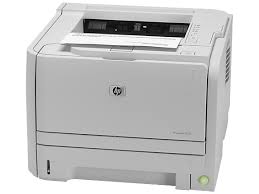
HP LaserJet P2035n Printer
Specifications
- Product number
- CE462A
- Resolution (black)
- 600 × 600 dpi; HP FastRes 1200
- Monthly recommended volume
- 500–2,500 pages
- Processor
- 266 MHz
- Duplex printing
- Manual
- Paper input
- 50-sheet multipurpose tray + 250-sheet tray
Quick downloads
HP P2035n driver download for Windows
HP LaserJet P2035 and P2035n GDI Plug and Play Package
Windows 2000
Windows Server 2003
Windows Vista (32-bit)
Windows XP (32-bit)
Full OS list
Windows 8 (32-bit)
Windows 7 (32-bit)
Windows Vista (32-bit)
Windows XP (32-bit)
Windows 2000
Windows Server 2003
The GDI Plug and Play Package provides easy installation and offers basic printing functions.
HP LaserJet P2035 and P2035n GDI Plug and Play Package
Windows Server 2003
Windows Vista (64-bit)
Windows XP (64-bit)
Full OS list
Windows 8 (64-bit)
Windows 7 (64-bit)
Windows Vista (64-bit)
Windows XP (64-bit)
Windows Server 2003
The GDI Plug and Play Package provides easy installation and offers basic printing functions.
HP LaserJet P2030 Printer Series Full Software Solution
Windows Server 2003
Windows Vista (32-bit)
Windows Vista (64-bit)
Windows XP (32-bit)
+1 versions
Full OS list
Windows Vista (64-bit)
Windows XP (32-bit)
Windows XP (64-bit)
Windows 2000
Windows Server 2003
HP LaserJet P2030 Printer Series Full Software Solution contains the full set of software components that are available on the bundled product CD. Below operating systems are supported: Windows 2000…
Read more
Windows XP (32-bit and 64-bit) Windows Server 2003 (32-bit and 64-bit) Windows Vista (32-bit and 64-bit) The most recent printer drivers and printing software for the HP LaserJet P2030 Series printers are available at the following URL: www.hp.com/go/LJP2030series_software Additional Information on Linux and UNIX Linux drivers and accompanying installation instructions are provided by HP at http://hplip.sourceforge.net/index.html . While HP does not provide formal consumer or commercial support for this software, informal support is provided through a series of resources at this HP-sponsored site: http://hplip.sourceforge.net/index.html For more information on HP's Open Source programs go to: http://www.hp.com/go/linuxprinting For information and printer drivers for UNIX, see the following Web site: http://www.hp.com/pond/modelscripts/index2.html
HP LaserJet P2035 and P2035n GDI Plug and Play Package
Windows Server 2003
Windows Vista (32-bit)
Windows XP (32-bit)
Full OS list
Windows XP (32-bit)
Windows 2000
Windows Server 2003
The GDI Plug and Play package provides simple plug and play installation and offers host-based printing function in Windows.
HP LaserJet P2035 and P2035n XPS Driver Package
The XPS driver package provides XML Paper Specification (XPS) print driver for Microsoft Vista systems.
HP LaserJet P2035 and P2035n GDI Plug and Play Package
Windows Vista (64-bit)
Windows XP (64-bit)
Full OS list
Windows XP (64-bit)
Windows Server 2003
The GDI Plug and Play package provides simple plug and play installation and offers host-based printing function in Windows.
HP LaserJet P2035 and P2035n XPS Driver Package
The XPS driver package provides XML Paper Specification (XPS) print driver for Microsoft Vista systems.
Firmware, fax & utilities (1)
HP LaserJet P2030 Series Firmware Update Utility
Windows Server 2008 R2, 2008, 2003
Windows Vista (32-bit)
Windows Vista (64-bit)
Windows XP (32-bit)
Full OS list
Windows 7 (64-bit)
Windows Vista (32-bit)
Windows Vista (64-bit)
Windows XP (32-bit)
Windows Server 2008 R2
Windows Server 2008 W32
Windows Server 2008 x64
Windows Server 2008 Small Business
Windows Server 2008 Itanium
Windows Server 2008 Foundation Edition
Windows Server 2008 Essential Business
Windows Server 2003
This firmware update utility is for the HP LaserJet P2030 series printers only. This update is recommended for HP LaserJet P2030 series printers that have a prior version of firmware. This utility…
Read more
updates the printer's firmware to the latest version. The firmware version can be found on the Self Test/Device Configuration page. To print a configuration page press and hold the Go button (button with green paper icon on it) for 5 seconds when printer Ready light is on and no other jobs are printing or select it from the Print Information Pages drop-down list on the Services tab in the Windows Printer Preference dialog.
HP P2035n driver download for macOS
Mac Printer Driver
OS X 10.9–10.11
Full OS list
macOS 11
macOS 10.15
macOS 10.14
macOS 10.13
macOS 10.12
Mac OS X 10.11
Mac OS X 10.10
Mac OS X 10.9
The full software solution includes everything you need to install for your HP printer.
HP LaserJet P2030 Series Mac OS X Full Software Solution
This download package contains HP LaserJet P2030 Series Mac OS X Full Software Solution Installer v1.0.2017. This is the same version of software on the HP LaserJet P2030 Series CD version 2.0.
Mac Printer Driver
Full OS list
Mac OS X 10.7
The full software solution includes everything you need to install for your HP printer.
Firmware, fax & utilities (1)
HP LaserJet Firmware Update Utility
Mac OS X
Full OS list
Mac OS X 10.7
Mac OS X 10.6
Mac OS X 10.5
Description: The following firmware update utility is for the HP LJ P2035 and P2035n. This utility is for use on Mac OS X, 10.5, 10.6, 10.7 and later. The utility can be used with a USB connection or…
Read more
network connection (P2035n only). This update is recommended for HP LJ P2035 printers that have a prior version of firmware. This utility updates the printer firmware version to the latest version. The firmware version can be found on the Self Test/Configuration Page which can be printed by pressing and holding the GO button (button with green paper icon on it) for 5 seconds when the printer Ready light is on and no other jobs are printing.
HP P2035n Linux Support
Linux — HP Support
Installation & Support
HP LaserJet P2035n Driver FAQ
Can I install the P2035n over a network?
The P2035n includes network connectivity. Install a compatible HP driver, then add the printer using its network address or the Windows printer discovery process. The exact steps depend on your Windows version and network configuration.
Which driver should I choose?
Choose a package explicitly listed for your Windows version and system architecture on HP’s support page. Do not assume that a package for a similarly named P2035 model is identical.
What if I need to install it offline?
Download the verified installer first, transfer it to the target PC, and then run it there. See our guide to installing printer drivers without an internet connection.