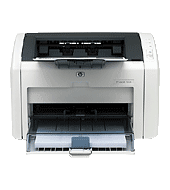
Paper handling is simple: a 250-sheet input tray, a 10-sheet priority feed slot, and a 150-sheet face-down bin. Duplex is manual, with driver support. This HP LaserJet 1022 series laser printer prints black at up to 1200 x 1200 dpi and suits 250 to 2000 pages a month.
HP LaserJet 1020 and 1022 Printer Series Hostbased Plug and Play Basic Driver
Win 7 64-bit
Download the HP LaserJet 1020 and 1022 Printer Series Hostbased Plug and Play Basic Driver for Windows. HP offers it at 3.1 MB for Win 7 64-bit and 2.6 MB for Win 7 32-bit.
Quick install: download the recommended file above, run it, and choose Wi-Fi or USB when the installer asks, then print a test page. Full steps
HP LaserJet 1022 series driver for Windows
Basic driver only
Win 7 64-bit
Details
- Description
- Note: This driver works both the LaserJet 1020 and 1022 Series printers. The Plug and Play Bundle provides basic printing functions
- File name
lj1018_1020_1022-HB-pnp-win64-en.exe- MD5 checksum (from HP)
d946e3984d48c18812169cb3d31063b2- Software ID (HP)
- bi-101596-3 · verify on HP
Win 7 32-bit
Details
- File name
lj1018_1020_1022-HB-pnp-win32-en.exe- MD5 checksum (from HP)
1ae55beb593952094d8de8013e15e51f- Software ID (HP)
- bi-88660-3 · verify on HP
Firmware
Win 7 64-bitWin 7 32-bit
Details
- Description
- This firmware update utility is for the HP LaserJet 1022n, 1022nw printers only. This update is recommended for HP LaserJet 1022n and 1022nw printers…
- File name
HP1022_FW_Upgrade_Security_20120928.exe- MD5 checksum (from HP)
ea150861ecd6aad4431fd48dd38e06a6- Software ID (HP)
- bi-59777-2 · verify on HP
Win 7 64-bitWin 7 32-bit
Details
- File name
HP1022_FW_Upgrade_Security.exe- MD5 checksum (from HP)
33b21f82a442bcfb3a26c2f99b453ffa- Software ID (HP)
- bi-117532-1 · verify on HP
HP LaserJet 1022 series driver for Linux
Linux
Details
- Software ID (HP)
- mp-54524-1 · verify on HP
All files come straight from HP (ftp.hp.com). We checked them against HP’s list on Oct 25, 2026. Systems checked: Win 11, Win 10 64-bit, Win 7 64-bit, macOS 26, macOS 15, macOS 13, Linux. Older systems may have more files on HP’s page for this model.
HP LaserJet 1022 series driver support by operating system
64-bit
Latest HP LaserJet 1022 series driver and firmware updates
- HP LaserJet Firmware Update Utility (for Win 7 64-bit, Win 7 32-bit) v20130314 (Apr 18, 2013): Firmware Version 20130314 Fix:. Fix the wireless configuration lost issue. Added the "RFU" setting to control…
- HP LaserJet 1020 and 1022 Printer Series Hostbased Plug and Play Basic Driver v20120918 (Jan 09, 2013): Windows 8 Support
- HP LaserJet 1020 and 1022 Printer series Hostbased Plug and Play Basic Driver v20120918 (Jan 09, 2013): Windows 7 support. Darken text support
- HP LaserJet Firmware Update Utility (for Win 7 64-bit, Win 7 32-bit) v20120928 (Oct 29, 2012): Firmware Version 20120928 Fix:. Added the "RFU" setting to control remote firmware updates. The options are…
Which HP LaserJet 1022 series driver should I choose?
HP offers two kinds of download here: Basic driver and Firmware. The basic driver is the Plug and Play package that lets Windows print, and most owners need only this. Firmware utilities (2.8 MB for 20120928, 4.1 MB for 20130314) apply to the 1022n and 1022nw only. Update firmware only to fix a problem HP lists, such as lost wireless configuration, which version 20130314 fixes.
Duplex is manual, so the driver supports two-sided jobs but you handle the pages. HP does not include a USB cable, so buy one separately. The printer has no display and no HP ePrint. HP offers optional Jetdirect, wireless print server and bt1300 adapters.
How to install the HP LaserJet 1022 series driver
- Close any software programs running on your computer.
- Save the downloaded file, then double-click it. The self-extracting process appears.
- Accept the license agreement and click Next. Driver installation begins.
- Connect the USB cable when the screen prompts you to.
- Wait while Plug and Play finishes installing the driver, then click Finish.
Adding the printer by hand or installing on Linux? See our printer driver install guide.
HP LaserJet 1022 series specifications
Source: HP product specifications for the HP LaserJet 1022 Printer series.
Each file lists the MD5 checksum HP publishes. Our guide to checking a driver download shows how to compare it. If an HP link is down, try the Microsoft Update Catalog search for the HP LaserJet 1022 series.
HP LaserJet 1022 series driver troubleshooting
Windows does not find the printer after installation
Confirm the printer is on and the USB cable is firmly seated at both ends. Then run the installer again and connect the cable only when the screen prompts for it.
Printed pages look faint or streaky
Remove the toner cartridge and rock it gently side to side to spread the toner. Reinstall it, then print a test page. Replace the cartridge if the problem stays.
Wireless configuration is lost on a 1022n or 1022nw
Firmware version 20130314 fixes this lost wireless configuration issue. HP offers it as the Firmware Update Utility, 4.1 MB, for Win 7 64-bit and 32-bit. It applies to the 1022n and 1022nw only.
For “driver is unavailable”, offline printers and stuck print jobs, see our printer driver troubleshooting guide.
HP LaserJet 1022 series driver FAQ
Which Windows versions does HP list for this driver?
HP lists the basic driver for Win 7 64-bit and Win 7 32-bit. The 64-bit package lists Windows 8 support as its fix, and the 32-bit package lists Windows 7 support.
How large are the driver downloads?
The 64-bit basic driver is 3.1 MB and the 32-bit basic driver is 2.6 MB. Both carry version 20120918 and a date of Jan 09, 2013.
What does the latest firmware update fix?
Version 20130314 fixes the lost wireless configuration issue. It also adds an RFU setting to control remote firmware updates. It is for the 1022n and 1022nw printers only.
Does this printer support duplex printing or HP ePrint?
Duplex is manual, with driver support provided. HP ePrint capability is not available on this printer.
Drivers for similar HP printers
Owners of related models can find the matching downloads here: HP LaserJet 1018 driver, HP LaserJet 1020 series driver, HP LaserJet 1200 series driver.
Last checked: Oct 25, 2026. HP and HP LaserJet 1022 series are trademarks of HP Inc. This site is not affiliated with HP.