For the Canon imageCLASS MF266dn, Canon lists Windows 64-bit MFDrivers V6.101 from 15 Oct 2026 as the newest Windows driver. The newest macOS driver is MF Printer Driver V10.11.14 from 13 Oct 2026. The download buttons open Canon's own download link. Checked by Günay V. (DriverPrinter Lab) on .
Each button opens Canon’s own download link. Canon publishes no checksums, so we list the version, date and size from Canon’s page. Our guide to checking a driver download shows how to verify a file.
Windows downloads for the Canon imageCLASS MF266dn
File
Version
[Windows 32bit] Generic Plus PCL6 Printer Driver V3.50For
[Windows 64bit] MF269dw/MF267dw/MF266dn/MF264dw/MF261d MFDrivers (UFRII LT / Generic Plus PCL6 / Generic FAX / ScanGear)For Windows 11 (64-bit), Windows 10 (64-bit), Windows 8.1 (64-bit), Windows 7 (64-bit), Windows Server 2008 (64-bit), Windows Server 2008 R2 (64-bit), Windows Server 2012 (64-bit), Windows Server 2012 R2 (64-bit), Windows Server 2016 (64-bit), Windows Server 2019 (64-bit), Windows Server 2022 (32-bit), Windows Server 2025 (32-bit)
[Windows 32bit] MF269dw/MF267dw/MF266dn/MF264dw/MF261d MFDrivers (UFRII LT / Generic Plus PCL6 / Generic FAX / ScanGear)For Windows 10 (32-bit), Windows 8.1 (32-bit), Windows 7 (32-bit), Windows Server 2008 (32-bit)
[Windows 7/ 8.1/ Server 2008 64bit] Generic FAX Driver V10.50For Windows 8.1 (64-bit), Windows 7 (64-bit), Windows Server 2008 (64-bit), Windows Server 2008 R2 (64-bit)
How to install the Canon imageCLASS MF266dn driver
Canon’s own steps for the full driver package:
To download files, click the file link, select [Save], and specify the directory where you want to save the file.The download will start automatically.
Downloaded files are saved in the specified folder in a self-extracting format (.exe format).
Double-click the files to decompress them. A new folder will be created in the same folder. The new folder will have the same name as the compressed file.
Double-click the decompressed Setup.exe file to start installation.
Check that the printer is on and the USB or network cable is firmly seated. Restart the printer and the computer. Then run the installer again so it can find the device. Pick the driver that matches your operating system.
The driver installation stops partway through
Close other installers and restart the computer. Run the installer again as administrator. On Windows, check your bitness: use the 64-bit package on 64-bit systems and the 32-bit package on 32-bit systems.
The scanner does not appear after installation
On Windows, the MFDrivers package includes ScanGear, so reinstall it. On a Mac, install Scanner Driver & Utilities V2.15.22 separately. It also installs MF Scan Utility and MF Toolbox, which add the scanner.
Other models that share files with the Canon imageCLASS MF266dn
Canon lists these models for the same scanner (ICA) driver: imageCLASS MF261d, imageCLASS MF264dw, imageCLASS MF266dn, imageCLASS MF267dw, imageCLASS MF269dw.
Use the 64-bit MFDrivers V6.101 on Windows 11, Windows 10 (x64) and the listed 64-bit Windows Server versions. Use the 32-bit MFDrivers V6.10 on Windows 10, 8.1, 7 or Server 2008 (32-bit).
What does the Windows MFDrivers package include?
It includes UFRII LT, Generic Plus PCL6, Generic FAX and ScanGear. Canon shares the same package across the MF269dw, MF267dw, MF266dn, MF264dw and MF261d.
Which macOS versions does the newest Mac driver cover?
MF Printer Driver V10.11.14 covers macOS 11 through macOS 27. Canon lists separate older drivers for macOS 10.15, 10.14, 10.13, 10.12, and OS X 10.11 and 10.10.
Do I need separate downloads on a Mac?
Yes. Canon lists the printer driver (V10.11.14), the scanner driver (V2.15.22) and the fax driver (V4.15.25) as separate files. Install only the ones you need for printing, scanning or faxing.
We use cookies to ensure that we give you the best experience on our website. If you continue to use this site we will assume that you are happy with it.
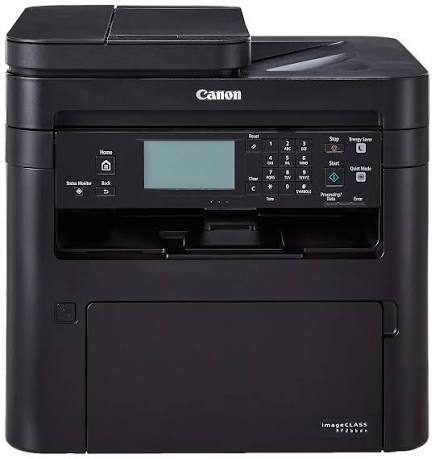 For the Canon imageCLASS MF266dn, Canon lists Windows 64-bit MFDrivers V6.101 from 15 Oct 2026 as the newest Windows driver. The newest macOS driver is MF Printer Driver V10.11.14 from 13 Oct 2026. The download buttons open Canon's own download link.