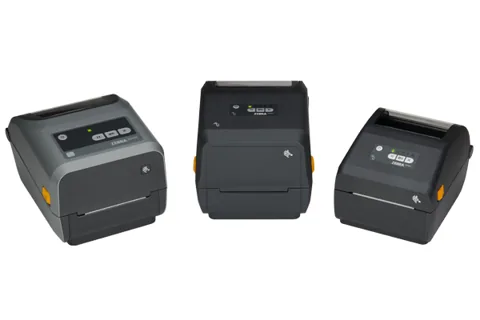
 The Zebra ZD421 driver for Windows is the ZDesigner Windows Printer Driver v10 (35 MB), and Zebra names it as the recommended driver for this label printer. The same files serve all three versions of the printer: the ZD421d (direct thermal), the ZD421t (thermal transfer with a ribbon roll) and the ZD421c (ribbon cartridge). Below, in addition, every file Zebra lists for the ZD421 is shown once: both Windows drivers, the setup and label design software, the printer firmware and the guides. Each button downloads the file straight from Zebra's own server.
Download the Zebra ZD421 driver
First, pick Windows Printer Driver v10 unless you need the older CPCL or EPL command languages. Moreover, each row names the systems the file supports, as listed by Zebra. Zebra's End User License Agreement applies to these downloads.
Windows driver files for the Zebra ZD421
Windows Printer Driver v10Driver · zddriver-v1062628275-certified.zipThis is the recommended driver to use with your printer. 'ZDesigner Printer Driver' is for use with ZebraDesigner 3 and other Windows applications. For x86, x64 and Arm processors.Supports: Windows 11, Windows 10, Windows Server 2025, Windows Server 2022, Windows Server 201910.6.26.28275Oct 23, 202535 MBWindows Printer Driver v5Driver · zd51177415-certified.exeUse this driver if you need to use either CPCL or EPL printer command languages. 'ZDesigner Printer Driver' is compatible with ZebraDesigner 3 and prior versions. Not for Windows on Arm processors.Supports: Windows 11, Windows 10, Windows Server 2025, Windows Server 2022, Windows Server 20195.1.17.7415Jan 28, 202514 MBZebraDesigner 3 Label Design SoftwareSoftware · zebradesigner3-330104.zipBoth the FREE ZebraDesigner Essentials 3 and PAID ZebraDesigner Professional 3 editions will be installed. The application will initially run as the free Essentials edition.Supports: Windows3.3.0.104Dec 31, 2025197 MBFirmware Download Utility (ZDownloader)Utility · firmware-downloader-v50013.zipA utility that uploads Printer OS (Firmware) and Service Packs to your printer.Supports: Windows-Jun 30, 202623 MBZebra Printer Setup Utilities for WindowsUtility · zsu-1191327.zipUse this software to configure your printer after Printer Driver installation. Recommended driver installation and configuration utility (zsu-1191327.zip).Supports: Windows 11, Windows 10, Windows Server 2025, Windows Server 2022, Windows Server 20191.1.9.1327Dec 10, 202511 MBFactory Installed Printer EmulationsFirmware · IncludedPrinterEmulations.zipPrinter Emulations are on-printer apps that allow this printer to use a variety of printer command languages. Use only on printers that have been updated to Link-OS 7.7 or later.Supports: Printers on Link-OS 7.7 or later-Sep 25, 20266 MBLink-OS v7.7 MIB file for SNMPFirmware · ZEBRA-Link-OS_7.7_Vxx_21_53.mibSupports: SNMP management software-Sep 25, 2026317 KBPrinter OS V93.21.53ZFirmware · V93.21.53Z.zipSupports: Printer firmwareV93.21.53ZSep 24, 202645 MBOLE for Retail POS (OPOS)POS driver · zebra-printer-opos-driver-installer-v1-14-1-143.exeVersion 1.14.1.143. Use this driver to develop applications that are compatible with the Unified POS specification. See the release notes for printer compatibility and system requirements.Supports: Windows 11, Windows 10, Windows 8.1, Windows 71.14.1.143Dec 1, 20227 MBManuals and guides
Mac OS, Linux/Unix Drivers InformationGuide · ZSN108111-v4_CUPS_Installation.pdfOperating System: Mac OS, Linux/UnixSupports: macOS, Linux-Date not listed476 KBZD421 user guideGuide · zd421-zd621-ug-en.pdfSupports: All systems (PDF)-Date not listed36 MBZD421/621/888D/888T China Local OS Certificate (Kylin)Guide · Certification_ZD_Series_Kylin.pdfSupports: All systems (PDF)-Date not listed425 KBZD421/621/888D/888T China Local OS Certificate (UOS)Guide · Certification_ZD_Series_UOS.pdfSupports: All systems (PDF)-Date not listed2 MBYou can compare this list with Zebra's ZD421 support page. Therefore, pick the file by your operating system.
Windows Printer Driver v10 or v5 for the ZD421?
Zebra lists two Windows drivers for the ZD421, and they are not interchangeable. Therefore, check which one your software needs before you install.
Windows Printer Driver v10 (version 10.6.26.28275) is the recommended choice. It is the ZDesigner driver for ZebraDesigner 3 and other Windows applications, and it runs on Windows 10, Windows 11 and Windows Server 2019, 2022 and 2025. In addition, it works on computers with x86, x64 and Arm processors.
Windows Printer Driver v5 (version 5.1.17.7415) is for one case only: you need the CPCL or EPL printer command languages. However, this driver does not support Windows on Arm devices, so it will not install on an Arm laptop.
Besides these, the OPOS driver is not a print driver for everyday use. Instead, developers use it to build point-of-sale applications that follow the Unified POS specification.
Zebra ZD421 on Mac and Linux
Zebra does not provide a ZD421 driver for macOS or Linux. Instead, Zebra suggests the CUPS driver, which is already part of macOS and of some Linux distributions. Zebra’s software note lists Red Hat, SUSE, Ubuntu and Mac OS X 10.6 or later, and its support for this setup is limited.
To add the printer, first open http://localhost:631 in a browser and choose to add a printer. For a USB connection, the printer then appears under local printers. For a network connection, however, choose AppSocket/HP JetDirect and enter the address as socket://printer-IP:9100, because 9100 is the default port for Zebra desktop printers.
Next, select Zebra as the make. The CUPS driver does not list every Zebra model, so pick the command language instead of the model name. The ZD421 uses ZPL, so choose the ZPL entry and finish the setup. If Zebra is missing from the list of makes, a system update that refreshes CUPS may be needed. The full steps are in the CUPS guide in the table above.
ZD421 firmware and printer emulations
The ZD421 runs Zebra’s Link-OS, and the firmware file in the table is Printer OS V93.21.53Z for Link-OS v7.7. In addition to the ZD421, Zebra lists it for the ZD411, ZD611 and ZD621 printers. To load it, use the Firmware Download Utility (ZDownloader), which sends the Printer OS file to the printer from a Windows computer.
Moreover, the Factory Installed Printer Emulations package holds on-printer apps that let the ZD421 understand other printer command languages. However, Zebra says to use it only on printers already updated to Link-OS 7.7 or later, so update the firmware first.
About the Zebra ZD421
The ZD421 is a 4-inch desktop label printer in Zebra's ZD400 Series, and it runs the Link-OS printer operating system. In addition, the key figures below come from Zebra's ZD400 Series specification sheet.
Print methodsDirect thermal (ZD421d) or thermal transfer (ZD421t with a ribbon roll, ZD421c with a ribbon cartridge)Resolution203 dpi (8 dots per mm); 300 dpi (12 dots per mm) optionalMaximum print width4.09 in. (104 mm) at 203 dpi; 4.16 in. (106 mm) at 300 dpiMaximum print speed6 in. (152 mm) per second at 203 dpi; 4 in. (102 mm) per second at 300 dpiMemory512 MB Flash; 256 MB SDRAMProgramming languagesZPL II, EPL 2, XML, ZBI, PDF DirectStandard connectionsUSB 2.0 and USB Host; Bluetooth Low Energy 5 for Zebra's printer setup mobile app onlyLabel length0.25 in. (6.35 mm) to 39.0 in. (991 mm)Media widthDirect thermal: 0.585 to 4.25 in. (15 to 108 mm); ribbon roll: up to 4.41 in. (112 mm); ribbon cartridge: up to 4.65 in. (118 mm)Media roll sizeOuter diameter up to 5.00 in. (127 mm); 0.5 in. and 1.0 in. cores standardRibbon lengthZD421t: 984 ft. (300 m) or 243 ft. (74 m) rolls; ZD421c: 243 ft. (74 m) cartridgeSize and weightDirect thermal: 8.69 x 6.98 x 5.93 in., 2.98 lbs. (1.35 kg); ribbon roll: 10.5 x 8.0 x 7.44 in., 4.52 lbs. (2.05 kg); ribbon cartridge: 10.0 x 8.0 x 7.0 in., 5.0 lbs. (2.3 kg)Operating temperature40 to 105 F (4.4 to 41 C)Install the Zebra ZD421 driver step by step
First, do not connect the printer to the computer yet. Zebra warns that a ZD421 plugged in by USB before the driver is installed can show up as an unknown device in Devices and Printers. If that has already happened, follow Zebra’s recovery steps before you go on.
Next, download Windows Printer Driver v10 from the table above, unpack the .zip file and run the installer inside. Zebra’s own walk-through is Installing the Drivers and Running the Printer Installation Wizard.
Then install Zebra Setup Utilities, which is the tool Zebra provides to configure the printer after the driver. After that, peel off the sticker that covers the USB port, connect the cable and turn the printer on. For a wired or wireless network connection, Zebra’s Setup Utilities guide shows the steps.
Finally, load the labels and, on the ZD421t or ZD421c, the ribbon roll or ribbon cartridge. Then run a SmartCal media calibration and print a configuration report, as the ZD421 user guide describes. As a result, the printer learns the label length and the first label starts in the right place.
For installer errors on Windows, see the driver installation guide for Windows 11 and the driver installation error guide.
Last checked: Nov 28, 2026. Zebra is a trademark of its owner. This site is not affiliated with Zebra.