Advertisement
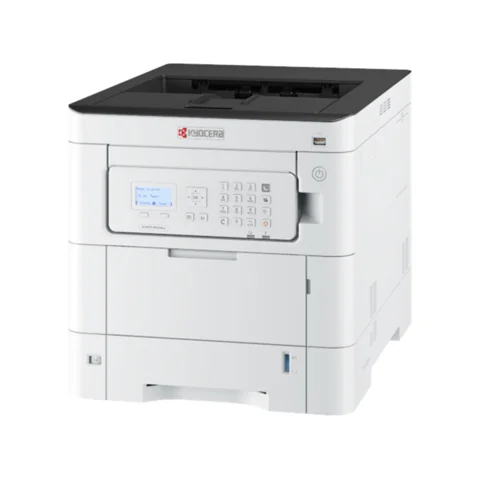 The newest Kyocera ECOSYS PA3500cx driver on the maker’s support site is the KX Printer Driver 8.7.0917 (published Oct 16, 2026) for Windows 11 (64-bit, ARM64), Windows 10 (32/64-bit, ARM64), Windows Server 2025, 2022, 2019, 2016 (64-bit). Also, all 25 ECOSYS PA3500cx files below, for Windows, macOS and Linux, come straight from the maker’s own server. The ECOSYS PA4000cx and ECOSYS PA4500cx use the same driver and software files, so this page serves them too.
Download the Kyocera ECOSYS PA3500cx driver
Most people need only this file. For the ECOSYS PA3500cx, Kyocera marks the web installer as its recommended download, because it installs the right driver and finds the printer for you.
All Kyocera ECOSYS PA3500cx downloads
The other 21 files for the ECOSYS PA3500cx serve special cases: for example, the full KX driver package (246.23 MB) for a PC without internet, utilities, fonts or Linux packages. Open the part you need for your ECOSYS PA3500cx.
Kyocera ECOSYS PA3500cx driver for Windows (6 files)
KX Printer DriverKx87_UPD_8.7.0917_jp_RC3_signed.zipSupports: Windows 11 (64-bit, ARM64), Windows 10 (32/64-bit, ARM64), Windows Server 2025, 2022, 2019, 2016 (64-bit)8.7.0917Oct 16, 2026246.23 MBKX Printer DriverKx87_UPD_8.7.0917_en_RC3_signed.zipSupports: Windows 11 (64-bit, ARM64), Windows 10 (32/64-bit, ARM64), Windows Server 2025, 2022, 2019, 2016 (64-bit)8.7.0917Oct 16, 2026239.93 MBKPDL mini-driverKPDL mini-driver_Japanese_8.2205.exeSupports: Windows 11 (64-bit), Windows 10 (32/64-bit), Windows 8.1 (32/64-bit), Windows Server 2022, 2019, 2016, 2012 R2, 20128.2205Jul 3, 20239.03 MBKPDL mini-driverKPDL mini-driver_8.2205.exeSupports: Windows 11 (64-bit), Windows 10 (32/64-bit), Windows 8.1 (32/64-bit), Windows Server 2022, 2019, 2016, 2012 R2, 20128.2205Jul 3, 202310.02 MBPCL mini-driverPCL mini-driver_Japanese_1.4.exeSupports: Windows 11 (64-bit), Windows 10 (32/64-bit), Windows 8.1 (32/64-bit), Windows Server 2022, 2019, 2016, 2012 R2, 20121.4Jul 3, 20239.03 MBPCL mini-driverPCL mini-driver_1.4.exeSupports: Windows 11 (64-bit), Windows 10 (32/64-bit), Windows 8.1 (32/64-bit), Windows Server 2025, 2022, 2019, 2016, 2012 R2, 20121.4Jul 3, 20239.09 MBWindows utilities and fonts (9 files)
Status Monitor 5Status Monitor 5_5.4.35.17.exeSupports: Windows 11 (64-bit), Windows 10 (32/64-bit), Windows 8.1 (32/64-bit), Windows Server 2025, 2022, 2019, 2016, 2012 R2, 20125.4.35.17Oct 15, 202413.97 MBKYOCERA Net ViewerKYOCERA Net Viewer_6.13.0902.zipSupports: Windows 11 (64-bit), Windows 10 (32/64-bit), Windows Server 2025, 2022, 2019, 2016 (64-bit)6.13.0902Oct 16, 2026152.43 MBQuick Network Setup ToolQuick Network Setup_2.0.11.exeSupports: Windows 11 (64-bit), Windows 10 (32/64-bit), Windows 8.1 (32/64-bit), Windows Server 2025, 2022, 2019, 2016, 2012 R2, 20122.0.11Jul 3, 20230.34 MBWi-Fi Setup ToolWIFI Setup Tool_2.0.23.22.exeSupports: Windows 11 (64-bit), Windows 10 (32/64-bit), Windows 8.1 (32/64-bit), Windows Server 2022, 2019, 2016, 2012 R2, 20122.0.23.22Jul 3, 20233.38 MBMaintenance MenuMaintenance Menu_1.4.12.13.exeSupports: Windows 11 (64-bit), Windows 10 (32/64-bit), Windows 8.1 (32/64-bit), Windows Server 2022, 2019, 2016, 2012 R2, 20121.4.12.13Jul 3, 20233.63 MBKYOCERA Net Direct PrintKYOCERA Net Direct Print_2.6.1202.exeSupports: Windows 11 (64-bit), Windows 10 (32/64-bit), Windows 8.1 (32/64-bit), Windows Server 2022, 2019, 2016, 2012 R2, 20122.6.1202Jul 3, 202318.11 MBUpgrade SyncUpgrade Sync 1.1.5.0.exeSupports: Windows 11 (64-bit), Windows 10 (32/64-bit), Windows Server 2025, 2022, 2019, 2016 (64-bit)1.1.5.0Jun 28, 20260.95 MBOptional Printer ComponentsPost Installer_7.0.1926.exeSupports: Windows 11 (64-bit), Windows 10 (32/64-bit), Windows 8.1 (32/64-bit), Windows Server 2022, 2019, 2016, 2012 R2, 20127.0.1926Jul 10, 20233.06 MBFontsFONTS.exeSupports: Windows 11 (64-bit), Windows 10 (32/64-bit), Windows 8.1 (32/64-bit), Windows Server 2022, 2019, 2016, 2012 R2, 2012202306Jul 3, 202322.18 MBKyocera ECOSYS PA3500cx driver for macOS (3 files)
Mac Printer DriverKyocera Web build 2026.07.03.dmgSupports: macOS 12 or later, Mac OS X 10.9 or later62_2026.07.03Aug 18, 202698.39 MBMac Printer DriverKyocera Japanese Web build 2026.07.03.dmgSupports: macOS 12 or later, Mac OS X 10.9 or later62_2026.07.03Aug 18, 202654.62 MBLinux downloads (3 files)
Upgrade Sync(Ubuntu,Debian)Upgrade Sync 1.1.5.0.debSupports: Linux1.1.5.0Jun 28, 2026107.88 MBUpgrade Sync(Fedora,RedHat,OpenSUSE,CentOS)Upgrade Sync 1.1.5.0.rpmSupports: Linux1.1.5.0Jun 28, 2026104.86 MBBesides, you can compare every file with Kyocera’s own ECOSYS PA3500cx support page.
Manuals for the ECOSYS PA3500cx, ECOSYS PA4000cx and ECOSYS PA4500cx
The 37 English manuals for the ECOSYS PA3500cx are below. However, Kyocera also publishes them in other languages, so open its support page for those.
More manuals
Show 37 manuals for utilities, Command Center and printing tools
Models supported by this ECOSYS PA3500cx driver page
Colour laser, 35 pages/min; the main model of this page40 pages/min; uses the same driver and software files45 pages/min, the guide's lead model; same filesECOSYS PA3500cx specifications
These figures come from the ECOSYS PA4500cx Operation Guide (ECOSYSPA4500cx_EN_202306.pdf, Kyocera, June 2023).
PA3500cx: 35 pages/min (A4), 37 (Letter); PA4000cx: 40 / 42; PA4500cx: 45 / 47; colour and black alike9600 dpi equivalent × 600 dpi, 1200 × 1200 dpi equivalentAutomatic1 GB, up to 3 GB with an extra module (PA4500cx)SuperSpeed USB, Ethernet, USB host port; optional Wi-Fi and extra interface kits (IB-50/IB-51, IB-37/IB-38)550-sheet cassette + 100-sheet multipurpose tray; up to 4 extra 550-sheet cassettes (3 on slower models)60–163 g/m² from the cassette, up to 220 g/m² from the multipurpose tray6 seconds or less from sleep394 × 533 × 455 mm, 33 kg without tonerToner for the ECOSYS PA3500cx
These are Kyocera's average yields (ISO/IEC 19798, A4, EcoPrint off). The guide gives no order codes, so check the code for your region on Kyocera's site. The starter set of the PA4500cx prints about 8,000 black and 6,000 colour pages.
Black18,000 pages13,000 pages7,000 pagesCyan13,000 pages10,000 pages5,000 pagesMagenta13,000 pages10,000 pages5,000 pagesYellow13,000 pages10,000 pages5,000 pagesPaper, envelopes and labels on the ECOSYS PA3500cx
A 550-sheet cassette is standard, so the PA3500cx rarely runs out of A4. The 100-sheet multipurpose tray accepts card up to 220 g/m².
For heavy use, Kyocera sells extra 550-sheet cassettes: up to four on the PA4500cx and three on the slower models.
How the ECOSYS PA3500cx differs from its siblings
The three models differ in speed and toner size, not in drivers. The PA4000cx and PA4500cx therefore use the same files and the same KX driver as the PA3500cx.
Common ECOSYS PA3500cx messages and fixes
Toner empty message The printer waits until you fit a container of the colour shown. Use the yield table above to judge how long each colour lasts.
Network printer not found Connect Ethernet first, then run the web installer. It finds the PA3500cx on the network and adds it for you.
Install the Kyocera ECOSYS PA3500cx driver
- Connect the PA3500cx to your network with Ethernet, or to the PC with a USB cable.
- Run the web installer from the blue box at the top; Kyocera recommends it, and one KX driver covers all three models.
- On a PC without internet, open the Windows driver section of the full list and use the full KX package instead.
- Print a colour test page to check cyan, magenta, yellow and black together.
For installer errors on Windows, see the driver installation guide for Windows 11 and the driver installation error guide.
Last checked: Nov 15, 2026. Kyocera and ECOSYS are trademarks of Kyocera Corporation. This site is not affiliated with Kyocera.
Advertisement