Advertisement
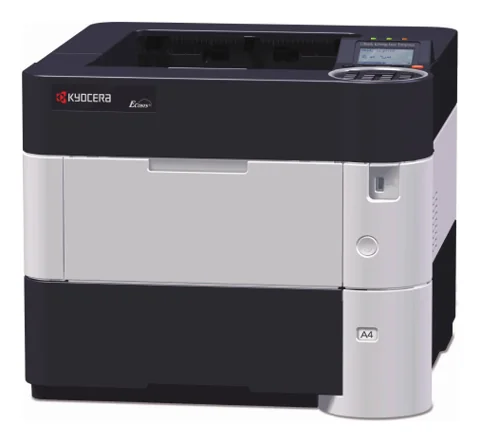 The newest Kyocera ECOSYS P3155dn driver on the maker’s support site is the KX Printer Driver 8.7.0917 (published Oct 16, 2026) for Windows 11 (64-bit, ARM64), Windows 10 (32/64-bit, ARM64), Windows Server 2025, 2022, 2019, 2016 (64-bit). Also, all 9 ECOSYS P3155dn files below, for Windows, macOS and Linux, come straight from the maker’s own server. The ECOSYS P3150dn and ECOSYS P3145dn use the same driver and software files, so this page serves them too. The photo shows the ECOSYS P3060dn, an older printer of the same family, because Kyocera publishes no photo of the P3155dn.
Download the Kyocera ECOSYS P3155dn driver
Most people need only this file. For the ECOSYS P3155dn, one download per system is enough: the full KX package holds the driver and the support tools for the ECOSYS P3155dn. Kyocera marks no single ECOSYS P3155dn file as recommended, so the box lists the complete package for each system.
All Kyocera ECOSYS P3155dn downloads
The other 6 files for the ECOSYS P3155dn serve special cases: the older KX version 4 driver, the scanner and fax drivers, utilities and the Japanese-language builds of the ECOSYS P3155dn packages. Open the part you need for your ECOSYS P3155dn.
Kyocera ECOSYS P3155dn driver for Windows (3 files)
KX Printer DriverKx87_UPD_8.7.0917_jp_RC3_signed.zipSupports: Windows 11 (64-bit, ARM64), Windows 10 (32/64-bit, ARM64), Windows Server 2025, 2022, 2019, 2016 (64-bit)8.7.0917Oct 16, 2026246.23 MBKX v4 Printer DriverKxv4_v6.2.2215_RC2_WHQL_jp.zipSupports: Windows 11 (64-bit, ARM64), Windows 10 (32/64-bit, ARM64), Windows 8.1 (32/64-bit), Windows Server 2025, 2022, 2019, 2016, 2012 R2, 20126.2.2215Dec 23, 2024159.03 MBKX v4 Printer DriverKxv4_v6.2.2215_RC2_WHQL_en.zipSupports: Windows 11 (64-bit, ARM64), Windows 10 (32/64-bit, ARM64), Windows 8.1 (32/64-bit), Windows Server 2022, 2019, 2016, 2012 R2, 20126.2.2215Dec 23, 2024169.01 MBWindows utilities and fonts (2 files)
Status Monitor 5Status Monitor 5_5.4.35.17.exeSupports: Windows 11 (64-bit), Windows 10 (32/64-bit), Windows 8.1 (32/64-bit), Windows Server 2025, 2022, 2019, 2016, 2012 R2, 20125.4.35.17Oct 15, 202413.97 MBKYOCERA Net ViewerKYOCERA Net Viewer_6.13.0902.zipSupports: Windows 11 (64-bit), Windows 10 (32/64-bit), Windows Server 2025, 2022, 2019, 2016 (64-bit)6.13.0902Oct 16, 2026152.43 MBKyocera ECOSYS P3155dn driver for macOS (1 file)
Mac Printer DriverKyocera Japanese Web build 2026.07.03.dmgSupports: macOS 12 or later, Mac OS X 10.9 or later62_2026.07.03Aug 18, 202654.62 MBBesides, you can compare every file with Kyocera’s own ECOSYS P3155dn support page.
Manuals for the ECOSYS P3155dn, ECOSYS P3150dn and ECOSYS P3145dn
The 12 English manuals for the ECOSYS P3155dn are below. However, Kyocera also publishes them in other languages, so open its support page for those.
More manuals
Show 11 manuals for utilities, Command Center and printing tools
Models supported by this ECOSYS P3155dn driver page
Mono laser, 55 pages/min; the main model of this page50 pages/min; uses the same driver and software files45 pages/min; same filesOlder P3000 series; Kyocera serves it with the same file setColour printer that Kyocera serves with the same file setECOSYS P3155dn specifications
These figures come from the ECOSYS P3155dn / P3150dn / P3145dn Operation Guide (ECOSYSP3155dn_EN.pdf, Kyocera).
P3145dn 45, P3150dn 50, P3155dn 55 pages/min47 / 52 / 57 pages/min5.3 seconds or lessFast 1200, Fine 1200 and 600 dpi512 MBHi-Speed USB, Ethernet, 2 USB host ports; optional extra interface kit (IB-50/IB-51) and Wi-Fi (IB-36)500-sheet cassette60–120 g/m² from the cassette380 × 410 × 285 mm (15.0 × 16.2 × 11.2 in), about 14.1 kg without tonerToner for the ECOSYS P3155dn
These are Kyocera's average yields (ISO/IEC 19752, EcoPrint off). The containers in the box print about 6,000 pages on the P3145dn, 8,000 on the P3150dn and 10,000 on the P3155dn. The guide lists no order codes, so check the code for your region on Kyocera's site.
P3145dn12,500 pagesP3150dn15,500 pagesP3155dn (North and Latin America)21,000 pagesP3155dn (other regions)25,000 pagesHow the ECOSYS P3155dn differs from its siblings
The three P3100 models differ by speed grade only. Moreover, the older P3045dn and P3055dn use the same package, but they have their own guides, so this page names them without separate specifications.
Common ECOSYS P3155dn messages and fixes
Wi-Fi is missing The P3155dn has no built-in Wi-Fi. Wireless needs Kyocera's optional IB-36 kit; otherwise use Ethernet or USB.
Toner container empty With a yield of 21,000 to 25,000 pages, a container lasts a long time, but the starter container is only 10,000 pages.
Install the Kyocera ECOSYS P3155dn driver
- Connect the P3155dn by Ethernet or USB; Wi-Fi works only with the optional IB-36 kit.
- Download the full KX driver package for your system from the blue box at the top; on Windows, unzip it and start the installer inside the folder. Kyocera recommends it, and it fits the P3145dn, P3150dn and P3155dn alike.
- Print a test page; the printer reaches its first page in about 5.3 seconds.
For installer errors on Windows, see the driver installation guide for Windows 11 and the driver installation error guide.
Last checked: Nov 15, 2026. Kyocera and ECOSYS are trademarks of Kyocera Corporation. This site is not affiliated with Kyocera.
Advertisement