Advertisement
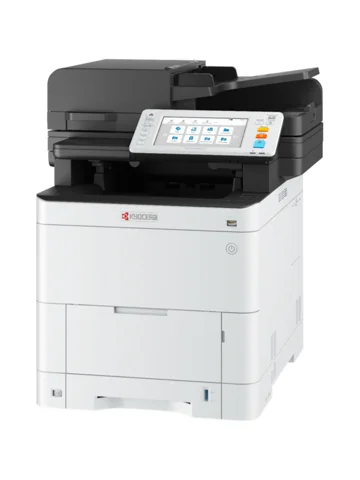 The newest Kyocera ECOSYS MA3500cifx driver on the maker’s support site is the KX Printer Driver 8.7.0917 (published Oct 16, 2026) for Windows 11 (64-bit, ARM64), Windows 10 (32/64-bit, ARM64), Windows Server 2025, 2022, 2019, 2016 (64-bit). Also, each button below downloads the file straight from the maker’s own server. In addition, the list covers Windows, macOS and Linux.
Download the Kyocera ECOSYS MA3500cifx driver
The web installer is the easiest route, because it sets up the driver and the printer in a few steps. Therefore, the maker recommends it first. After that, the full driver packages follow, and each file lists every system it supports.
Kyocera ECOSYS MA3500cifx driver for Windows
| File | Version | Size | |
|---|---|---|---|
Web installerRecommended by KyoceraWeb Installer_1.13.6.0.exeSupports: Windows 11 (64-bit), Windows 10 (32/64-bit), Windows 8.1 (32/64-bit), Windows Server 2025, 2022, 2019, 2016, 2012 R2, 2012 |
1.13.6.0Jul 11, 2024 |
17.17 MB |
Download |
KX Printer DriverKx87_UPD_8.7.0917_jp_RC3_signed.zipSupports: Windows 11 (64-bit, ARM64), Windows 10 (32/64-bit, ARM64), Windows Server 2025, 2022, 2019, 2016 (64-bit) |
8.7.0917Oct 16, 2026 |
246.23 MB |
Download |
KX Printer DriverKx87_UPD_8.7.0917_en_RC3_signed.zipSupports: Windows 11 (64-bit, ARM64), Windows 10 (32/64-bit, ARM64), Windows Server 2025, 2022, 2019, 2016 (64-bit) |
8.7.0917Oct 16, 2026 |
239.93 MB |
Download |
KPDL mini-driverKPDL mini-driver_Japanese_8.2205.exeSupports: Windows 11 (64-bit), Windows 10 (32/64-bit), Windows 8.1 (32/64-bit), Windows Server 2022, 2019, 2016, 2012 R2, 2012 |
8.2205Jul 3, 2023 |
9.03 MB |
Download |
KPDL mini-driverKPDL mini-driver_8.2205.exeSupports: Windows 11 (64-bit), Windows 10 (32/64-bit), Windows 8.1 (32/64-bit), Windows Server 2022, 2019, 2016, 2012 R2, 2012 |
8.2205Jul 3, 2023 |
10.02 MB |
Download |
PCL mini-driverPCL mini-driver_Japanese_1.4.exeSupports: Windows 11 (64-bit), Windows 10 (32/64-bit), Windows 8.1 (32/64-bit), Windows Server 2022, 2019, 2016, 2012 R2, 2012 |
1.4Jul 3, 2023 |
9.03 MB |
Download |
PCL mini-driverPCL mini-driver_1.4.exeSupports: Windows 11 (64-bit), Windows 10 (32/64-bit), Windows 8.1 (32/64-bit), Windows Server 2025, 2022, 2019, 2016, 2012 R2, 2012 |
1.4Jul 3, 2023 |
9.09 MB |
Download |
Windows utilities and fonts
| File | Version | Size | |
|---|---|---|---|
TWAIN Driver / Kyocera Quick ScanKyocera TWAIN Driver_3.4.0328.exeSupports: Windows 11 (64-bit, ARM64), Windows 10 (32/64-bit, ARM64), Windows Server 2025, 2022, 2019, 2016 (64-bit) |
3.4.0328Jun 30, 2026 |
123.62 MB |
Download |
WIA DriverKyocera WIA Driver_2.3.3726.exeSupports: Windows 11 (64-bit), Windows 10 (32/64-bit), Windows 8.1 (32/64-bit), Windows Server 2022, 2019, 2016, 2012 R2, 2012 |
2.3.3726Jul 3, 2023 |
12.45 MB |
Download |
FAX DriverNWFAX7.2b_KDC_7.2.2114_RC3.zipSupports: Windows 11 (64-bit), Windows 10 (32/64-bit), Windows 8.1 (32/64-bit), Windows Server 2022, 2019, 2016, 2012 R2, 2012 |
7.2.2114Jan 31, 2024 |
133.05 MB |
Download |
Status Monitor 5Status Monitor 5_5.4.35.17.exeSupports: Windows 11 (64-bit), Windows 10 (32/64-bit), Windows 8.1 (32/64-bit), Windows Server 2025, 2022, 2019, 2016, 2012 R2, 2012 |
5.4.35.17Oct 15, 2024 |
13.97 MB |
Download |
KYOCERA Net ViewerKYOCERA Net Viewer_6.13.0902.zipSupports: Windows 11 (64-bit), Windows 10 (32/64-bit), Windows Server 2025, 2022, 2019, 2016 (64-bit) |
6.13.0902Oct 16, 2026 |
152.43 MB |
Download |
Quick Network Setup ToolQuick Network Setup_2.0.11.exeSupports: Windows 11 (64-bit), Windows 10 (32/64-bit), Windows 8.1 (32/64-bit), Windows Server 2025, 2022, 2019, 2016, 2012 R2, 2012 |
2.0.11Jul 3, 2023 |
0.34 MB |
Download |
Wi-Fi Setup ToolWIFI Setup Tool_2.0.23.22.exeSupports: Windows 11 (64-bit), Windows 10 (32/64-bit), Windows 8.1 (32/64-bit), Windows Server 2022, 2019, 2016, 2012 R2, 2012 |
2.0.23.22Jul 3, 2023 |
3.38 MB |
Download |
Maintenance MenuMaintenance Menu_1.4.12.13.exeSupports: Windows 11 (64-bit), Windows 10 (32/64-bit), Windows 8.1 (32/64-bit), Windows Server 2022, 2019, 2016, 2012 R2, 2012 |
1.4.12.13Jul 3, 2023 |
3.63 MB |
Download |
KYOCERA Net Direct PrintKYOCERA Net Direct Print_2.6.1202.exeSupports: Windows 11 (64-bit), Windows 10 (32/64-bit), Windows 8.1 (32/64-bit), Windows Server 2022, 2019, 2016, 2012 R2, 2012 |
2.6.1202Jul 3, 2023 |
18.11 MB |
Download |
Upgrade SyncUpgrade Sync 1.1.5.0.exeSupports: Windows 11 (64-bit), Windows 10 (32/64-bit), Windows Server 2025, 2022, 2019, 2016 (64-bit) |
1.1.5.0Jun 28, 2026 |
0.95 MB |
Download |
Scan to Folder Setup Tool for SMBScan to SMB_1.2.10.5.exeSupports: Windows 11 (64-bit), Windows 10 (32/64-bit), Windows 8.1 (32/64-bit), Windows Server 2022, 2019, 2016, 2012 R2, 2012 |
1.2.10.5Jul 3, 2023 |
2.99 MB |
Download |
File Management UtilityFile Management Utility_4.0.3402.exeSupports: Windows 11 (64-bit), Windows 10 (32/64-bit), Windows 8.1 (32/64-bit), Windows Server 2025, 2022, 2019, 2016, 2012 R2, 2012 |
4.0.3402Oct 31, 2023 |
17.44 MB |
Download |
Optional Printer ComponentsPost Installer_7.0.1926.exeSupports: Windows 11 (64-bit), Windows 10 (32/64-bit), Windows 8.1 (32/64-bit), Windows Server 2022, 2019, 2016, 2012 R2, 2012 |
7.0.1926Jul 10, 2023 |
3.06 MB |
Download |
FontsFONTS.exeSupports: Windows 11 (64-bit), Windows 10 (32/64-bit), Windows 8.1 (32/64-bit), Windows Server 2022, 2019, 2016, 2012 R2, 2012 |
202306Jul 3, 2023 |
22.18 MB |
Download |
Kyocera ECOSYS MA3500cifx driver for macOS
| File | Version | Size | |
|---|---|---|---|
Web installerRecommended by KyoceraWeb Installer 2.1.7.0.dmgSupports: macOS 12 or later, Mac OS X 10.9 or later |
2.1.7.0Jun 30, 2026 |
105.59 MB |
Download |
Mac Printer DriverKyocera Web build 2026.07.03.dmgSupports: macOS 12 or later, Mac OS X 10.9 or later |
62_2026.07.03Aug 18, 2026 |
98.39 MB |
Download |
Mac Printer DriverKyocera Japanese Web build 2026.07.03.dmgSupports: macOS 12 or later, Mac OS X 10.9 or later |
62_2026.07.03Aug 18, 2026 |
54.62 MB |
Download |
Upgrade SyncUpgrade Sync 1.1.5.0.dmgSupports: macOS 12 or later |
1.1.5.0Jun 28, 2026 |
141.46 MB |
Download |
Linux downloads
| File | Version | Size | |
|---|---|---|---|
Web installer(Fedora,RedHat,OpenSUSE,CentOS)Recommended by KyoceraWeb Installer 2.1.7.0.rpmSupports: Linux |
2.1.7.0Jun 30, 2026 |
74.46 MB |
Download |
Web installer(Ubuntu,Debian)Recommended by KyoceraWeb Installer 2.1.7.0.debSupports: Linux |
2.1.7.0Jun 30, 2026 |
74.24 MB |
Download |
Linux PackagesKyoceraLinuxPackages-20260709.tar.gzSupports: Linux |
260709Sep 4, 2026 |
254.12 MB |
Download |
Kyocera SANE DriverKyoceraSANE_v2.3.1523_RC2.zipSupports: Linux |
2.3.1523May 15, 2026 |
18.61 MB |
Download |
Upgrade Sync(Ubuntu,Debian)Upgrade Sync 1.1.5.0.debSupports: Linux |
1.1.5.0Jun 28, 2026 |
107.88 MB |
Download |
Upgrade Sync(Fedora,RedHat,OpenSUSE,CentOS)Upgrade Sync 1.1.5.0.rpmSupports: Linux |
1.1.5.0Jun 28, 2026 |
104.86 MB |
Download |
Besides, you can compare every file with Kyocera’s own ECOSYS MA3500cifx support page.
Manuals for the ECOSYS MA3500cifx
The English manuals are below. However, the maker also publishes them in other languages, so open its support page for those.
More manuals
Show 39 manuals for utilities, Command Center and printing tools
| Manual | Version | Size | |
|---|---|---|---|
SETUP GUIDE_ECOSYSMA4000cifx_US_202410.pdf |
PDFNov 15, 2024 |
1.49 MB |
Download |
QUICK GUIDE_ECOSYSMA4000cifx_202306.pdf |
PDFJul 3, 2023 |
1.35 MB |
Download |
ecosysma4000cifx_he_03.pdf |
PDFSep 5, 2025 |
15.02 MB |
Download |
ecosysma4000cifx_tr_03.pdf |
PDFSep 5, 2025 |
15.24 MB |
Download |
ecosysma4000cifx_sv_03.pdf |
PDFSep 5, 2025 |
15.88 MB |
Download |
ECOSYSMA4000cifx_ENUS_202410.pdf |
English(PDF)Nov 15, 2024 |
27.00 MB |
Download |
ecosysma4000cifx_ar_03.pdf |
PDFSep 5, 2025 |
15.35 MB |
Download |
ecosysma4000cifx_ru_03.pdf |
PDFSep 5, 2025 |
26.31 MB |
Download |
ecosysma4000cifx_eses_04.pdf |
PDFSep 5, 2025 |
25.84 MB |
Download |
ecosysma4000cifx_ca_03.pdf |
PDFSep 5, 2025 |
16.06 MB |
Download |
ecosysma4000cifx_no_03.pdf |
PDFSep 5, 2025 |
15.08 MB |
Download |
ecosysma4000cifx_ro_03.pdf |
PDFSep 5, 2025 |
15.90 MB |
Download |
ecosysma4000cifx_pl_03.pdf |
PDFSep 5, 2025 |
15.68 MB |
Download |
ecosysma4000cifx_cs_03.pdf |
PDFSep 5, 2025 |
15.49 MB |
Download |
ecosysma4000cifx_it_03.pdf |
PDFSep 5, 2025 |
26.03 MB |
Download |
ecosysma4000cifx_hu_03.pdf |
PDFSep 5, 2025 |
15.54 MB |
Download |
ecosysma4000cifx_el_03.pdf |
PDFSep 5, 2025 |
15.98 MB |
Download |
ecosysma4000cifx_frfr_04.pdf |
PDFSep 5, 2025 |
25.95 MB |
Download |
ecosysma4000cifx_fi_04.pdf |
PDFSep 5, 2025 |
15.36 MB |
Download |
ecosysma4000cifx_enen_04.pdf |
PDFSep 5, 2025 |
26.36 MB |
Download |
ecosysma4000cifx_nl_03.pdf |
PDFSep 5, 2025 |
15.58 MB |
Download |
ecosysma4000cifx_da_03.pdf |
PDFSep 5, 2025 |
15.32 MB |
Download |
ecosysma4000cifx_de_04.pdf |
PDFSep 5, 2025 |
25.49 MB |
Download |
ecosysma4000cifx_ptpt_03.pdf |
PDFSep 5, 2025 |
15.47 MB |
Download |
FAX_ECOSYSMA4000cifx_EN_202306.pdf |
English(PDF)Jul 3, 2023 |
4.42 MB |
Download |
MA4500ci_CL_KX_Printer_Driver_ENUS_8.2_202306.pdf |
English(PDF)Jul 3, 2023 |
5.42 MB |
Download |
ECOSYSMA4000cifx_CL_KX_Printer_Driver_EN_8.2_202505.pdf |
PDFJul 15, 2025 |
5.54 MB |
Download |
commandcenterrx_ecosysma4000cifx_en_02.pdf |
English(PDF)Aug 18, 2026 |
1.15 MB |
Download |
UpgradeSync_UserGuide_en.pdf |
PDFJul 28, 2025 |
0.27 MB |
Download |
MaintenanceMenu_KD_EN_202206.pdf |
English(PDF)Jul 3, 2023 |
0.56 MB |
Download |
CardAuth_B_ECOSYSMA4000cifx_EN_202306.pdf |
English(PDF)Jul 3, 2023 |
87 KB |
Download |
DataEncryptionOverwrite_ECOSYSMA4000cifx_EN_202306.pdf |
English(PDF)Jul 3, 2023 |
0.26 MB |
Download |
NetViewerUserGuide6.12_EN.pdf |
English(PDF)Jun 30, 2026 |
0.56 MB |
Download |
directprint_kd_en_202505.pdf |
English (PDF)Dec 1, 2025 |
1.35 MB |
Download |
FileManagement_KD_EN_202310.pdf |
English(PDF)Oct 31, 2023 |
0.44 MB |
Download |
IB-53_Manual_2.zip |
zipOct 15, 2025 |
105.17 MB |
Download |
IB-54_55_Manual_2.zip |
zipSep 5, 2025 |
120.58 MB |
Download |
prescribecom_kd_en_202505.pdf |
English(PDF)Dec 1, 2025 |
6.56 MB |
Download |
PrescribeTech_KD_EN_202301.pdf |
English(PDF)Feb 15, 2023 |
30.31 MB |
Download |
Which file should you choose?
First, pick the web installer if you want the simplest setup. Besides, it is small (17.17 MB), whereas the full driver package is 246.23 MB. Therefore, the package suits a PC that has a slow connection or no internet at all. However, the installer is the file that the maker recommends. For example, it suits a single PC at home or in a small office. In addition, the version numbers in the table show which file is newer. Finally, always match the file to your system, because each row lists the systems it supports.
Install the driver step by step
First, download the web installer for your system from the table above and run it. Then follow the instructions on the screen, and connect the printer by USB cable or select it on the network when the installer asks. Next, print a test page to confirm that the printer works. If you prefer the full driver package, however, download the KX Printer Driver instead, extract the ZIP file and start the setup program inside it. Finally, on Linux or macOS, use the package for your system from the table.
For installer errors on Windows, see the driver installation guide for Windows 11 and the driver installation error guide.
Last checked: Nov 10, 2026. Kyocera and ECOSYS are trademarks of Kyocera Corporation. This site is not affiliated with Kyocera.
Advertisement