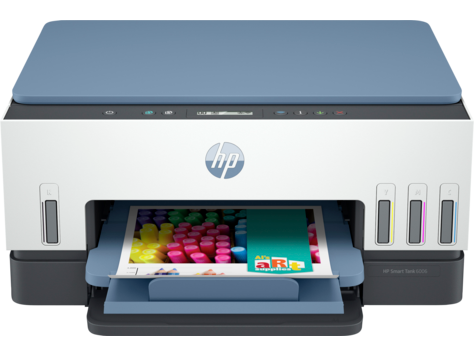
Built for low-volume documents, 400 to 800 pages a month, the HP Smart Tank 6002 All-in-One prints, scans and copies, with wireless support. It adds automatic duplex and a 150-sheet input tray. Black print speed reaches up to 12 ppm, which suits home and light office use.
HP Universal Scan – Full Feature Software and Driver
Win 11Win 10 64-bit
Download HP Universal Scan – Full Feature Software and Driver (436.2 MB) for Windows. It covers Windows 11 and Windows 10 64-bit.
Quick install: download the recommended file above, run it, and choose Wi-Fi or USB when the installer asks, then print a test page. Full steps
HP Smart Tank 6002 All-in-One driver for Windows
Full software and drivers
HP Universal Scan - Full Feature Software and Driver (for Win 11, Win 10 64-bit)Win 11Win 10 64-bit
Details
- File name
Full_Webpack-63.8.6459-SJ0001_Full_Webpack.exe- MD5 checksum (from HP)
7e76f43e3ae4d4638f9271aa6235f8dc- Software ID (HP)
- cs-308747-11 · verify on HP
HP Universal Scan - Full Feature Software and Driver (for Win 7 64-bit)Win 7 64-bit
Details
- File name
Full_Webpack-51.7.5630-SJ0001_Full_Webpack.exe- MD5 checksum (from HP)
d5d076d9ab58d6bba996ab4af1149055- Software ID (HP)
- cs-292548-3 · verify on HP
HP Universal Scan - Full Feature Software and Driver (ARM 64)Win 11
Details
- File name
Full_Webpack-63.8.6459_ARM64-SJ0001_Full_Webpack.exe- MD5 checksum (from HP)
6d62a1c7a02013ab7ada7c43595e721c- Software ID (HP)
- cs-351749-3 · verify on HP
Basic driver only
HP Universal Scan - Basic Feature Software and Driver (for Win 11, Win 10 64-bit)Win 11Win 10 64-bit
Details
- File name
Basic_Webpack_x64-63.8.6459-SJ0001_Basicx64_Webpack.exe- MD5 checksum (from HP)
24c79852645f3dea63bb0a61b2ebd87d- Software ID (HP)
- cs-308746-11 · verify on HP
HP Universal Scan - Basic Feature Software and Driver (for Win 7 64-bit)Win 7 64-bit
Details
- File name
Basic_Webpack_x64-51.7.5630-SJ0001_Basicx64_Webpack.exe- MD5 checksum (from HP)
4a9275e44fbf3ad68f0edec713718f99- Software ID (HP)
- cs-292547-3 · verify on HP
HP Universal Scan - Basic Feature Software and Driver (ARM 64)Win 11
Details
- File name
Basic_Webpack_x64-63.8.6459_ARM64-SJ0001_Basicx64_Webpack.exe- MD5 checksum (from HP)
ff10299f0401ee28a1e09f0aecef6c3c- Software ID (HP)
- cs-351748-3 · verify on HP
Setup apps
HP Easy Start Printer Setup Software (Internet connection required for driver installation)Win 11Win 10 64-bitWin 7 64-bit
Details
- File name
HPEasyStart_17_6_15.exe- MD5 checksum (from HP)
d3c5840776dec9f1f7e1ba23499a15e8- Software ID (HP)
- mp-366488-3 · verify on HP
HP Easy Start Printer Setup Software – Offline Use OnlyWin 11Win 10 64-bitWin 7 64-bit
Details
- File name
HPEasyStart-17.6.9-ST6000_55_3_5043_Webpack.exe- Software ID (HP)
- verify on HP
Install HP app to complete setup and supportWin 11Win 10 64-bit
Details
- Software ID (HP)
- mp-366135-1 · verify on HP
Firmware
HP Smart Tank 660-670/6000 series Printer Firmware UpdateWin 11Win 10 64-bitWin 7 64-bit
Details
- File name
HP_ST660_ST670_ST6000_2630B.exe- MD5 checksum (from HP)
55089e5a3f4bf31f4f02a23b829299ca- Software ID (HP)
- bi-280265-10 · verify on HP
HP Smart Tank 6002 All-in-One driver for macOS
Install HP app to complete setup and supportmacOS 26macOS 15macOS 13
Details
- Software ID (HP)
- mp-351535-1 · verify on HP
HP Smart Tank 660-670/6000 series Printer Firmware UpdatemacOS 15macOS 13
Details
- File name
HP_ST660_ST670_ST6000_2630B.dmg- MD5 checksum (from HP)
81b63c2f26d4b83dcde443942985446b- Software ID (HP)
- bi-286353-9 · verify on HP
HP Smart Tank 6002 All-in-One driver for Linux
HP Printers - Driver Support for Linux OSLinux
Details
- Software ID (HP)
- mp-54524-1 · verify on HP
All files come straight from HP (ftp.hp.com). We checked them against HP’s list on Oct 25, 2026. Systems checked: Win 11, Win 10 64-bit, Win 7 64-bit, macOS 26, macOS 15, macOS 13, Linux. Older systems may have more files on HP’s page for this model.
HP Smart Tank 6002 All-in-One driver support by operating system
DownloadWin 11Win 10
64-bitWin 7
64-bitmacOSFull software and drivers✓✓✓–Basic driver only✓✓✓–Setup apps✓✓✓–Firmware✓✓✓✓Latest HP Smart Tank 6002 All-in-One driver and firmware updates
- HP Smart Tank 660-670/6000 series Printer Firmware Update v002.2630B (Sep 15, 2026): Fix and Enhancements:. Print Performance Improvements. Connectivity Improvements
Which HP Smart Tank 6002 All-in-One driver should I choose?
HP sorts downloads for this printer into four categories. Full software and drivers is the complete scan package, at 436.2 MB for Windows 11 and 10. Basic driver is the minimum scan option with WIA and Twain support, at 113.9 MB. Setup app means HP Easy Start, which guides setup and installs drivers. Firmware updates are optional, so install one only to fix a connectivity or print performance problem.
Duplex printing is automatic, and the trays hold 150 sheets in and 100 out. Connections include dual band 2.4/5G Wi-Fi, Wi-Fi Direct and Hi-Speed USB 2.0. Refills are HP 32XL black and HP 31 cyan, magenta and yellow bottles.
How to install the HP Smart Tank 6002 All-in-One driver
- Download HP Universal Scan – Full Feature Software and Driver (436.2 MB) from HP's page for your Windows version.
- Open the downloaded file when the transfer finishes.
- Follow the installer's on-screen prompts. HP gives no further install instructions for this download.
- Connect the printer by Wi-Fi (2.4/5G dual band) or by a Hi-Speed USB 2.0 cable.
- Scan a test page to confirm the software sees the printer.
Adding the printer by hand or installing on Linux? See our printer driver install guide.
HP Smart Tank 6002 All-in-One specifications
Printing: HP Smart Tank 6002 All-in-One driver specs
FunctionsPrint, Scan, Copy, WirelessPrint speed blackNormal: ISO speeds measured using ISO/IEC 24734, ISO/IEC 17629 or ISO/IEC 29183. In simplex mode. Excludes first page or first set of ISO test pages for PPM measurements. For details see http://www.hp.com/go/printerclaims . Exact speed…Print quality black (best)Black: Up to 1200 x 1200 rendered dpi Color: Up to 4800 x 1200 optimized dpi color when printing from a computer and 1200 input dpiDuty cycle (monthly, letter)Up to 3,000 pages Duty cycle is the maximum number of pages that can be printed in a month, but this page volume is not recommended on an ongoing basis.Recommended monthly page volume400 to 800 HP recommends the number of pages printed not exceed the recommended monthly page volume for optimum device performance.Multitasking supportedNoPrint speed black (ISO, A4)Up to 12 ppmPrint technologyHP Thermal InkjetPrinter drivers includedHP PCL 3 GUIPrint languagesHP PCL 3 GUIPaper handling: HP Smart Tank 6002 All-in-One driver specs
Duplex printingAutomaticPaper handling input, standard150-sheet input trayPaper handling output, standard100-sheet output trayMedia sizes supportedLetter; Legal; Government Legal; Executive; Statement; 4 x 6 in; 5 x 7 in; 8 x 10 in; L; Photo 2L; Envelope( #10, Monarch, 5.5 bar); Card (4 x 6 in, 5 x 8 in)Connectivity, supplies and size: HP Smart Tank 6002 All-in-One driver specs
Connectivity, standard1 Wi-Fi Direct; 2 Hi-Speed USB 2.0 (device)Wireless capabilityYes, 2.4/5G dual band Wi-Fi, Wi-Fi DirectMobile printing capabilityApple AirPrint; Mopria™ certified; HP Print Service Plugin (Android printing); HP app; Wi-Fi® Direct PrintingDisplay2-line LCD Smart guided buttons, 2.0 x 0.4 in (50.8 x 10.16 mm)Replacement cartridgesHP 32XL 135-ml Black bottle (~6000 pages), HP 31 70-ml Cyan bottle (~8000 pages), HP 31 70-ml Magenta bottle (~8000 pages), HP 31 70-ml Yellow bottle (~8000 pages)Dimensions (W x D x H)16.83 x 14.33 x 7.82 inWeight6.38 kg 14.07 lbManufacturer WarrantyOne-year or 30,000 pages limited hardware warranty, whichever is earlier from the date of purchase. For more info please visit us at http://support.hp.com.Source: HP product specifications for the HP Smart Tank 6002 All-in-One.
Each file lists the MD5 checksum HP publishes. Our guide to checking a driver download shows how to compare it. If an HP link is down, try the Microsoft Update Catalog search for the HP Smart Tank 6002 All-in-One.
HP Smart Tank 6002 All-in-One driver troubleshooting
Computer cannot find the printer over Wi-Fi
Confirm the printer and computer share the same network. Restart both devices and the router. Try a Hi-Speed USB 2.0 cable or Wi-Fi Direct to confirm the printer itself works.
Streaky or faded prints from the thermal inkjet
Check the ink levels in the HP 32XL and HP 31 bottles and refill any that run low. Print again after refilling. Use the printer's own maintenance options for cleaning.
Scanning feels slow
Install HP Universal Scan version 63.8.6459, which HP says optimizes scan speed. Choose the Full Feature package for Windows 11 or Windows 10 64-bit, then repeat the scan.
For “driver is unavailable”, offline printers and stuck print jobs, see our printer driver troubleshooting guide.
HP Smart Tank 6002 All-in-One driver FAQ
Which Windows versions does the recommended download support?
HP Universal Scan – Full Feature Software and Driver, version 63.8.6459, supports Windows 11 and Windows 10 64-bit. HP also offers an ARM 64 build for Windows 11 and an older version for Windows 7 64-bit.
How large is the basic driver?
The Basic Feature package for Windows 11 and Windows 10 64-bit is 113.9 MB. The Full Feature package is 436.2 MB, so the basic one downloads much faster.
What does the firmware update fix?
HP lists print performance improvements and connectivity improvements for firmware version 002.2630B. It covers the HP Smart Tank 660-670/6000 series. HP offers it for Windows and for macOS 15 and macOS 13.
How many pages should I print each month?
HP recommends 400 to 800 pages a month for best performance. The duty cycle reaches 3,000 pages, but HP does not recommend that volume on an ongoing basis.
Drivers for similar HP printers
Owners of related models can find the matching downloads here: HP Ink Tank 115 driver, HP Ink Tank 318 driver, HP Ink Tank Wireless 412 driver, HP Ink Tank Wireless 419 driver, HP Smart Tank 500 All-in-One series driver, HP Smart Tank 5106 All-in-One driver.
Last checked: Oct 25, 2026. HP and HP Smart Tank 6002 All-in-One are trademarks of HP Inc. This site is not affiliated with HP.