Advertisement
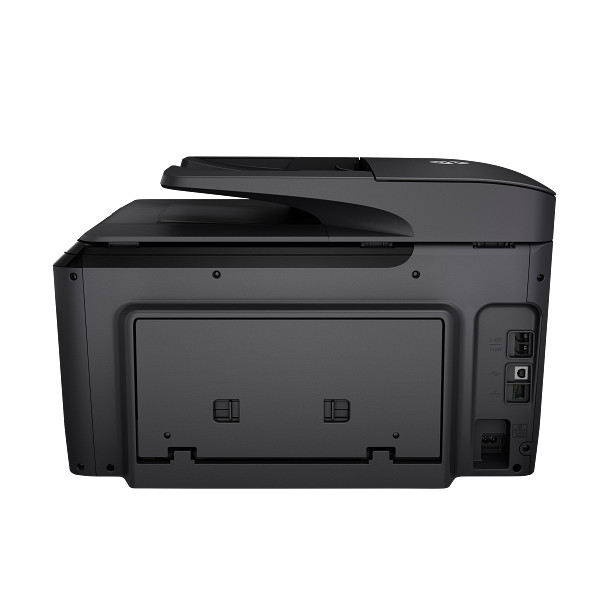
Office paperwork at 250 to 1,500 pages a month is what the HP OfficeJet Pro 8710 All-in-One series targets. It is an HP Thermal Inkjet all-in-one with scanning and fax ports. Automatic duplexing and a 250-sheet input tray suit small offices and busy home offices.
HP OfficeJet Pro 8710 All-in-One Print and Scan Driver and Accessories
Win 11Win 10 64-bitWin 7 64-bit
On Windows, download HP OfficeJet Pro 8710 All-in-One Print and Scan Driver and Accessories (115.8 MB). On macOS, download Install HP Easy Start (6.3 MB).
Quick install: download the recommended file above, run it, and choose Wi-Fi or USB when the installer asks, then print a test page. Full steps
HP OfficeJet Pro 8710 All-in-One series driver for Windows
Full software and drivers
Win 11Win 10 64-bitWin 7 64-bit
Details
- File name
Full_Webpack-40.15.1230_1-OJ8710_Full_Webpack.exe- MD5 checksum (from HP)
9b34dda406a09e98100d1026dc1f4428- Software ID (HP)
- bi-158259-7 · verify on HP
Basic driver only
Win 11Win 10 64-bitWin 7 64-bit
Details
- File name
Basic_Webpack_x64-40.15.1230-OJ8710_Basicx64_Webpack.exe- MD5 checksum (from HP)
ba4758162a9d26fa2c55403500155f33- Software ID (HP)
- bi-243053-2 · verify on HP
Setup apps
Win 11Win 10 64-bitWin 7 64-bit
Details
- File name
HPEasyStart_17_6_15.exe- MD5 checksum (from HP)
d3c5840776dec9f1f7e1ba23499a15e8- Software ID (HP)
- mp-366488-3 · verify on HP
Win 11Win 10 64-bit
Details
- Software ID (HP)
- mp-366135-1 · verify on HP
Firmware
Win 11Win 10 64-bitWin 7 64-bit
Details
- File name
OJP8710_2615B.exe- MD5 checksum (from HP)
de05637767507344f0146249c865cfa8- Software ID (HP)
- bi-215337-25 · verify on HP
Utilities and other software
Win 11Win 10 64-bitWin 7 64-bit
Details
- File name
UFD_8.2-8.2.89-HPUFDDriver.exe- MD5 checksum (from HP)
5e75dcabe30aa70b34cf4f2319568616- Software ID (HP)
- ds-203195-19 · verify on HP
- Release notes
- Read on HP
Win 10 64-bitWin 7 64-bit
Details
- File name
HPEPrintAppSetupx64.exe- MD5 checksum (from HP)
f47f746e9f3a0bf359c06d3a4d889b43- Software ID (HP)
- lj-166432-4 · verify on HP
HP OfficeJet Pro 8710 All-in-One series driver for macOS
Setup apps
macOS 26macOS 15
Details
- File name
HP_Easy_Start.app.zip- MD5 checksum (from HP)
19c1a5f786f5f93f9f778ad71ee444a3- Software ID (HP)
- mp-166618-27 · verify on HP
macOS 26macOS 15macOS 13
Details
- Software ID (HP)
- mp-351535-1 · verify on HP
Firmware
macOS 26macOS 15macOS 13
Details
- File name
OJP8710_2615B.dmg- MD5 checksum (from HP)
59c84304abffab291c422ab869a29fe0- Software ID (HP)
- bi-216088-24 · verify on HP
HP OfficeJet Pro 8710 All-in-One series driver for Linux
Linux
Details
- Software ID (HP)
- mp-54524-1 · verify on HP
All files come straight from HP (ftp.hp.com). We checked them against HP’s list on Oct 25, 2026. Systems checked: Win 11, Win 10 64-bit, Win 7 64-bit, macOS 26, macOS 15, macOS 13, Linux. Older systems may have more files on HP’s page for this model.
HP OfficeJet Pro 8710 All-in-One series driver support by operating system
| Download | Win 11 | Win 10 64-bit |
Win 7 64-bit |
macOS 26 | macOS 15 | macOS 13 |
|---|---|---|---|---|---|---|
| Full software and drivers | ✓ | ✓ | ✓ | – | – | – |
| Basic driver only | ✓ | ✓ | ✓ | – | – | – |
| Setup apps | ✓ | ✓ | ✓ | ✓ | ✓ | – |
| Firmware | ✓ | ✓ | ✓ | ✓ | ✓ | ✓ |
| Utilities and other software | ✓ | ✓ | ✓ | – | – | – |
Latest HP OfficeJet Pro 8710 All-in-One series driver and firmware updates
- HP Officejet Pro 8710/8720 Firmware Update v001.2615B (Jun 03, 2026): Bug fix and enhancements
Which HP OfficeJet Pro 8710 All-in-One series driver should I choose?
Full software and drivers (115.8 MB) installs the print and scan driver and accessories. Most owners want this one. The Basic driver (68.9 MB) is for IT professional use only. Setup apps like HP Easy Start (26.5 MB on Windows) guide setup and need internet access. Utilities add single functions, such as the Universal Fax Driver (25.2 MB). Firmware (30.3 MB on Windows) updates the printer itself; install it only if you need the bug fixes HP describes.
Automatic duplex printing is standard, and the input tray holds 250 sheets. Connections include USB 2.0, Ethernet and Wi-Fi 802.11b/g/n. Wireless works on 2.4 GHz only. The 2.65-inch touchscreen handles on-printer controls.
How to install the HP OfficeJet Pro 8710 All-in-One series driver
- Download HP OfficeJet Pro 8710 All-in-One Print and Scan Driver and Accessories (115.8 MB) from this page.
- Run the downloaded file on Windows 11, Windows 10 64-bit or Windows 7 64-bit.
- Connect the printer by USB, Ethernet or Wi-Fi 802.11b/g/n, whichever your setup uses. Wi-Fi needs a 2.4 GHz network.
- Follow the installer prompts until setup finishes.
- Print a test page to confirm the driver works.
- On a Mac, install HP Easy Start (6.3 MB) instead. It supports macOS 26 and macOS 15.
Adding the printer by hand or installing on Linux? See our printer driver install guide.
HP OfficeJet Pro 8710 All-in-One series specifications
Printing
| Print speed black | ISO Laser comparable, Professional Mode: Up to 22 ppm,General Office Mode: Up to 35 ppm |
|---|---|
| Print speed color | ISO Laser comparable, Professional Mode: Up to 18 ppm,General Office Mode: Up to 35 ppm |
| First page out (ready) | Black: As fast as 9 sec |
| Print quality black (best) | Black: 1200 x 1200 rendered dpi Color: Up to 4800 x 1200 optimized dpi on HP Advance Photo Paper 1200 x 1200 dpi input |
| Print quality color (best) | Up to 4800 x 1200 optimized dpi on HP Advance Photo Paper 1200 x 1200 dpi input |
| Duty cycle (monthly, letter) | Up to 25,000 pages |
| Recommended monthly page volume | 250 to 1500 |
| Print technology | HP Thermal Inkjet |
| Printer drivers included | HP PCL 3 GUI; HP PCL 3 Enhanced |
| Print languages | HP PCL 3 GUI, HP PCL 3 Enhanced |
Paper handling
| Duplex printing | Automatic (standard) |
|---|---|
| Paper handling input, standard | 250-sheet input tray |
| Paper handling output, standard | 150-sheet output tray |
| Media sizes supported | Letter; Legal; Government Legal; Executive; Statement; 3 x 5 in; 4 x 6 in; 5 x 7 in; 13 x 18 cm; 8 x 10 in; 10 x 15 cm; L; Photo 2L; Envelope( #10, Monarch, 5.5bar); Card (3 x 5 in, 4 x 6 in, 5 x 8 in) |
| Maximum Input Capacity (envelopes) | Up to 30 |
Connectivity, supplies and size
| Connectivity, standard | 1 USB 2.0; 1 Host USB; 1 Ethernet; 1 Wireless 802.11b/g/n; 2 RJ-11 modem ports |
|---|---|
| Wireless capability | Yes, built-in Ethernet, Wi-Fi 802.11b/g/n |
| Mobile printing capability | Chrome OS; HP ePrint; Apple AirPrint™; Mopria™ Certified Wireless operations are compatible with 2.4 GHz operations only. App or software and HP ePrint account registration may also be required. Some features require purchase of an… |
| Display | 2.65” (6.75 cm) CGD touchscreen |
| Dimensions (W x D x H) | 19.7 x 15.9 x 13.4 in (desktop footprint); 19.7 x 20.9 x 13.4 in (duplexer built-in, output tray no need to extend) |
| Weight | 25.4 lb |
| Manufacturer Warranty | One-year limited hardware warranty; For more info please visit us at http://support.hp.com |
Source: HP product specifications for the HP OfficeJet Pro 8710 All-in-One Printer series.
Each file lists the MD5 checksum HP publishes. Our guide to checking a driver download shows how to compare it. If an HP link is down, try the Microsoft Update Catalog search for the HP OfficeJet Pro 8710 All-in-One series.
HP OfficeJet Pro 8710 All-in-One series driver troubleshooting
The printer is not found over Wi-Fi
Confirm your router offers a 2.4 GHz network, since the printer's wireless works on 2.4 GHz only. Restart the printer and router, then rerun setup. Ethernet or USB gives you a fallback.
Prints look streaky or faded
Look at the printer touchscreen for low-ink messages and replace any empty cartridge. Load fresh, undamaged paper, then reprint. Contact HP support if streaks persist.
Print jobs stall in the queue
Clear the Windows print queue, restart the printer and PC, then send the job again. Reinstall the driver from the full software download if it stalls once more.
For “driver is unavailable”, offline printers and stuck print jobs, see our printer driver troubleshooting guide.
HP OfficeJet Pro 8710 All-in-One series driver FAQ
Which Windows versions does the full driver support?
HP lists Windows 11, Windows 10 64-bit and Windows 7 64-bit for the Print and Scan Driver and Accessories download, version 40.15.1230_1, at 115.8 MB.
Which macOS versions can I use?
HP offers Install HP Easy Start (6.3 MB) for macOS 26 and macOS 15. HP does not offer a full driver package for Mac in these downloads.
What does the firmware update fix?
HP lists version 001.2615B, dated Jun 03, 2026, as a bug fix and enhancements release. It is 30.3 MB on Windows and 37.1 MB on macOS. HP gives no further detail.
How fast does it print, and does it duplex?
Automatic duplex printing is standard. HP rates black at up to 22 ppm in Professional Mode and up to 35 ppm in General Office Mode.
Drivers for similar HP printers
Owners of related models can find the matching downloads here: HP OfficeJet Pro 8034e All-in-One driver, HP OfficeJet Pro 8125e All-in-One driver, HP OfficeJet Pro 8135e All-in-One driver, HP OfficeJet Pro 8139e All-in-One driver, HP OfficeJet Pro 8745 All-in-One driver, HP Officejet Pro 8610 e-All-in-One driver.
Last checked: Oct 25, 2026. HP and HP OfficeJet Pro 8710 All-in-One series are trademarks of HP Inc. This site is not affiliated with HP.
Advertisement