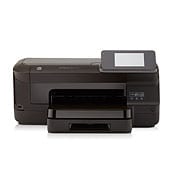
Automatic duplex is standard, and the 250-sheet input tray and 150-sheet output tray mean fewer refills and less stacking. The HP Officejet Pro 251dw uses HP Thermal Inkjet technology. HP recommends 250 to 1500 pages per month, which suits small offices and busy home setups.
HP Officejet Pro 251dw Printer Full Feature Software and Drivers
Win 11Win 10 64-bitWin 7 64-bit
For Windows, download HP Officejet Pro 251dw Printer Full Feature Software and Drivers (109.7 MB). On a Mac, download Install HP Easy Start (6.3 MB).
Quick install: download the recommended file above, run it, and choose Wi-Fi or USB when the installer asks, then print a test page. Full steps
HP Officejet Pro 251dw driver for Windows
Full software and drivers
Win 11Win 10 64-bitWin 7 64-bit
Details
- File name
Full_Webpack-119-OJ251_DW_Full_Webpack.exe- MD5 checksum (from HP)
d173bdd395643007c125a8135c1c21a8- Software ID (HP)
- ij-115136-5 · verify on HP
Basic driver only
Win 11Win 10 64-bitWin 7 64-bit
Details
- Description
- This basic feature software solution is a driver-only software solution intended for customers who only want a basic driver to use with their HP…
- File name
Basic_Webpack_x64-119-OJ251_DW_Basicx64_Webpack.exe- MD5 checksum (from HP)
a4a1a85af68d84410565c216422cff25- Software ID (HP)
- ij-115143-5 · verify on HP
HP Universal Print Driver
Win 10 64-bitWin 7 64-bit
Details
- File name
upd-pcl6-win10-x64-8.2.0.26778.zip- MD5 checksum (from HP)
1311b735d1ada9b02676d32b5ba5b232- Software ID (HP)
- ds-99374-36 · verify on HP
- Release notes
- Read on HP
Win 10 64-bitWin 7 64-bit
Details
- File name
upd-ps-win10-x64-8.2.0.26778.zip- MD5 checksum (from HP)
626ec0b8d41d3be40357b3c825c3502d- Software ID (HP)
- ds-99376-35 · verify on HP
- Release notes
- Read on HP
Win 11
Details
- File name
upd-pcl6-win11-x64-8.2.0.26819.zip- MD5 checksum (from HP)
5660c16a00e21f11736fd003063d6d13- Software ID (HP)
- ds-365647-1 · verify on HP
- Release notes
- Read on HP
Win 11
Details
- File name
upd-ps-win11-x64-8.2.0.26819.zip- MD5 checksum (from HP)
d27ad643905526df8cc9a89b556dbf42- Software ID (HP)
- ds-365648-1 · verify on HP
- Release notes
- Read on HP
Win 11Win 10 64-bitWin 7 64-bit
Details
- File name
HP-PARK-v1.9.2.zip- MD5 checksum (from HP)
b7f948771a52c13721d963c6830ac7b5- Software ID (HP)
- ds-99433-30 · verify on HP
- Release notes
- Read on HP
More HP Officejet Pro 251dw driver downloads: HP Universal Print Driver
Win 11 ARM64
Details
- File name
upd-pcl6-win11-ARM64-8.2.0.26778.zip- MD5 checksum (from HP)
e270ca97f4ddb5139217621ccc205506- Software ID (HP)
- ds-359027-2 · verify on HP
- Release notes
- Read on HP
Win 7 64-bit
Details
- Description
- This is the latest version of HP's Universal Print Driver (UPD). The UPD, available in 32- and 64-bit packages, is a single driver that supports…
- Software ID (HP)
- ij-119647-1 · verify on HP
Firmware
Win 10 64-bitWin 7 64-bit
Details
- File name
OJP251DW_2031A.exe- MD5 checksum (from HP)
847e4fbf4f48324e3893dcedf4c5e0c3- Software ID (HP)
- bi-215339-2 · verify on HP
Utilities and other software
Win 10 64-bitWin 7 64-bit
Details
- File name
HPEPrintAppSetupx64.exe- MD5 checksum (from HP)
f47f746e9f3a0bf359c06d3a4d889b43- Software ID (HP)
- ds-151205-6 · verify on HP
HP Officejet Pro 251dw driver for macOS
macOS 26macOS 15
Details
- File name
HP_Easy_Start.app.zip- MD5 checksum (from HP)
19c1a5f786f5f93f9f778ad71ee444a3- Software ID (HP)
- mp-166618-27 · verify on HP
HP Officejet Pro 251dw driver for Linux
Linux
Details
- Software ID (HP)
- mp-163323-1 · verify on HP
All files come straight from HP (ftp.hp.com). We checked them against HP’s list on Oct 25, 2026. Systems checked: Win 11, Win 10 64-bit, Win 7 64-bit, macOS 26, macOS 15, macOS 13, Linux. Older systems may have more files on HP’s page for this model.
HP Officejet Pro 251dw driver support by operating system
64-bit
64-bit
Which HP Officejet Pro 251dw driver should I choose?
Full software and drivers (109.7 MB) is the complete Windows package, so most owners should start there. Basic driver (39.7 MB) installs the driver only, for people who want no extra software. Universal Print Driver is a generic driver for IT-managed setups. Update firmware (24.8 MB) only to fix a problem its notes describe, such as security fixes. Mac users get the HP Easy Start setup app at 6.3 MB.
Automatic duplex is standard. You can connect by Ethernet, USB 2.0 or Wi-Fi 802.11b/g/n. Cartridges are HP 950 black and HP 951 cyan, magenta and yellow, with XL versions of each.
How to install the HP Officejet Pro 251dw driver
- Click the Download button for the Full Feature Software and Drivers (109.7 MB).
- Choose Run when the pop-up appears. In Firefox, choose Save File instead.
- Allow time for the compressed file to extract and run.
- Double-click the saved file if you used Save File, and click OK if an Open Executable File prompt appears.
- Follow the on-screen instructions, including how to connect the printer by USB, Ethernet or Wi-Fi.
- On a Mac, download Install HP Easy Start (6.3 MB) and open it to set up the printer.
Adding the printer by hand or installing on Linux? See our printer driver install guide.
HP Officejet Pro 251dw specifications
HP Officejet Pro 251dw driver specs: printing
HP Officejet Pro 251dw driver specs: paper handling
HP Officejet Pro 251dw driver specs: paper handling (continued)
HP Officejet Pro 251dw driver specs: connectivity, supplies and size
HP Officejet Pro 251dw driver specs: connectivity, supplies and size (continued)
Source: HP product specifications for the HP Officejet Pro 251dw Printer.
Each file lists the MD5 checksum HP publishes. Our guide to checking a driver download shows how to compare it. If an HP link is down, try the Microsoft Update Catalog search for the HP Officejet Pro 251dw.
HP Officejet Pro 251dw driver troubleshooting
Computer cannot find the printer on the network
Confirm the printer and computer share the same network, since AirPrint requires this. Move the printer closer to the access point if Wi-Fi is weak. Try an Ethernet cable to rule out wireless range.
Faded or streaky prints
Check that each cartridge is seated properly. Replace any low cartridge with the matching HP 950 or HP 951 type. Remember that actual yield varies considerably with page content.
Secure connection to HP Cloud fails
Install Firmware Update 2031A (24.8 MB, Aug 18, 2020). HP says it updates the certificate that maintains a secure HP Cloud connection. It runs on Windows 10 64-bit and Windows 7 64-bit.
For “driver is unavailable”, offline printers and stuck print jobs, see our printer driver troubleshooting guide.
HP Officejet Pro 251dw driver FAQ
Which Windows versions does the full driver support?
The Full Feature Software and Drivers, version 32.4.119, supports Windows 11, Windows 10 64-bit and Windows 7 64-bit. It is 109.7 MB and dated Dec 06, 2021.
Which download should I use on a Mac?
Use Install HP Easy Start, version 2.16.7.260722. It is 6.3 MB and supports macOS 26 and macOS 15. HP added macOS 26 support in this release.
What does firmware update 2031A fix?
HP lists security fixes including a network component update, a certificate update to keep a secure HP Cloud connection, and general fixes. The file is 24.8 MB and dated Aug 18, 2020.
Can this printer print on both sides and which paper sizes does it take?
Yes, automatic duplex is standard. Tray 1 takes sizes from US Legal and A4 down to small index cards and envelopes. Custom sizes run 3 to 8.5 inches wide and 5 to 14 inches long.
Drivers for similar HP printers
Owners of related models can find the matching downloads here: HP OfficeJet 250C Mobile All-in-One driver.
Last checked: Oct 25, 2026. HP and HP Officejet Pro 251dw are trademarks of HP Inc. This site is not affiliated with HP.