Advertisement

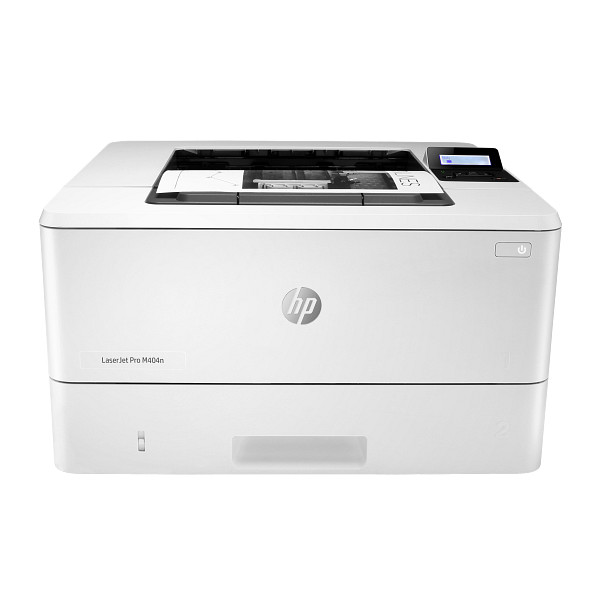
Prints black pages at up to 40 ppm for offices that run 750 to 4000 pages a month. The HP LaserJet Pro M404-M405 series carries a duty cycle of up to 80,000 pages monthly. A 100-sheet Tray 1 and a 250-sheet Tray 2 cover mixed paper.
HP LaserJet Pro M404/M405d Printer Full Software Solution
Win 11Win 10 64-bitWin 7 64-bit
On Windows, download HP LaserJet Pro M404/M405d Printer Full Software Solution (120.0 MB). On a Mac, download Install HP Easy Start (6.3 MB).
Quick install: download the recommended file above, run it, and connect the USB cable only when the installer asks, then print a test page. Full steps
HP LaserJet Pro M404-M405 series driver for Windows
Full software and drivers
Win 11Win 10 64-bit
Details
- Description
- This solution provides only the PCL-6 driver without an installer. To install the print driver use the Add Printer Wizard
- File name
V4_DriveronlyWebpack-48.6.4638-LJM404-M405_V4_DriveronlyWebpack.exe- MD5 checksum (from HP)
8e74c0e4da9706855162e4f485105902- Software ID (HP)
- lj-223868-9 · verify on HP
Win 11Win 10 64-bitWin 7 64-bit
Details
- File name
Full_Webpack-48.6.4638-LJM404-M405_U_Full_Webpack.exe- MD5 checksum (from HP)
526e16736edf5fa25c6355a6e813e35e- Software ID (HP)
- lj-223854-9 · verify on HP
Win 11Win 10 64-bitWin 7 64-bit
Details
- File name
Full_Webpack-48.6.4638-LJM404-M405_UW_Full_Webpack.exe- MD5 checksum (from HP)
5707765f7f4b8938a70169d3db6fb4ed- Software ID (HP)
- lj-223853-10 · verify on HP
Win 11Win 10 64-bitWin 7 64-bit
Details
- File name
Full_Webpack-48.6.4638-LJM404-M405_UWWL_Full_Webpack.exe- MD5 checksum (from HP)
9b2266cb52b68f9a14848ce8a5937aee- Software ID (HP)
- lj-223852-9 · verify on HP
Win 11Win 10 64-bitWin 7 64-bit
Details
- File name
V3_DriveronlyWebpack-48.6.4638-LJM404-M405_V3_DriveronlyWebpack.exe- MD5 checksum (from HP)
465622777259e2346b3988ca19ad7338- Software ID (HP)
- lj-223864-9 · verify on HP
Basic driver only
Win 11Win 10 64-bitWin 7 64-bit
Details
- File name
Basic_Webpack_x64-48.6.4638-LJM404-M405_U_Basicx64_Webpack.exe- MD5 checksum (from HP)
e973fe05bce0bf994801341ed1abe6a3- Software ID (HP)
- lj-223863-9 · verify on HP
Win 11Win 10 64-bitWin 7 64-bit
Details
- File name
Basic_Webpack_x64-48.6.4638-LJM404-M405_UW_Basicx64_Webpack.exe- MD5 checksum (from HP)
fe9d0d20d856c50af378813eda6c1bfd- Software ID (HP)
- lj-223862-9 · verify on HP
Win 11Win 10 64-bitWin 7 64-bit
Details
- File name
Basic_Webpack_x64-48.6.4638-LJM404-M405_UWWL_Basicx64_Webpack.exe- MD5 checksum (from HP)
dc9a643e0819ce7b395987b1f94ef2b1- Software ID (HP)
- lj-223861-9 · verify on HP
Setup apps
Win 11Win 10 64-bitWin 7 64-bit
Details
- File name
HPEasyStart_17_6_15.exe- MD5 checksum (from HP)
d3c5840776dec9f1f7e1ba23499a15e8- Software ID (HP)
- mp-366488-3 · verify on HP
HP Universal Print Driver
Win 10 64-bitWin 7 64-bit
Details
- File name
upd-pcl6-win10-x64-8.2.0.26778.zip- MD5 checksum (from HP)
1311b735d1ada9b02676d32b5ba5b232- Software ID (HP)
- ds-99374-36 · verify on HP
- Release notes
- Read on HP
Win 10 64-bitWin 7 64-bit
Details
- File name
upd-ps-win10-x64-8.2.0.26778.zip- MD5 checksum (from HP)
626ec0b8d41d3be40357b3c825c3502d- Software ID (HP)
- ds-99376-35 · verify on HP
- Release notes
- Read on HP
Win 11
Details
- File name
upd-pcl6-win11-x64-8.2.0.26819.zip- MD5 checksum (from HP)
5660c16a00e21f11736fd003063d6d13- Software ID (HP)
- ds-365647-1 · verify on HP
- Release notes
- Read on HP
Win 11
Details
- File name
upd-ps-win11-x64-8.2.0.26819.zip- MD5 checksum (from HP)
d27ad643905526df8cc9a89b556dbf42- Software ID (HP)
- ds-365648-1 · verify on HP
- Release notes
- Read on HP
Win 11Win 10 64-bitWin 7 64-bit
Details
- File name
HP-PARK-v1.9.2.zip- MD5 checksum (from HP)
b7f948771a52c13721d963c6830ac7b5- Software ID (HP)
- ds-99433-30 · verify on HP
- Release notes
- Read on HP
More hP Universal Print Driver
Win 11 ARM64
Details
- File name
upd-pcl6-win11-ARM64-8.2.0.26778.zip- MD5 checksum (from HP)
e270ca97f4ddb5139217621ccc205506- Software ID (HP)
- ds-359027-2 · verify on HP
- Release notes
- Read on HP
Firmware
Win 11Win 10 64-bitWin 7 64-bit
Details
- Description
- Reminder: Dynamic security enabled printer. This Firmware includes dynamic security measures, which are used to block cartridges using a non-HP chip…
- File name
HP_LaserJet_Pro_M304_M305_M404_M405_series_FW_002_2626A.exe- MD5 checksum (from HP)
b4e648cea0a3d91f4deeb7d0dfc92856- Software ID (HP)
- lj-230912-19 · verify on HP
- Release notes
- Read on HP
Utilities and other software
Win 11Win 10 64-bit
Details
- Description
- HP app will help you install printer drivers, print, scan, share files, send faxes and more. Some HP app features require a network connection and an…
- Software ID (HP)
- mp-366094-1 · verify on HP
Win 10 64-bitWin 7 64-bit
Details
- File name
HPRoam_Win_Installer-1_2_83_79.exe- MD5 checksum (from HP)
0250b96d39e5e8b16b892f46fe40f692- Software ID (HP)
- ti-209321-14 · verify on HP
Win 10 64-bitWin 7 64-bit
Details
- File name
HPEPrintAppSetupx64.exe- MD5 checksum (from HP)
f47f746e9f3a0bf359c06d3a4d889b43- Software ID (HP)
- ds-151205-6 · verify on HP
HP LaserJet Pro M404-M405 series driver for macOS
Setup apps
macOS 26macOS 15
Details
- File name
HP_Easy_Start.app.zip- MD5 checksum (from HP)
19c1a5f786f5f93f9f778ad71ee444a3- Software ID (HP)
- mp-166618-27 · verify on HP
Firmware
macOS 15macOS 13
Details
- Description
- Reminder: Dynamic security enabled printer. This Firmware includes dynamic security measures, which are used to block cartridges using a non-HP chip…
- File name
HP_LaserJet_Pro_M304_M305_M404_M405_series_FW_002_2626A.dmg- MD5 checksum (from HP)
35110d47bc5424b86e05fa1f0821e2c9- Software ID (HP)
- lj-230915-13 · verify on HP
- Release notes
- Read on HP
Utilities and other software
macOS 26macOS 15macOS 13
Details
- File name
HP_Easy_Admin.app.zip- MD5 checksum (from HP)
32c3c4edfb4e3bc519c3c1731542360e- Software ID (HP)
- mp-218629-7 · verify on HP
HP LaserJet Pro M404-M405 series driver for Linux
Linux
Details
- Software ID (HP)
- mp-163323-1 · verify on HP
All files come straight from HP (ftp.hp.com). We checked them against HP’s list on Oct 25, 2026. Systems checked: Win 11, Win 10 64-bit, Win 7 64-bit, macOS 26, macOS 15, macOS 13, Linux. Older systems may have more files on HP’s page for this model.
HP LaserJet Pro M404-M405 series driver support by operating system
| Download | Win 11 | Win 10 64-bit |
Win 7 64-bit |
macOS 26 | macOS 15 | macOS 13 |
|---|---|---|---|---|---|---|
| Full software and drivers | ✓ | ✓ | ✓ | – | – | – |
| Basic driver only | ✓ | ✓ | ✓ | – | – | – |
| Setup apps | ✓ | ✓ | ✓ | ✓ | ✓ | – |
| HP Universal Print Driver | ✓ | ✓ | ✓ | – | – | – |
| Firmware | ✓ | ✓ | ✓ | – | ✓ | ✓ |
| Utilities and other software | – | ✓ | ✓ | ✓ | ✓ | ✓ |
Latest HP LaserJet Pro M404-M405 series driver and firmware updates
- HP LaserJet Pro M404_M405 Series Firmware Update Utility v002_2626A (Sep 03, 2026): Fixed 2-sided option disappears from printer settings issue. Contains all previous fixes. Security updates
Which HP LaserJet Pro M404-M405 series driver should I choose?
Full software and drivers packages (120.0 MB) install everything for the printer, so most people should choose one. Basic driver packages are smaller, at about 48 MB, and install the driver with basic software. Setup apps such as HP Easy Start (26.5 MB on Windows) guide you through setup and download drivers online. Universal Print Driver packages, around 20 MB, are generic drivers for IT-managed setups. Update firmware only to fix the 2-sided option disappearing from printer settings; version 002_2626A (54.9 MB on Windows) fixes that.
Tray 1 holds 100 sheets, Tray 2 holds 250, and an optional third tray adds 550. Replacement toner comes as CF258A (~3,000 pages) or CF258X (~10,000 pages). Tray 1 accepts custom sizes from 3 x 5 to 8.5 x 14 in.
How to install the HP LaserJet Pro M404-M405 series driver
- Close any programs running on your computer, then turn on the printer.
- Keep the USB cable unplugged until the installer prompts for it. For a network connection, attach the network cable first.
- Click Download on this page, then click the downloaded file.
- Wait while the files extract; the installation starts automatically.
- Follow the on-screen instructions to finish. To install later, choose Save and pick a location on your hard disk.
- On a Mac, download Install HP Easy Start (6.3 MB) and run it to set up the printer.
Adding the printer by hand or installing on Linux? See our printer driver install guide.
HP LaserJet Pro M404-M405 series specifications
Printing
| Print speed black | Normal: Up to 40 ppm (default) ; Up to 42 ppm (HP High Speed) |
|---|---|
| First page out (ready) | Black: As fast as 6.1 sec |
| Print quality black (best) | Black: Fine Lines (1200 x 1200 dpi) |
| Duty cycle (monthly, letter) | Up to 80,000 pages Duty cycle is defined as the maximum number of pages per month of imaged output. This value provides a comparison of product robustness in relation to other HP LaserJet or HP Color LaserJet devices, and enables… |
| Recommended monthly page volume | 750 to 4000 |
| Print languages | HP PCL 6, HP postscript level 3 emulation, PDF, URF, PWG Raster |
Paper handling
| Paper handling input, standard | 100-sheet multipurpose Tray 1, 250-sheet input Tray 2 |
|---|---|
| Paper handling output, standard | 150-sheet output bin |
| Media sizes, custom | Tray 1: 3 x 5 to 8.5 x 14 in; Tray 2, optional Tray 3: 3.94 x 5.83 to 8.5 x 14 in |
| Paper handling input, optional | Optional third 550-sheet tray |
| Maximum output capacity (sheets) | Up to 150 sheets |
| Media types | Paper (plain, EcoFFICIENT, light, heavy, bond, colored, letterhead, preprinted, prepunched, recycled, rough); envelopes; labels |
| Media weight, supported | Tray 1: 16 to 46.6 lb; Tray 2 and Optional 550-sheet Tray 3: 16 to 32 lb |
Connectivity, supplies and size
| Display | 2-line backlit LCD graphic display |
|---|---|
| Dimensions (W x D x H) | 15 x 14.06 x 8.5 in |
| Manufacturer Warranty | One-year Bench/Depot Repair warranty. Warranty and support options vary by product, country and local legal requirements. Contact your Contractual Vendor or go to hp.com/support to learn about HP award winning service and support options… |
| Orderable supplies | CF258A HP 58A Black LaserJet Toner Cartridge (~3,000 pages); CF258X HP 58X Black LaserJet Toner Cartridge (~10,000 pages) |
| Maximum dimensions (W x D x H) | 15 x 25 x 9.5 in |
Source: HP product specifications for the HP LaserJet Pro M404-M405 series.
Each file lists the MD5 checksum HP publishes. Our guide to checking a driver download shows how to compare it. If an HP link is down, try the Microsoft Update Catalog search for the HP LaserJet Pro M404-M405 series.
HP LaserJet Pro M404-M405 series driver troubleshooting
The installer cannot find the printer
Confirm the printer is turned on. Plug in the network cable before starting the installer if you use a network. Connect the USB cable only when the installer asks for it. Then run the installer again.
Pages print faint or with streaks
Remove the toner cartridge and rock it gently from side to side. Reinstall it, then print a test page. Replace the cartridge with a CF258A or CF258X if the problem stays.
The 2-sided option is missing from printer settings
Download the Firmware Update Utility, version 002_2626A (54.9 MB for Windows, 57.6 MB for macOS). Run it with the printer turned on. HP lists this version as the fix for the missing option.
For “driver is unavailable”, offline printers and stuck print jobs, see our printer driver troubleshooting guide.
HP LaserJet Pro M404-M405 series driver FAQ
Which Windows versions does the full software package support?
HP lists Windows 11, Windows 10 64-bit and Windows 7 64-bit for the Full Software Solution packages. Each one is about 120 MB.
Is there a download for Mac?
HP offers Install HP Easy Start (6.3 MB, version 2.16.7.260722) for macOS 26 and macOS 15. HP Easy Admin (4.9 MB) also supports macOS 26, 15 and 13.
What does firmware 002_2626A fix?
It fixes the 2-sided option disappearing from printer settings. It also contains all previous fixes and security updates. The Windows file is 54.9 MB; the macOS file is 57.6 MB.
How fast does this printer print?
HP rates it at up to 40 ppm by default and up to 42 ppm in HP High Speed mode. The first page comes out in as little as 6.1 seconds.
Drivers for similar HP printers
Owners of related models can find the matching downloads here: HP Color LaserJet Pro M452dn driver, HP Color LaserJet Pro M452dw driver, HP Color LaserJet Pro M452nw driver, HP Color LaserJet Pro M454nw driver, HP Color LaserJet Pro MFP M476dn driver, HP Color LaserJet Pro MFP M477fdn driver.
Last checked: Oct 25, 2026. HP and HP LaserJet Pro M404-M405 series are trademarks of HP Inc. This site is not affiliated with HP.
Advertisement