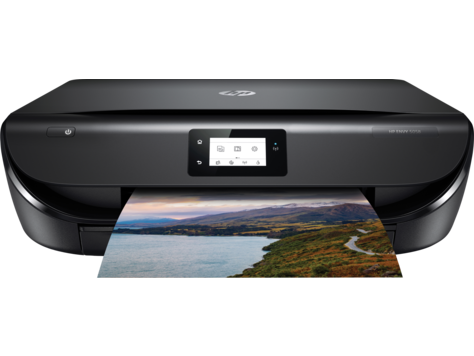
Built for home documents, school work and photos at 100 to 400 pages a month, the HP ENVY 5032 All-in-One prints, copies and scans. It also handles photo printing. Its monthly duty cycle reaches 1000 pages, so it suits a household or a small home office.
HP ENVY 5000 All-in-One Print and Scan Full Driver Solution
Win 11Win 10 64-bitWin 7 64-bit
On Windows, download HP ENVY 5000 All-in-One Print and Scan Full Driver Solution (134.0 MB). On a Mac, download Install HP Easy Start (6.3 MB).
Quick install: download the recommended file above, run it, and choose Wi-Fi or USB when the installer asks, then print a test page. Full steps
HP ENVY 5032 All-in-One driver for Windows
Full software and drivers
Win 11Win 10 64-bitWin 7 64-bit
Details
- File name
Full_Webpack-44.11.2778-EN5000_Full_Webpack.exe- MD5 checksum (from HP)
155a9dcca075882cf57d3994bd4ec754- Software ID (HP)
- oj-267500-4 · verify on HP
Setup apps
Win 11Win 10 64-bitWin 7 64-bit
Details
- File name
HPEasyStart_17_6_15.exe- MD5 checksum (from HP)
d3c5840776dec9f1f7e1ba23499a15e8- Software ID (HP)
- mp-366488-3 · verify on HP
Win 11Win 10 64-bit
Details
- Software ID (HP)
- mp-366135-1 · verify on HP
Firmware
Win 11Win 10 64-bitWin 7 64-bit
Details
- File name
EN5000_2421A.exe- MD5 checksum (from HP)
964e475ed6efde03a4e5bc55d419e8e0- Software ID (HP)
- mp-215235-15 · verify on HP
HP ENVY 5032 All-in-One driver for macOS
Setup apps
macOS 26macOS 15
Details
- File name
HP_Easy_Start.app.zip- MD5 checksum (from HP)
19c1a5f786f5f93f9f778ad71ee444a3- Software ID (HP)
- mp-166618-27 · verify on HP
macOS 26macOS 15macOS 13
Details
- Software ID (HP)
- mp-351535-1 · verify on HP
Firmware
macOS 13
Details
- File name
EN5000_2421A.dmg- MD5 checksum (from HP)
a3750f9185d7c61873d4ec24c879e60e- Software ID (HP)
- mp-228712-12 · verify on HP
All files come straight from HP (ftp.hp.com). We checked them against HP’s list on Oct 25, 2026. Systems checked: Win 11, Win 10 64-bit, Win 7 64-bit, macOS 26, macOS 15, macOS 13, Linux. Older systems may have more files on HP’s page for this model.
HP ENVY 5032 All-in-One driver support by operating system
64-bit
64-bit
Which HP ENVY 5032 All-in-One driver should I choose?
HP offers three kinds of download here. Full software and drivers installs the driver plus HP's complete software, so choose it for a normal Windows setup. The Setup app, HP Easy Start, is a small download of 26.5 MB on Windows and 6.3 MB on Mac, and it guides you through setup. Firmware is a separate 41.6 MB update tool on Windows. Update firmware only to fix a specific problem. HP lists no fixes for this one.
Automatic duplex printing is standard. The input tray holds 100 sheets and the output tray holds 25. You can connect by Hi-Speed USB 2.0 or dual-band Wi-Fi. Wi-Fi Direct, Apple AirPrint and Mopria Print Service also work for mobile printing.
How to install the HP ENVY 5032 All-in-One driver
- Download HP ENVY 5000 All-in-One Print and Scan Full Driver Solution (134.0 MB) from the Windows section.
- Open the downloaded file and let the installer start.
- Follow the on-screen prompts. HP says this package includes everything needed to install and use the printer.
- Pick USB or Wi-Fi when the installer asks how the printer connects.
- Finish with a test print once the installer reports success.
- On a Mac, download Install HP Easy Start (6.3 MB) and run it to set up the printer.
Adding the printer by hand or installing on Linux? See our printer driver install guide.
Models supported by this HP ENVY 5032 driver page
These printers use the same driver files, so every download on this page fits each of them.
Web Services for HP ENVY 5032 All-in-One
Web Services lets the printer reach the Internet by itself, so you can get documents and print them without turning on a computer. The printer must be connected to the Internet for this to work. However, a USB cable connection rules these features out.
HP ePrint is a free HP service. When you enable Web Services, the printer gets its own email address, and anything you email to it prints, from any location. No special drivers or software are needed. In addition, an HP Connected account, where available, lets you check job status and control who can print.
Removing Web Services from HP ENVY 5032 All-in-One
To remove Web Services from the control panel, start at the Home screen and touch the HP ePrint icon. Then touch Web Services Settings and choose Remove Web Services. This route works at the printer itself, so no computer is involved.
You can also use the embedded web server. Open the EWS, click the Web Services tab, and click Remove Web Services in the Web Services Settings section. Click Remove Web Services again, then click Yes to confirm. Afterward, the service is removed from your printer.
Fixing Web Services and HP ePrint problems
Start with the connection. The printer needs a wireless link to the Internet, because a USB cable will not work for these features. Also confirm that Web Services is enabled, the latest product updates are installed, and the network hub, switch or router is on and working properly.
For HP ePrint, check that the printer's email address is typed correctly and is the only address in the To line, otherwise attachments might not print. If your network uses a proxy, the settings must be valid. If your firewall's proxy settings changed, update them in the control panel or EWS.
Aligning the printhead in Windows
Alignment helps keep print quality high. However, you do not need to realign the printhead after replacing cartridges. Run it from the HP printer software when you want to align, and keep a sheet of unused plain white letter or A4 paper ready.
First load the paper in the input tray. Open the HP printer software, go to Print & Scan, and click Maintain Your Printer in the Print section. In Printer Toolbox, click Align Printheads on the Device Services tab. The printer then prints an alignment sheet.
Power consumption and environmental information
The power consumption section of the guide belongs to a wider group of regulatory and environmental notices. It covers disposal of waste equipment by users, chemical substances, and battery disposal notices for Taiwan and Brazil, plus the European Union Battery Directive.
The same list includes hazardous substance statements for several countries, EPEAT, the SEPA Ecolabel for China, and the China Energy Label for printers, fax and copiers. In addition, HP says it is committed to helping customers reduce their environmental footprint, with Eco-Tips and environmental programs to visit.
HP ENVY 5032 All-in-One specifications
Source: HP product specifications for the HP ENVY 5032 All-in-One Printer.
Each file lists the MD5 checksum HP publishes. Our guide to checking a driver download shows how to compare it. If an HP link is down, try the Microsoft Update Catalog search for the HP ENVY 5032 All-in-One.
HP ENVY 5032 All-in-One driver troubleshooting
Computer cannot find the printer over Wi-Fi
Restart the printer and your router, then try again. Keep the printer close to the router during setup. The printer also has a USB 2.0 port, so a USB cable works as a fallback.
Faded or streaky print from the inkjet
Make sure the cartridges are seated properly and are not empty. Replace any that are low. Then reprint with the best quality setting in the print dialog on supported paper.
Paper jams or pages do not feed
Remove the stack and straighten the sheets. Reload no more than 100 sheets of a supported size, such as letter or legal. Clear any torn scraps from the paper path before printing again.
For “driver is unavailable”, offline printers and stuck print jobs, see our printer driver troubleshooting guide.
HP ENVY 5032 All-in-One driver FAQ
Does the driver support Windows 11?
Yes. The Full Driver Solution supports Win 11, Win 10 64-bit and Win 7 64-bit. HP Easy Start also supports Win 11 and Win 10 64-bit, with a separate Win 7 64-bit version.
Which macOS versions does HP Easy Start support?
HP lists macOS 26 and macOS 15 for Install HP Easy Start, version 2.16.7.260722. The download is 6.3 MB, and the latest release added macOS 26 support.
How big is the firmware update?
The Windows firmware update is 41.6 MB and the macOS one is 44.9 MB. Both are version 003.2421A, dated Jul 09, 2024. HP lists no fixes for either.
Can this printer print on both sides automatically?
Yes. Automatic duplex printing is standard. It prints up to 10 ppm in black (ISO, A4) and handles letter, legal, 4 x 6 in, 5 x 7 in, 8 x 10 in and No. 10 envelopes.
Drivers for similar HP printers
Owners of related models can find the matching downloads here: HP ENVY 5010 All-in-One driver, HP ENVY 5012 All-in-One driver, HP ENVY 5014 All-in-One driver, HP ENVY 5020 All-in-One driver, HP ENVY 5030 All-in-One driver, HP ENVY 5034 All-in-One driver.
Last checked: Oct 25, 2026. HP and HP ENVY 5032 All-in-One are trademarks of HP Inc. This site is not affiliated with HP.