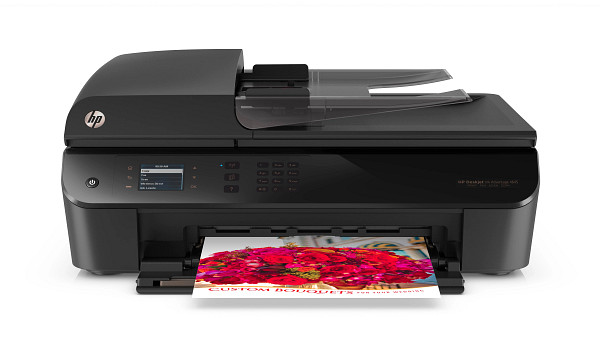
You can connect this printer by USB 2.0 cable or over built-in 802.11b/g/n Wi-Fi, so setup suits a desk or a shared room. The HP Deskjet Ink Advantage 4645 e-All-in-One prints and scans, with a flatbed and a 35-sheet document feeder. HP recommends 150 to 600 pages a month.
HP Deskjet Ink Advantage 4640 e-All-in-One Print and Scan Driver and Accessories
Win 11Win 10 64-bitWin 7 64-bit
On Windows, download HP Deskjet Ink Advantage 4640 e-All-in-One Print and Scan Driver and Accessories (123.4 MB). On macOS, download Install HP Easy Start (6.3 MB).
Quick install: download the recommended file above, run it, and choose Wi-Fi or USB when the installer asks, then print a test page. Full steps
HP Deskjet Ink Advantage 4645 e-All-in-One driver for Windows
Full software and drivers
Win 11Win 10 64-bitWin 7 64-bit
Details
- File name
Full_Webpack-118_1-DJ4640_Full_Webpack.exe- MD5 checksum (from HP)
d0909b53afa5370148f64519795c8d64- Software ID (HP)
- mp-120052-7 · verify on HP
Basic driver only
Win 11Win 10 64-bitWin 7 64-bit
Details
- File name
Basic_Webpack_x64-118-DJ4640_Basicx64_Webpack.exe- MD5 checksum (from HP)
c70b0d6b898905c4e6236bd3b7937655- Software ID (HP)
- mp-243088-2 · verify on HP
Setup apps
Win 11Win 10 64-bit
Details
- Software ID (HP)
- mp-366135-1 · verify on HP
Firmware
Win 10 64-bitWin 7 64-bit
Details
- File name
DJ4640_R1830A.exe- MD5 checksum (from HP)
0769661587abfbacc0c4be4c696b2bcb- Software ID (HP)
- al-214936-2 · verify on HP
Utilities and other software
Win 10 64-bitWin 7 64-bit
Details
- File name
HPEPrintAppSetupx64.exe- MD5 checksum (from HP)
f47f746e9f3a0bf359c06d3a4d889b43- Software ID (HP)
- lj-166432-4 · verify on HP
HP Deskjet Ink Advantage 4645 e-All-in-One driver for macOS
macOS 26macOS 15
Details
- File name
HP_Easy_Start.app.zip- MD5 checksum (from HP)
19c1a5f786f5f93f9f778ad71ee444a3- Software ID (HP)
- mp-166618-27 · verify on HP
macOS 26macOS 15macOS 13
Details
- Software ID (HP)
- mp-351535-1 · verify on HP
HP Deskjet Ink Advantage 4645 e-All-in-One driver for Linux
Linux
Details
- Software ID (HP)
- mp-54524-1 · verify on HP
All files come straight from HP (ftp.hp.com). We checked them against HP’s list on Oct 25, 2026. Systems checked: Win 11, Win 10 64-bit, Win 7 64-bit, macOS 26, macOS 15, macOS 13, Linux. Older systems may have more files on HP’s page for this model.
HP Deskjet Ink Advantage 4645 e-All-in-One driver support by operating system
64-bit
64-bit
Which HP Deskjet Ink Advantage 4645 e-All-in-One driver should I choose?
Full software and drivers (123.4 MB) installs printing and scanning, so most owners should start there. IT professionals managing many PCs can use the basic driver at 41.6 MB. HP ePrint Software, a 31.2 MB utility, prints from a PC to HP ePrinters. Firmware, at 2.8 MB, is a separate update; install it only to get its critical security fixes. Macs use the 6.3 MB setup app, HP Easy Start.
Duplex printing is automatic as standard. Paper capacity is a 100-sheet input tray and a 30-sheet output tray. Scan to e-mail is available, and the scanner is flatbed plus automatic document feeder.
How to install the HP Deskjet Ink Advantage 4645 e-All-in-One driver
- Unplug the USB cable from the PC and the printer before you start.
- Download the Print and Scan Driver and Accessories file (123.4 MB) from this page.
- Run the downloaded file. Extraction can take a while.
- Follow the on-screen instructions in the installer.
- Choose wireless setup if the installer offers it, to use the built-in Wi-Fi; otherwise use USB.
- On a Mac, download Install HP Easy Start (6.3 MB) and follow its prompts.
Adding the printer by hand or installing on Linux? See our printer driver install guide.
HP Deskjet Ink Advantage 4645 e-All-in-One specifications
Source: HP product specifications for the HP Deskjet Ink Advantage 4645 e-All-in-One Printer.
Each file lists the MD5 checksum HP publishes. Our guide to checking a driver download shows how to compare it. If an HP link is down, try the Microsoft Update Catalog search for the HP Deskjet Ink Advantage 4645 e-All-in-One.
HP Deskjet Ink Advantage 4645 e-All-in-One driver troubleshooting
HP ePrint fails to update credentials when printing to ePrint Enterprise
Install HP ePrint Software 5.5.118.22560, which corrected a failure to update user credentials when printing to ePrint Enterprise with a static ePrint print queue. Restart the PC afterward.
Printer drops off the wireless network
Restart the printer and the router. Confirm the PC uses the same network as the printer. Then move the printer closer to the router and try again.
Prints show streaks or faded text
Run a printhead cleaning if the HP software offers one, then print a test page. Swap out any empty cartridge. Check that the paper matches the media type you chose.
For “driver is unavailable”, offline printers and stuck print jobs, see our printer driver troubleshooting guide.
HP Deskjet Ink Advantage 4645 e-All-in-One driver FAQ
Which Windows versions does the recommended driver support?
The Print and Scan Driver and Accessories, version 32.4.118_1, supports Windows 11, Windows 10 64-bit and Windows 7 64-bit.
How large is the recommended Windows download?
It is 123.4 MB. HP released version 32.4.118_1 on May 19, 2022, repackaged without Optical Character Recognition (OCR) functionality.
What does the firmware update fix?
Firmware 1830A, dated Aug 10, 2018, delivers critical security fixes. It is 2.8 MB and supports Windows 10 64-bit and Windows 7 64-bit.
Which macOS versions does HP Easy Start support?
HP Easy Start, version 2.16.7.260722, supports macOS 26 and macOS 15. The download is 6.3 MB and added macOS 26 support.
Drivers for similar HP printers
Owners of related models can find the matching downloads here: HP DeskJet 4100e All-in-One series driver, HP DeskJet 4220e All-in-One driver.
Last checked: Oct 25, 2026. HP and HP Deskjet Ink Advantage 4645 e-All-in-One are trademarks of HP Inc. This site is not affiliated with HP.