Advertisement
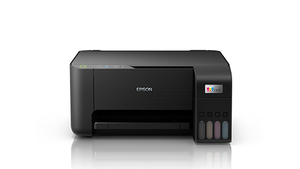 The newest Epson L3210 driver is version 3.80.00 for Windows (released Jul 30, 2025) and version 13.48 for macOS (released May 1, 2026). Each button opens Epson’s official Download Center for your system. The page also covers the Epson L3211.
Which Epson L3210 driver do I need?
| Your system | Download this file | |
|---|---|---|
| Windows 11, 10, 7 (64-bit) | Printer Driver (64-bit) v3.80.00Jul 30, 2025 · 67.4 MB · driver only | Download |
| Windows 10, 7 (32-bit) | Printer Driver (32-bit) v3.80.00Jul 30, 2025 · 32.2 MB · driver only | Download |
| macOS 26, 15, 13, 10.15 | Printer Driver v13.48May 1, 2026 · 82.6 MB · driver only | Download |
These files install the printer driver on its own. To get the driver and Epson’s utilities together, use the Combo Package Installer in the extras below. Epson says it has everything you need to use the printer.
Epson L3210 driver at a glance
| Model | Epson L3210 (also sold as L3211, L3212, L3215, L3216, L3218, L3219) |
|---|---|
| Epson product number | C11CJ68501 |
| Newest Windows driver | 3.80.00 (Jul 30, 2025) |
| Newest macOS driver | 13.48 (May 1, 2026) |
| Firmware | XH19P5 (Jun 17, 2025) |
| Downloads listed | 22 files for Windows and macOS |
All Epson L3210 downloads from Epson
Epson L3210 Windows extras: setup installer, scanner software, firmware, utilities
| File | |
|---|---|
| Drivers and Utilities Combo Package Installerv5.0 · Aug 6, 2026 · 2.4 MBFor Windows 11, 10, 7 (32-bit and 64-bit) | Download |
| Epson Scan2v6.7.81.0 · Nov 25, 2025 · 66.4 MBFor Windows 11, 10, 7 (32-bit and 64-bit) | Download |
| Firmware UpdaterXH19P5 · Jun 17, 2025 · 5.5 MBFor Windows 11, 10, 7 (32-bit and 64-bit) | Download |
| Epson Printer Connection Checkerv3.4.4 · Oct 21, 2026 · 7.9 MBFor Windows 11, 10, 7 (32-bit and 64-bit) | Download |
| Software Updaterv5.1.0.0 · Oct 20, 2026 · 7.2 MBFor Windows 11, 10, 7 (32-bit and 64-bit) | Download |
Epson lists 5 more Windows files for the Epson L3210 (other printer drivers, uninstaller, extra apps): see the full list on Epson’s Download Center.
Epson L3210 macOS extras: setup installer, scanner software, firmware, utilities
| File | |
|---|---|
| Drivers and Utilities Combo Package Installerv5.1 · Sep 26, 2023 · 14.1 MBFor macOS 26, 15, 13, 10.15 | Download |
| Epson Scan2v6.7.84.0 · Sep 8, 2025 · 66.6 MBFor macOS 26, 15, 13, 10.15 | Download |
| Firmware UpdaterXH19P5 · Jun 17, 2025 · 10.0 MBFor macOS 26, 15, 13, 10.15 | Download |
| Software Updaterv3.0.1 · Oct 6, 2026 · 15.2 MBFor macOS 26, 15, 13, 10.15 | Download |
Epson lists 5 more macOS files for the Epson L3210 (other printer drivers, uninstaller, extra apps): see the full list on Epson’s Download Center.
Buttons open Epson’s Download Center for this model and system; Epson serves the file there. Epson publishes no checksums, so we show the version, date and size from Epson’s own list. Our guide to checking a driver download shows how to compare a file. Older systems may have more files on Epson’s page for the Epson L3210.
How to install the Epson L3210 driver
- Download the Printer Driver file that matches your Windows version from the table above.
- Close other programs, then run the downloaded file and follow the installer prompts.
- Connect the printer to your computer when the installer asks for it.
- Print a test page to confirm the driver works.
- Mac users should pick the macOS Printer Driver from the table and run it the same way.
Epson also publishes a guided setup for the Epson L3210: Epson Setup Navi. Adding the printer by hand or installing on Linux? See our printer driver install guide.
Epson L3210 specifications
| Scanner Type | Flatbed colour image scanner |
|---|---|
| Number of Paper Trays | 1 |
| Dimensions (W x D x H) | 375 x 347 x 179mm |
| Weight | 3.9 kg |
Source: Epson Europe product page for the Epson L3210 (SKU C11CJ68501).
Epson L3210 driver troubleshooting
Windows does not detect the printer after installation
Check that the cable is firmly seated, and try a different port. Then turn the printer off and restart the computer. Reinstall the Printer Driver if the problem remains.
Print jobs stall or fail with no clear cause
Run Epson Printer Connection Checker, which diagnoses and resolves printer connection problems automatically. Afterward, restart both the printer and the computer, then send a test page.
The driver misbehaves or seems out of date
Use Epson Software Updater to download updates for the printer's firmware and utilities. Failing that, uninstall and reinstall the Printer Driver listed for your system.
For “driver is unavailable”, offline printers and stuck print jobs, see our printer driver troubleshooting guide.
Epson L3210 driver FAQ
Which driver do I need for Windows 11?
Download the Printer Driver version 3.80.00, a 67.4 MB file. The same 64-bit file covers Windows 10 64-bit and Windows 7 64-bit.
Is there a driver for 32-bit Windows?
Yes. A separate Printer Driver 3.80.00 at 32.2 MB covers Windows 10 32-bit and Windows 7 32-bit. It is smaller than the 64-bit file.
Which Mac systems does the L3210 driver support?
The macOS Printer Driver, version 13.48, is 82.6 MB. It covers macOS 26, macOS 15, macOS 13 and macOS 10.15.
Where is the scanner software for this printer?
Epson Scan2 controls the scanner, and Epson ScanSmart handles scanning and saving documents and photos. Both are listed for Windows and macOS. Scan PDF Extensions2 and Scan OCR Component2 are also available.
Drivers for similar Epson printers
Owners of related models can find the matching downloads here: Epson L366 driver, Epson L380 driver, Epson L3150 / L3151 / L3156 driver, Epson L375 driver, Epson L3250 / L3252 / L3256 driver.
Last checked: Nov 12, 2026. Epson and Epson L3210 are trademarks of Seiko Epson Corporation. This site is not affiliated with Epson.
Advertisement