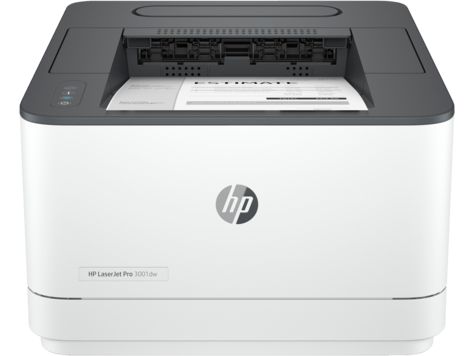
Automatic duplex and a 250-sheet main tray handle most daily paper work on the HP LaserJet Pro 3001dwe. The tray also takes 10 envelopes, and the output tray holds 150 sheets. It prints black at up to 35 ppm. HP recommends 350 to 2500 pages a month, so it suits small offices and busy home desks.
HP Easy Start Printer Setup Software
Win 11Win 10 64-bitWin 7 64-bit
On Windows, download HP Easy Start Printer Setup Software (26.5 MB). On a Mac, download HP Easy Start Pro for Mac (81.5 MB). Both are the setup apps HP recommends for this printer.
Quick install: download the recommended file above, run it, and choose Wi-Fi or USB when the installer asks, then print a test page. Full steps
HP LaserJet Pro 3001dwe driver for Windows
Setup apps
HP Easy Start Printer Setup SoftwareWin 11Win 10 64-bitWin 7 64-bit
Details
- File name
HPEasyStart_17_6_15.exe- MD5 checksum (from HP)
d3c5840776dec9f1f7e1ba23499a15e8- Software ID (HP)
- mp-309232-23 · verify on HP
HP Universal Print Driver
HP Universal Print Driver for Windows PCL6 (64-bit) (for Win 10 64-bit, Win 7 64-bit)Win 10 64-bitWin 7 64-bit
Details
- File name
upd-pcl6-win10-x64-8.2.0.26778.zip- MD5 checksum (from HP)
1311b735d1ada9b02676d32b5ba5b232- Software ID (HP)
- ds-99374-36 · verify on HP
- Release notes
- Read on HP
HP Universal Print Driver for Windows PostScript (64-bit)Win 10 64-bitWin 7 64-bit
Details
- File name
upd-ps-win10-x64-8.2.0.26778.zip- MD5 checksum (from HP)
626ec0b8d41d3be40357b3c825c3502d- Software ID (HP)
- ds-99376-35 · verify on HP
- Release notes
- Read on HP
HP Universal Print Driver for Windows PCL6 (64-bit) (for Win 11)Win 11
Details
- File name
upd-pcl6-win11-x64-8.2.0.26819.zip- MD5 checksum (from HP)
5660c16a00e21f11736fd003063d6d13- Software ID (HP)
- ds-365647-1 · verify on HP
- Release notes
- Read on HP
HP Universal Print Driver for Windows PS (64-bit)Win 11
Details
- File name
upd-ps-win11-x64-8.2.0.26819.zip- MD5 checksum (from HP)
d27ad643905526df8cc9a89b556dbf42- Software ID (HP)
- ds-365648-1 · verify on HP
- Release notes
- Read on HP
HP Print Administrator Resource KitWin 11Win 10 64-bitWin 7 64-bit
Details
- File name
HP-PARK-v1.9.2.zip- MD5 checksum (from HP)
b7f948771a52c13721d963c6830ac7b5- Software ID (HP)
- ds-99433-30 · verify on HP
- Release notes
- Read on HP
More HP LaserJet Pro 3001dwe driver downloads: HP Universal Print Driver
HP Universal Print Driver for Windows PCL6 (ARM64-bit)Win 11 ARM64
Details
- File name
upd-pcl6-win11-ARM64-8.2.0.26778.zip- MD5 checksum (from HP)
e270ca97f4ddb5139217621ccc205506- Software ID (HP)
- ds-359027-2 · verify on HP
- Release notes
- Read on HP
Firmware
HP LaserJet Pro 3001-3008 series Firmware Update UtilityWin 11Win 10 64-bitWin 7 64-bit
Details
- Description
- This utility is for use on Microsoft Windows 32 and 64 bit operating systems. The utility can be used with a USB connection or network connection. Be…
- File name
HP_Laserjet_Pro_3000e_Series_002.2624A.exe- MD5 checksum (from HP)
45eb80363ad1f6e61cd14c5385276714- Software ID (HP)
- bi-295147-12 · verify on HP
- Release notes
- Read on HP
Utilities and other software
HP AppWin 11Win 10 64-bit
Details
- Software ID (HP)
- mp-366094-1 · verify on HP
HP LaserJet Pro 3001dwe driver for macOS
Setup apps
HP Easy Start Pro for MacmacOS 26macOS 15macOS 13
Details
- File name
HP_Easy_Start_Pro.pkg- MD5 checksum (from HP)
c319ad991c7098f1c5bfd77e3bedba9c- Software ID (HP)
- mp-283336-23 · verify on HP
HP appmacOS 26macOS 15macOS 13
Details
- Software ID (HP)
- mp-291838-1 · verify on HP
Firmware
HP LaserJet Pro 3001-3008 series Firmware Update UtilitymacOS 15macOS 13
Details
- Description
- This utility is for use on Mac OS X Operating systems. The utility can be used with a USB connection or network connection. Be sure to use the…
- File name
HP_Laserjet_Pro_3000e_Series_002.2624A.dmg- MD5 checksum (from HP)
da4d3c5cde2b870455e5b705a115d084- Software ID (HP)
- bi-295148-10 · verify on HP
- Release notes
- Read on HP
HP LaserJet Pro 3001dwe driver for Linux
HP Printers - Driver Support for Linux OSLinux
Details
- Software ID (HP)
- mp-54524-1 · verify on HP
All files come straight from HP (ftp.hp.com). We checked them against HP’s list on Oct 25, 2026. Systems checked: Win 11, Win 10 64-bit, Win 7 64-bit, macOS 26, macOS 15, macOS 13, Linux. Older systems may have more files on HP’s page for this model.
HP LaserJet Pro 3001dwe driver support by operating system
DownloadWin 11Win 10
64-bitWin 7
64-bitmacOS 26macOS 15macOS 13Setup apps✓✓✓✓✓✓HP Universal Print Driver✓✓✓–––Firmware✓✓✓–✓✓Which HP LaserJet Pro 3001dwe driver should I choose?
HP offers three kinds of download here. Setup apps, such as HP Easy Start, guide you through installation and install the drivers. Most owners should pick one. Universal Print Driver packages are generic PCL6 and PostScript drivers, about 20 to 21 MB, meant for IT-managed setups. Firmware update utilities are 56.2 MB on Windows and 58.7 MB on Mac. Update firmware only to fix a problem its fix list covers.
This printer has Gigabit Ethernet and Hi-Speed USB 2.0 ports. HP does not include a cable, so buy one before setup. It also supports AirPrint, Mopria, the HP app and Wi-Fi Direct printing. Custom paper runs 3 to 8.5 in wide and 5 to 14 in long.
How to install the HP LaserJet Pro 3001dwe driver
- Download HP Easy Start Printer Setup Software (26.5 MB) for Windows 11 or Windows 10 64-bit.
- Run the downloaded file and let the guided setup open.
- Power on the printer and connect it by Ethernet or USB. HP does not include a cable.
- Choose your connection type when setup asks: Ethernet, USB or Wi-Fi.
- Finish the prompts, then print a test page from any app.
- On a Mac, install HP Easy Start Pro for Mac (81.5 MB) instead. It supports macOS 26, 15 and 13.
Adding the printer by hand or installing on Linux? See our printer driver install guide.
HP LaserJet Pro 3001dwe specifications
Printing: HP LaserJet Pro 3001dwe driver specs
Print speed blackNormal: Up to 35 ppm Measured using ISO/IEC 24734, excludes first set of test documents. For more information see http://www.hp.com/go/printerclaims. Exact speed varies depending on the system configuration, software application, driver…First page out (ready)Black: As fast as 6.6 sec Measured using ISO/IEC 17629. For more information see http://www.hp.com/go/printerclaims. Exact speed varies depending on the system configuration, software application, driver, and document complexity.Print quality black (best)Black: Up to 1200 x 1200 dpiDuty cycle (monthly, letter)Up to 50,000 Duty cycle is defined as the maximum number of pages per month of imaged output. This value provides a comparison of product robustness in relation to other HP LaserJet or HP Color LaserJet devices, and enables appropriate…Recommended monthly page volume350 to 2500 pagesPrint languagesPCL5c; PCL6; PS; PCLmS; PDF; URF; PWG; PCLmCable includedNoPaper handling: HP LaserJet Pro 3001dwe driver specs
Duplex printingAutomatic (standard)Paper handling input, standard1 main tray; 250 sheets or 10 envelopesPaper handling output, standard150 sheets output trayMedia sizes supportedLetter; Legal; Executive; Oficio 8.5x13; 3x5; 4x6; 5x7; 5x8; Envelope #10; Envelope MonarchMedia sizes, customWidth 3 x 8.5 in ; Length 5 to 14 inMaximum output capacity (sheets)Up to 150 sheetsMedia typesPaper (Cut sheets, plain, glossy film, labels), envelopes, card stock, postcardsMedia weight, supported16 to 43 lbConnectivity, supplies and size: HP LaserJet Pro 3001dwe driver specs
Connectivity, standard1 Gigabit Ethernet 10/100/1000 Base-T network; 1 Hi-Speed USB 2.0 (device); Wireless 802.11b/g/n, Dual band 2.4GHz/5GHzWireless capabilityNoMobile printing capabilityApple AirPrint™; Mopria™ certified; HP app; Wi-Fi Direct® printingDimensions (W x D x H)14.4 x 15.7 x 8.6 inWeight16.1IbManufacturer WarrantyTwo-year limited warrantyMaximum dimensions (W x D x H)14.4 x 29.9 x 14.4 inSource: HP product specifications for the HP LaserJet Pro 3001dwe Printer.
Each file lists the MD5 checksum HP publishes. Our guide to checking a driver download shows how to compare it. If an HP link is down, try the Microsoft Update Catalog search for the HP LaserJet Pro 3001dwe.
HP LaserJet Pro 3001dwe driver troubleshooting
The computer cannot find the printer on the network
Confirm the printer and computer share the same network. Check that the Ethernet cable is seated and its link light is on. Restart the printer, then run HP Easy Start again to detect it.
Pages print faint, streaked or with smudges
Open the printer and check the toner cartridge for damage or a loose fit. Remove it, rock it gently to spread the toner, and reseat it. Replace the cartridge if streaks remain.
Paper will not feed or jams in the tray
Remove the stack and fan it. Reload it with no more than 250 sheets. Confirm the paper is a supported size and weighs 16 to 43 lb. Clear any visible jammed sheet gently.
For “driver is unavailable”, offline printers and stuck print jobs, see our printer driver troubleshooting guide.
HP LaserJet Pro 3001dwe driver FAQ
Which Windows versions does the recommended download support?
HP Easy Start Printer Setup Software lists Windows 11 and Windows 10 64-bit. A separate Easy Start version covers Windows 7 64-bit. Both are version 17.6.15.
How big is the Mac download?
HP Easy Start Pro for Mac is 81.5 MB, version 2.8.0. It supports macOS 26, macOS 15 and macOS 13.
What does the firmware update fix?
HP lists version 2624A as general improvements and bug fixes for the 3001-3008 series. It names no single problem. The Windows utility is 56.2 MB and the Mac utility is 58.7 MB.
Does this printer print on both sides automatically?
Yes. HP lists automatic duplex printing as standard. The printer reaches up to 35 ppm in black and prints up to 1200 x 1200 dpi at best quality.
Drivers for similar HP printers
Owners of related models can find the matching downloads here: HP Color LaserJet Pro 3202dw driver, HP Color LaserJet Pro MFP 3301fdn driver, HP LaserJet 3390 All-in-One driver, HP LaserJet Pro 3002dn driver, HP LaserJet Pro MFP 3102fdn driver, HP LaserJet Pro MFP3102fdwe driver.
Last checked: Oct 25, 2026. HP and HP LaserJet Pro 3001dwe are trademarks of HP Inc. This site is not affiliated with HP.