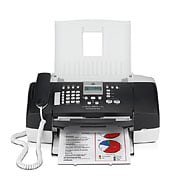
HP Thermal Inkjet printing means this machine runs on ink, not toner. The OfficeJet J3600 All-in-One prints, copies, scans and faxes. With 7 ppm black, a 20-page ADF and a USB-only connection, it suits one desk or a small home office.
HP Officejet Software and Driver Removal Utility
Win 7 64-bit
HP lists no model-specific driver for this printer, only generic utilities. For Windows, download the HP Officejet Software and Driver Removal Utility (2.6 MB), which is HP's generic option here.
Quick install: download the recommended file above, run it, and connect the USB cable only when the installer asks, then print a test page. Full steps
HP OfficeJet J3600 All-in-One driver for Windows
Win 7 64-bit
Details
- File name
OJJ3600_Scrubber_14.exe- MD5 checksum (from HP)
78302745329fc8ea9fd61b921c702308- Software ID (HP)
- mp-79588-2 · verify on HP
Win 7 64-bit
Details
- File name
dot4patch_reboot.exe- MD5 checksum (from HP)
46b8059df3e4d7c8414f5acce01954f3- Software ID (HP)
- mp-77751-1 · verify on HP
All files come straight from HP (ftp.hp.com). We checked them against HP’s list on Oct 25, 2026. Systems checked: Win 11, Win 10 64-bit, Win 7 64-bit, macOS 26, macOS 15, macOS 13, Linux. Older systems may have more files on HP’s page for this model.
HP OfficeJet J3600 All-in-One driver support by operating system
64-bit
Which HP OfficeJet J3600 All-in-One driver should I choose?
Both downloads HP offers for this printer fall in the Utility category. None is a full software and driver package. The HP Officejet Software and Driver Removal Utility (2.6 MB) strips old HP software from your PC, so choose it before a clean reinstall. The HP Print Software Patch When Upgrading Vista to Windows 7 (1.3 MB) is only for PCs that moved from Vista to Windows 7. Both target Win 7 64-bit.
This printer connects by one USB port and has no wireless. It also has no duplex, so flip pages by hand for two-sided jobs. The input tray holds 100 sheets, and it handles letter, legal, executive and cards.
How to install the HP OfficeJet J3600 All-in-One driver
- Click the Download Only button on the HP page for the Removal Utility.
- In the pop-up window, click Save and choose a folder you can find again.
- Double-click the downloaded .exe file. Expansion can take time, then an Explorer window opens.
- Open the extracted files and double-click uninstall.bat.
- Follow the onscreen instructions to finish removing the software.
- Run uninstall.bat 3 times in total to remove the software completely.
Adding the printer by hand or installing on Linux? See our printer driver install guide.
HP OfficeJet J3600 All-in-One specifications
Source: HP product specifications for the HP OfficeJet J3600 All-in-One Printer.
Each file lists the MD5 checksum HP publishes. Our guide to checking a driver download shows how to compare it. If an HP link is down, try the Microsoft Update Catalog search for the HP OfficeJet J3600 All-in-One.
HP OfficeJet J3600 All-in-One driver troubleshooting
The PC does not detect the printer over USB
Plug the USB cable straight into the PC, not a hub. Try another USB port next. Power the printer off and on, then restart the computer. Swap the cable if it still fails.
Prints look faded, streaked or have gaps
Check the ink levels first and replace any empty cartridge. Then reseat the cartridges and reprint. Use plain letter paper for the test, since thermal inkjet output varies by paper type.
Ink Levels, HP Scan or Print Status Toolbox stopped working after upgrading Vista to Windows 7
Install HP Print Software Patch When Upgrading Vista to Windows 7, version 1.0 (1.3 MB). It fixes known problems with those features on Win 7 64-bit.
For “driver is unavailable”, offline printers and stuck print jobs, see our printer driver troubleshooting guide.
HP OfficeJet J3600 All-in-One driver FAQ
Which driver should I download for the OfficeJet J3600?
HP lists no model-specific driver. For Windows, HP's generic option is the HP Officejet Software and Driver Removal Utility, version 13.0.0, 2.6 MB.
Which Windows version do the downloads support?
Both downloads HP offers list Win 7 64-bit. HP lists no other operating system for this printer.
What does the Vista to Windows 7 patch fix?
Version 1.0 fixes known problems after a Vista to Windows 7 upgrade. These include HP Print Status Toolbox, Ink Levels, Solution Center and HP Scan. It is 1.3 MB.
Can I print wirelessly or two-sided on this printer?
No. HP lists no wireless capability and no duplex printing. The only standard connection is 1 USB, and HP lists no optional connectivity.
Last checked: Oct 25, 2026. HP and HP OfficeJet J3600 All-in-One are trademarks of HP Inc. This site is not affiliated with HP.