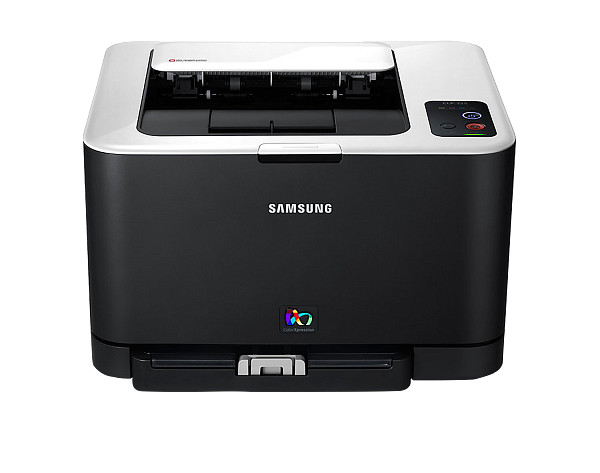
Samsung CLP-325W software comes from HP's download server as one print driver plus several small utilities. The driver handles printing. The utilities cover wireless setup, IP assignment and status monitoring. Windows 7, 10 and 11 users each have at least one option.
CLP-320, 325 Series Print Driver
Win 10 64-bitWin 10 32-bitWin 7 64-bitWin 7 32-bit
Download the CLP-320, 325 Series Print Driver (24.3 MB) for Windows. It is the Basic driver for the Samsung CLP-325W and supports Windows 10 and Windows 7.
Quick install: download the recommended file above, run it, and connect the USB cable only when the installer asks, then print a test page. Full steps
Samsung CLP-325W driver for Windows
Basic driver only
Win 10 64-bitWin 10 32-bitWin 7 64-bitWin 7 32-bit
Details
- Description
- CLP-320, 325 Series Print Driver
- File name
Samsung_CLP-320_Series_SPD_V3.11.34.00.18.exe- MD5 checksum (from HP)
2bd3e4c93f14887f82f4f7938bbae5ed- Software ID (HP)
- fp-197863-1 · verify on HP
Win 7 64-bitWin 7 32-bit
Details
- Description
- CLP-320, 325 Series Print Driver Mono(No Installer)
- File name
SPL_MONO.zip- MD5 checksum (from HP)
d79551c4d3d1b35f058daa4fd82f3c6d- Software ID (HP)
- fp-197864-1 · verify on HP
HP Universal Print Driver
Win 11Win 10 64-bitWin 10 32-bitWin 7 64-bitWin 7 32-bit
Details
- File name
SamsungUniversalPrintDriver3_V3.00.16.0101.01.exe- MD5 checksum (from HP)
c16cfa11640d1f39933117946ac9f9c9- Software ID (HP)
- fp-193881-4 · verify on HP
- Release notes
- Read on HP
Utilities and other software
Win 11Win 10 64-bitWin 10 32-bitWin 7 64-bitWin 7 32-bit
Details
- File name
WIN_EPM_V2.00.01.36.exe- MD5 checksum (from HP)
aaeb8b73b590790c8b7037424b50c3e6- Software ID (HP)
- fp-194462-5 · verify on HP
Win 11Win 10 64-bitWin 10 32-bitWin 7 64-bitWin 7 32-bit
Details
- File name
EWS_V3.70.18.0.exe- MD5 checksum (from HP)
f5931d8421d1066dd64aa63dfe2c0d74- Software ID (HP)
- fp-191418-2 · verify on HP
Win 11Win 10 64-bitWin 10 32-bitWin 7 64-bitWin 7 32-bit
Details
- File name
SetIP_V1.05.08.3.14.exe- MD5 checksum (from HP)
ae9b0051606d60949becd6b6f3658bfa- Software ID (HP)
- fp-191426-2 · verify on HP
Win 7 64-bitWin 7 32-bit
Details
- Description
- Smart Panel
- File name
CLP-320_Series_SP.exe- MD5 checksum (from HP)
8993710b5a863dfddf44f8a56ad19aa5- Software ID (HP)
- fp-197857-1 · verify on HP
All files come straight from HP (ftp.hp.com). We checked them against HP’s list on Oct 25, 2026. Systems checked: Win 11, Win 10 64-bit, Win 10 32-bit, Win 7 64-bit, Win 7 32-bit, macOS 13, macOS 12, macOS 11, macOS 10.15, Linux. Older systems may have more files on HP’s page for this model.
Samsung CLP-325W driver support by operating system
64-bit
64-bit
Which Samsung CLP-325W driver should I choose?
Start with the Basic driver, the CLP-320, 325 Series Print Driver at 24.3 MB, for Windows 10 or 7. A Mono version without an installer, 14.2 MB, supports Windows 7 only. The Universal Print Driver, 38.5 MB, is a generic driver for IT-managed setups and lists Windows 11. Utilities are optional extras: Easy Wireless Setup is 4.2 MB, Set IP is 1.5 MB, and Easy Printer Manager is 28.7 MB.
Easy Wireless Setup (4.2 MB) configures the printer's wireless network settings. Set IP (1.5 MB) assigns a network IP address using the printer's MAC address. Smart Panel (15.3 MB) installs on Windows 7 only.
How to install the Samsung CLP-325W driver
- Download the CLP-320, 325 Series Print Driver (24.3 MB) from HP's page for your Windows version.
- Run the downloaded file once it finishes.
- Follow the installer prompts until setup completes.
- For a wireless connection, run Samsung Easy Wireless Setup (4.2 MB) to configure the wireless network settings.
- Print a test page to confirm the driver works.
Adding the printer by hand or installing on Linux? See our printer driver install guide.
Each file lists the MD5 checksum HP publishes. Our guide to checking a driver download shows how to compare it. If an HP link is down, try the Microsoft Update Catalog search for the Samsung CLP-325W.
Samsung CLP-325W driver troubleshooting
Computer cannot find the printer on the network
Confirm the printer and computer share the same network. Then run Samsung Set IP (1.5 MB), which sets the network IP using the printer's MAC address. Rerun Easy Wireless Setup if the wireless settings changed.
Faded, streaked or blank pages
Check the printer's supplies first and reseat them if they look loose. Print another test page afterward. If the problem stays, replace the supply that ran low and try again.
Samsung Easy Printer Manager has trouble on Windows 10
Install Samsung Easy Printer Manager version 2.00.01.36 (28.7 MB). It fixes a Windows 10 RS4 compatibility issue. Remove the older version first if the new one will not install.
For “driver is unavailable”, offline printers and stuck print jobs, see our printer driver troubleshooting guide.
Samsung CLP-325W driver FAQ
Which Windows versions does the Basic driver support?
The CLP-320, 325 Series Print Driver supports Windows 10 (64-bit and 32-bit) and Windows 7 (64-bit and 32-bit). HP does not list Windows 11 for it.
How large is the recommended driver?
The CLP-320, 325 Series Print Driver is 24.3 MB, version 3.11.34.00.18, dated Sep 01, 2017. The Mono version without an installer is 14.2 MB.
Is there a driver for Windows 11?
HP lists the Samsung Universal Print Driver for Windows 11. It is version 3.00.16.0101.01, 38.5 MB, and suits IT-managed setups. Easy Printer Manager and the wireless and IP utilities also list Windows 11.
Does HP offer a macOS driver for this printer?
No. HP lists only Windows downloads for the Samsung CLP-325W. The recommended download is the CLP-320, 325 Series Print Driver for Windows.
Last checked: Oct 25, 2026. Samsung and Samsung CLP-325W are trademarks of Samsung Electronics. HP Inc. hosts these downloads. This site is not affiliated with Samsung or HP.
8 thoughts on “Samsung CLP-325W Driver Download”