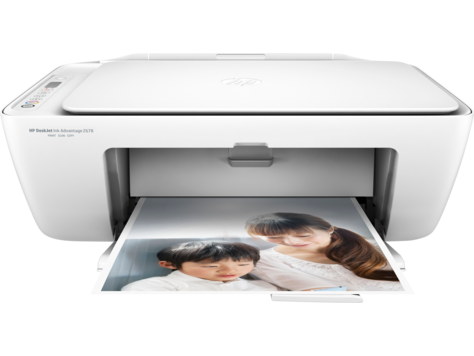
A 60-sheet input tray and a 25-sheet output tray set the pace on the HP DeskJet Ink Advantage 2679 All-in-One. Duplex printing is manual, with driver support. It prints, copies and scans, and it suits light use of 50 to 100 pages a month.
HP DeskJet / Ink Advantage 2600 All-in-One Printer series Print and Scan Driver and Accessories
Win 11Win 10 64-bitWin 7 64-bit
On Windows, get HP DeskJet / Ink Advantage 2600 All-in-One Printer series Print and Scan Driver and Accessories (136.3 MB). On macOS, get Install HP Easy Start (6.3 MB).
Quick install: download the recommended file above, run it, and connect the USB cable only when the installer asks, then print a test page. Full steps
HP DeskJet Ink Advantage 2679 All-in-One driver for Windows
Full software and drivers
Win 11Win 10 64-bitWin 7 64-bit
Details
- File name
Full_Webpack-43.4.2486-DJ2600_Full_Webpack.exe- MD5 checksum (from HP)
f4d9dda0ccf4a489075bf3ac6c810bb5- Software ID (HP)
- al-182912-8 · verify on HP
Setup apps
Win 11Win 10 64-bitWin 7 64-bit
Details
- File name
HPEasyStart_17_6_15.exe- MD5 checksum (from HP)
d3c5840776dec9f1f7e1ba23499a15e8- Software ID (HP)
- mp-366488-3 · verify on HP
Win 11Win 10 64-bit
Details
- Software ID (HP)
- mp-366135-1 · verify on HP
Firmware
Win 11Win 10 64-bitWin 7 64-bit
Details
- File name
DJ2600_2237A.exe- MD5 checksum (from HP)
144a62b5a1a6933f6bca50f44d780d38- Software ID (HP)
- al-214906-6 · verify on HP
HP DeskJet Ink Advantage 2679 All-in-One driver for macOS
macOS 26macOS 15
Details
- File name
HP_Easy_Start.app.zip- MD5 checksum (from HP)
19c1a5f786f5f93f9f778ad71ee444a3- Software ID (HP)
- mp-166618-27 · verify on HP
macOS 26macOS 15macOS 13
Details
- Software ID (HP)
- mp-351535-1 · verify on HP
HP DeskJet Ink Advantage 2679 All-in-One driver for Linux
Linux
Details
- Software ID (HP)
- mp-54524-1 · verify on HP
All files come straight from HP (ftp.hp.com). We checked them against HP’s list on Oct 25, 2026. Systems checked: Win 11, Win 10 64-bit, Win 7 64-bit, macOS 26, macOS 15, macOS 13, Linux. Older systems may have more files on HP’s page for this model.
HP DeskJet Ink Advantage 2679 All-in-One driver support by operating system
64-bit
64-bit
Which HP DeskJet Ink Advantage 2679 All-in-One driver should I choose?
HP offers three kinds of download for this printer. The full software and drivers package (136.3 MB) includes everything needed to install and use it, so most Windows owners should pick it. Setup apps are smaller, at 26.5 MB on Windows and 6.3 MB on Mac, and they guide you through setup. The Windows setup app needs an internet connection to install drivers. Firmware (3.4 MB) is a separate update. Install it only if you are fixing a network problem.
You can connect by Hi-Speed USB 2.0 or wirelessly, and AirPrint covers mobile printing. Duplex is manual, with driver support. Borderless printing is not available, and the printer cannot multitask.
How to install the HP DeskJet Ink Advantage 2679 All-in-One driver
- Download the 136.3 MB Print and Scan Driver and Accessories package from HP's page.
- Open the downloaded file and follow the on-screen prompts.
- Choose USB or wireless if the installer offers the choice, since the printer supports both.
- Print a test document to confirm the driver works.
- On a Mac, download Install HP Easy Start (6.3 MB) and open it to set up the printer.
Adding the printer by hand or installing on Linux? See our printer driver install guide.
Models supported by this HP DeskJet Ink Advantage 2679 driver page
These printers use the same driver files, so every download on this page fits each of them.
Specs of HP DeskJet Ink Advantage 2679 All-in-One
The HP DeskJet Ink Advantage 2679 All-in-One works best in a room between 15°C and 30°C (59°F to 86°F). It will still run from 5°C to 40°C, with humidity of 15% to 80% RH, non-condensing. However, store it anywhere from –40°C to 60°C when it is not in use.
The input tray holds up to 60 sheets of plain paper, 5 envelopes, 20 index cards or 20 photo sheets. The output tray takes fewer: 25 plain sheets, 5 envelopes, 10 cards or 10 photo sheets. Also, keep any USB cable at 3 m (10 feet) or shorter, since this limits noise from strong electromagnetic fields.
Scan with HP DeskJet Ink Advantage 2679 All-in-One
Open the printer software from the desktop icon. In Windows 10, click Start, pick HP in the app list, then choose the icon with your printer's name. Inside the software, click Scan, then Scan a Document or Photo, pick the scan type and click Scan.
Choose Email as PDF or Email as JPEG if you want your email software to open with the scan attached. On a Mac, open HP Easy Scan from the Applications folder, choose a scan profile and click Scan. Besides this, Windows users can create a shortcut, for example to save photos as PNG instead of JPEG.
Fixing paper jams and feed problems
Most feed trouble starts with the paper-width guide. Fit it snugly against the paper, but make sure it does not bend the stack. Do not push paper too far down into the input tray. Also, wait until printing finishes before adding paper; if the printer is nearly empty, wait for the out of paper message.
If paper is not picked up, check that it is loaded and not curled; bend curled sheets the opposite way to flatten them. For skewed pages, load paper against the far-right side with the guide on the left edge. However, if several pages feed at once, check for overloading and stuck-together sheets, and try HP paper.
Scanning through a web browser with Webscan
Webscan lets you scan photos and documents to your computer from a web browser, even without the printer software installed. By default it is off. To turn it on, open the embedded web server, click Settings, choose Administrator Settings under Security, select Webscan from EWS and click Apply.
Place the original print side down on the right front corner of the scanner glass. Then open the embedded web server, click the Scan tab, choose Webscan in the left pane, adjust settings and click Start Scan. However, options are basic; use the printer software for more. If Webscan will not open, your network administrator may have disabled it.
Sleep mode and energy saving
Sleep mode reduces the power the printer uses. After initial setup, it enters Sleep mode following 5 minutes of inactivity. Therefore, the printer saves energy during short breaks without you doing anything, and the 5-minute delay is only the starting value, which you can change.
To change the delay, open the embedded web server and click the Settings tab. In the Power Management section, click Energy Save Mode and select the option you want. Finally, click Apply so the new setting is saved.
HP DeskJet Ink Advantage 2679 All-in-One specifications
Source: HP product specifications for the HP DeskJet Ink Advantage 2679 All-in-One Printer.
Each file lists the MD5 checksum HP publishes. Our guide to checking a driver download shows how to compare it. If an HP link is down, try the Microsoft Update Catalog search for the HP DeskJet Ink Advantage 2679 All-in-One.
HP DeskJet Ink Advantage 2679 All-in-One driver troubleshooting
The computer cannot find the printer
Restart the printer and the computer first. For a wireless setup, confirm both sit on the same network. Try a USB cable straight to the computer to rule out the network.
Printouts look faint or streaky
Check the ink levels and reseat the cartridges. Try plain paper, photo paper or brochure paper, since those are the supported media types. Replace any cartridge that is empty.
The network connection keeps failing
Restart the printer and your router. If the problem continues, install firmware 001.2237A (3.4 MB), which HP lists as a Network Stack Update. Run it with the printer connected.
For “driver is unavailable”, offline printers and stuck print jobs, see our printer driver troubleshooting guide.
HP DeskJet Ink Advantage 2679 All-in-One driver FAQ
Which Windows versions does the recommended driver support?
The Print and Scan Driver and Accessories package, version 43.4.2486, supports Windows 11, Windows 10 64-bit and Windows 7 64-bit.
How large is the Windows driver download?
The full Print and Scan Driver and Accessories package is 136.3 MB. The HP Easy Start setup app for Windows is smaller at 26.5 MB.
What does the firmware update fix?
HP lists a Network Stack Update for firmware version 001.2237A, which is 3.4 MB. It supports Windows 11, Windows 10 64-bit and Windows 7 64-bit.
How fast does this printer print?
HP rates it at up to 5.5 ppm in black on A4. Black resolution reaches up to 1200 x 1200 rendered dpi.
Drivers for similar HP printers
Owners of related models can find the matching downloads here: HP DeskJet Ink Advantage 2600 All-in-One series driver, HP DeskJet Ink Advantage 2675 All-in-One driver, HP DeskJet Ink Advantage 2676 All-in-One driver, HP DeskJet Ink Advantage 2677 All-in-One driver, HP DeskJet Ink Advantage 2678 All-in-One driver, HP DeskJet 2130 All-in-One driver.
Last checked: Oct 25, 2026. HP and HP DeskJet Ink Advantage 2679 All-in-One are trademarks of HP Inc. This site is not affiliated with HP.