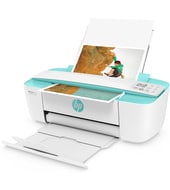
HP offers eight downloads for this printer, covering Windows 11, Windows 10, Windows 7 and macOS 26 and 15. The HP DeskJet 3764 All-in-One prints, copies and scans, with built-in Wi-Fi. A 1000-page duty cycle and a recommended 50 to 200 pages a month suit home users with light printing needs.
HP DeskJet and Ink Advantage 3700 All-in-One Print and Scan Driver and Accessories
Win 11Win 10 64-bitWin 7 64-bit
On Windows, download HP DeskJet and Ink Advantage 3700 All-in-One Print and Scan Driver and Accessories (102.6 MB). On a Mac, download Install HP Easy Start (6.3 MB).
Quick install: download the recommended file above, run it, and choose Wi-Fi or USB when the installer asks, then print a test page. Full steps
HP DeskJet 3764 All-in-One driver for Windows
Full software and drivers
Win 11Win 10 64-bitWin 7 64-bit
Details
- File name
Full_Webpack-40.16.1234-DJ3700_Full_Webpack.exe- MD5 checksum (from HP)
a64f64a599561e71c224398eda8410df- Software ID (HP)
- al-163859-7 · verify on HP
Setup apps
Win 11Win 10 64-bitWin 7 64-bit
Details
- File name
HPEasyStart_17_6_15.exe- MD5 checksum (from HP)
d3c5840776dec9f1f7e1ba23499a15e8- Software ID (HP)
- mp-366488-3 · verify on HP
Win 11Win 10 64-bit
Details
- Software ID (HP)
- mp-366135-1 · verify on HP
Firmware
Win 11Win 10 64-bitWin 7 64-bit
Details
- File name
DJ3700_2218A.exe- MD5 checksum (from HP)
753c33105bc9259912c3e12852483914- Software ID (HP)
- al-215329-4 · verify on HP
Utilities and other software
Win 11Win 10 64-bitWin 7 64-bit
Details
- File name
HPEasyStart-13.6.5-DJ3700_40_16_1234_1_Webpack.exe- MD5 checksum (from HP)
7cab4ab748df36b4f7bc7fc4fe0b5521- Software ID (HP)
- al-260049-4 · verify on HP
Win 11Win 10 64-bitWin 7 64-bit
Details
- File name
Basic_Webpack_x64-40.16.1234-DJ3700_Basicx64_Webpack.exe- MD5 checksum (from HP)
e4cb71f3feb7fe167792bf52808dd957- Software ID (HP)
- al-242680-4 · verify on HP
Win 10 64-bitWin 7 64-bit
Details
- File name
HPEPrintAppSetupx64.exe- MD5 checksum (from HP)
f47f746e9f3a0bf359c06d3a4d889b43- Software ID (HP)
- lj-166432-4 · verify on HP
HP DeskJet 3764 All-in-One driver for macOS
macOS 26macOS 15
Details
- File name
HP_Easy_Start.app.zip- MD5 checksum (from HP)
19c1a5f786f5f93f9f778ad71ee444a3- Software ID (HP)
- mp-166618-27 · verify on HP
macOS 26macOS 15macOS 13
Details
- Software ID (HP)
- mp-351535-1 · verify on HP
HP DeskJet 3764 All-in-One driver for Linux
Linux
Details
- Software ID (HP)
- mp-54524-1 · verify on HP
All files come straight from HP (ftp.hp.com). We checked them against HP’s list on Oct 25, 2026. Systems checked: Win 11, Win 10 64-bit, Win 7 64-bit, macOS 26, macOS 15, macOS 13, Linux. Older systems may have more files on HP’s page for this model.
HP DeskJet 3764 All-in-One driver support by operating system
64-bit
64-bit
Which HP DeskJet 3764 All-in-One driver should I choose?
Full software and drivers is the main choice at 102.6 MB. It holds the driver and the extra software. Setup app downloads, such as HP Easy Start at 26.5 MB, guide you through setup and need an internet connection for drivers. The offline EasyStart utility is 173.5 MB and suits PCs without internet. The IT Professional utility (59.5 MB) targets corporate deployment. Install the 4.3 MB firmware only if you need its listed Network Stack Update.
Duplex printing is manual, and the driver supports it. The printer has a 60-sheet input tray and a 25-sheet output tray. It connects by Hi-Speed USB 2.0 or Wi-Fi 802.11b/g/n, and it supports Apple AirPrint and Wi-Fi Direct printing.
How to install the HP DeskJet 3764 All-in-One driver
- Download the 102.6 MB Print and Scan Driver and Accessories package from this page.
- Run the downloaded file and follow the installer screens.
- For Wi-Fi printing, pick the wireless setup option if the installer offers it.
- For USB, connect a USB cable between the printer and the computer when prompted.
- Print a test page from any app to confirm the printer works.
- On a Mac, download Install HP Easy Start (6.3 MB) and open it to set up the printer.
Adding the printer by hand or installing on Linux? See our printer driver install guide.
Models supported by this HP DeskJet 3764 driver page
These printers use the same driver files, so every download on this page fits each of them.
Print quality fixes for HP DeskJet 3764 All-in-One
Start by checking the estimated ink levels in the printer software. If the cartridges are running low, replace them. However, if ink is fine, align the cartridges next. Load plain white letter or A4 paper, open Print & Scan, choose Maintain Your Printer, and click Align Cartridges on the Device Services tab.
The printer then prints an alignment page, and you follow the onscreen instructions. You can recycle or discard that sheet afterward. If the cartridges are not low, print a diagnostics page from the Device Reports tab. Then look at the blue, magenta, yellow and black boxes. Streaks or missing portions mean the cartridges need cleaning.
Recycling, energy and disposal information
The HP Inkjet Supplies Recycling Program lets you recycle used print and ink cartridges free of charge. It is available in many countries and regions, so check the website for your area. For details, visit www.hp.com/hpinfo/globalcitizenship/environment/recycle/. Besides cartridges, worn-out equipment also has a proper disposal route, described next.
Equipment with the ENERGY STAR logo is certified by the U.S. Environmental Protection Agency, and more certified models are listed at www.hp.com/go/energystar. The disposal symbol means the product should not go in household waste. Instead, take it to a designated collection point for electrical and electronic equipment recycling.
Print layout tips for HP DeskJet 3764 All-in-One
The print options include Booklet, which puts two pages on each side of a sheet so it folds in half. Choose left binding if you read left to right, or right binding if you read right to left. Also, Pages to Print lets you print only odd pages, only even pages, or all.
Page Borders adds borders when you print two or more pages per sheet. However, the Layout tab preview does not show Booklet or Page Borders choices. To save time, use a printing shortcut, which stores settings for a kind of job. Pick one on the Printing Shortcut tab, or save your own with Save As. Defaults cannot be deleted.
What Web Services offer on your printer
Web Services let the printer reach the Internet so you can get documents and print them without using a computer. However, the printer must be connected wirelessly. If it is connected with a USB cable, these web features are not available.
HP ePrint is a free HP service. Enable Web Services, then send an email to the address assigned to your printer, and it prints from anywhere. No special drivers or software are needed. In addition, an HP Connected account, where available, lets you view job status, manage the queue and control who can use the address.
HP DeskJet 3764 All-in-One specifications
Source: HP product specifications for the HP DeskJet 3764 All-in-One Printer.
Each file lists the MD5 checksum HP publishes. Our guide to checking a driver download shows how to compare it. If an HP link is down, try the Microsoft Update Catalog search for the HP DeskJet 3764 All-in-One.
HP DeskJet 3764 All-in-One driver troubleshooting
The computer cannot find the printer over Wi-Fi or USB
Restart the printer and the computer. Confirm the printer and PC share the same Wi-Fi network, since it supports 802.11b/g/n. For USB, try another cable or port, then rerun the installer.
Printouts look faint, streaked or have missing lines
This is a thermal inkjet, so low or dried-out ink is the usual cause. Check that the cartridges still have ink and are seated properly. Then reprint on plain paper to compare.
Paper will not feed or jams in the tray
Remove the stuck sheets gently. Keep the stack within the 60-sheet input tray capacity. Choose a paper size in the driver that matches what you loaded, such as letter or legal.
For “driver is unavailable”, offline printers and stuck print jobs, see our printer driver troubleshooting guide.
HP DeskJet 3764 All-in-One driver FAQ
Which operating systems does HP support for this printer?
HP offers Windows 11, Windows 10 64-bit and Windows 7 64-bit downloads. For Mac, the HP Easy Start installer lists macOS 26 and macOS 15.
How big is the recommended Windows driver?
The Print and Scan Driver and Accessories package is 102.6 MB, version 40.16.1234, dated Mar 14, 2022. The offline EasyStart package is larger at 173.5 MB.
What does the firmware update change?
Firmware version 001.2218A, 4.3 MB, updates some basic information in the Embedded Web Server and includes a Network Stack Update. HP dates it Jul 26, 2022.
Can this printer print on both sides automatically?
No. HP lists duplex printing as manual, with driver support provided. You flip the pages yourself. It handles media from 3 x 5 to 8.5 x 14 inches.
Drivers for similar HP printers
Owners of related models can find the matching downloads here: HP DeskJet 3720 All-in-One driver, HP DeskJet 3721 All-in-One driver, HP DeskJet 3722 All-in-One driver, HP DeskJet 3723 All-in-One driver, HP DeskJet 3724 All-in-One driver, HP DeskJet 3730 All-in-One driver.
Last checked: Oct 25, 2026. HP and HP DeskJet 3764 All-in-One are trademarks of HP Inc. This site is not affiliated with HP.