Advertisement

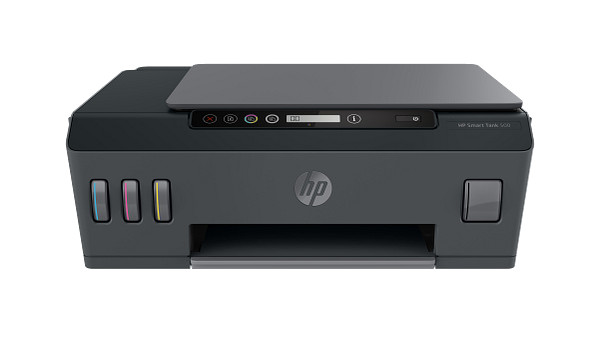
HP offers 17 downloads for the HP Smart Tank 500 All-in-One series: 15 for Windows and 2 for macOS. The printer prints, copies and scans over Hi-Speed USB 2.0 only, with no wireless. It suits a single-computer home or small office printing 400 to 800 pages a month.
HP Universal Scan – Full Feature Software and Driver
Win 11Win 10 64-bit
On Windows, download HP Universal Scan – Full Feature Software and Driver (436.2 MB). On a Mac, download Install HP Easy Start (6.3 MB).
Quick install: download the recommended file above, run it, and connect the USB cable only when the installer asks, then print a test page. Full steps
HP Smart Tank 500 All-in-One series driver for Windows
Full software and drivers
Win 11Win 10 64-bit
Details
- Description
- Full webpack provides various scan functionalities. Does not include OCR capabilities and Cloud Destinations
- File name
Full_Webpack-63.8.6459-SJ0001_Full_Webpack.exe- MD5 checksum (from HP)
7e76f43e3ae4d4638f9271aa6235f8dc- Software ID (HP)
- cs-308747-11 · verify on HP
Win 7 64-bit
Details
- File name
Full_Webpack-51.7.5630-SJ0001_Full_Webpack.exe- MD5 checksum (from HP)
d5d076d9ab58d6bba996ab4af1149055- Software ID (HP)
- cs-292548-3 · verify on HP
Win 11
Details
- File name
Full_Webpack-63.8.6459_ARM64-SJ0001_Full_Webpack.exe- MD5 checksum (from HP)
6d62a1c7a02013ab7ada7c43595e721c- Software ID (HP)
- cs-351749-3 · verify on HP
Basic driver only
Win 11Win 10 64-bit
Details
- Description
- This is the minimum Scan Software solution which provides basic Scan functionality, WIA and Twain support.Does not include OCR capabilities and Cloud…
- File name
Basic_Webpack_x64-63.8.6459-SJ0001_Basicx64_Webpack.exe- MD5 checksum (from HP)
24c79852645f3dea63bb0a61b2ebd87d- Software ID (HP)
- cs-308746-11 · verify on HP
Win 7 64-bit
Details
- File name
Basic_Webpack_x64-51.7.5630-SJ0001_Basicx64_Webpack.exe- MD5 checksum (from HP)
4a9275e44fbf3ad68f0edec713718f99- Software ID (HP)
- cs-292547-3 · verify on HP
Win 11
Details
- File name
Basic_Webpack_x64-63.8.6459_ARM64-SJ0001_Basicx64_Webpack.exe- MD5 checksum (from HP)
ff10299f0401ee28a1e09f0aecef6c3c- Software ID (HP)
- cs-351748-3 · verify on HP
Setup apps
Win 11Win 10 64-bit
Details
- Software ID (HP)
- mp-366135-1 · verify on HP
Win 11Win 10 64-bitWin 7 64-bit
Details
- File name
HPEasyStart_17_6_15.exe- MD5 checksum (from HP)
d3c5840776dec9f1f7e1ba23499a15e8- Software ID (HP)
- mp-366488-3 · verify on HP
Win 11Win 10 64-bitWin 7 64-bit
Details
- File name
Full_Webpack-50.3.4603_1-ST500_Full_Webpack.exe- MD5 checksum (from HP)
127b402f019db9a80160f4cafaa5b040- Software ID (HP)
- pr-236188-5 · verify on HP
Win 11Win 10 64-bitWin 7 64-bit
Details
- File name
Basic_Webpack_x64-50.3.4603-ST500_Basicx64_Webpack.exe- MD5 checksum (from HP)
aa551cc310b1b6b28324174da1e9cea6- Software ID (HP)
- bi-242687-4 · verify on HP
Firmware
Win 11Win 10 64-bitWin 7 64-bit
Details
- File name
HP_Smart_Tank_500_2413B.exe- MD5 checksum (from HP)
83ca4b314753f0c54258d620b126f11f- Software ID (HP)
- bi-245515-9 · verify on HP
Utilities and other software
Win 11Win 10 64-bit
Details
- File name
Win7plus-1.0.1020-HPOCR_Win7plus.exe- MD5 checksum (from HP)
cce55cb23d2580d7de22c10203b771dd- Software ID (HP)
- cs-323861-1 · verify on HP
Win 11Win 10 64-bit
Details
- File name
Readiris17-17.4.211_HP-cd25n005.exe- MD5 checksum (from HP)
f3e28efbe291bcfe97ecc279fc813dde- Software ID (HP)
- bi-355536-1 · verify on HP
Win 11Win 10 64-bit
Details
- File name
Readiris_PDF-27.0.577.2-HP.msi- MD5 checksum (from HP)
fefe270010c198ba0f4eaf0fa4b500d6- Software ID (HP)
- bi-355537-3 · verify on HP
Win 7 64-bit
Details
- File name
Win7plus-1.0.1019-HPOCR_Win7plus.exe- MD5 checksum (from HP)
3f49c91f29c83aa812b631234e305936- Software ID (HP)
- cs-324236-1 · verify on HP
HP Smart Tank 500 All-in-One series driver for macOS
Setup apps
macOS 26macOS 15
Details
- File name
HP_Easy_Start.app.zip- MD5 checksum (from HP)
19c1a5f786f5f93f9f778ad71ee444a3- Software ID (HP)
- mp-166618-27 · verify on HP
macOS 26macOS 15macOS 13
Details
- Software ID (HP)
- mp-351535-1 · verify on HP
Firmware
macOS 13
Details
- File name
HP_Smart_Tank_500_2330A.dmg- MD5 checksum (from HP)
98ca0069dce987cfbe9b4e7d8561de45- Software ID (HP)
- bi-245516-7 · verify on HP
HP Smart Tank 500 All-in-One series driver for Linux
Linux
Details
- Software ID (HP)
- mp-54524-1 · verify on HP
All files come straight from HP (ftp.hp.com). We checked them against HP’s list on Oct 25, 2026. Systems checked: Win 11, Win 10 64-bit, Win 7 64-bit, macOS 26, macOS 15, macOS 13, Linux. Older systems may have more files on HP’s page for this model.
HP Smart Tank 500 All-in-One series driver support by operating system
| Download | Win 11 | Win 10 64-bit |
Win 7 64-bit |
macOS 26 | macOS 15 | macOS 13 |
|---|---|---|---|---|---|---|
| Full software and drivers | ✓ | ✓ | ✓ | – | – | – |
| Basic driver only | ✓ | ✓ | ✓ | – | – | – |
| Setup apps | ✓ | ✓ | ✓ | ✓ | ✓ | – |
| Firmware | ✓ | ✓ | ✓ | – | – | ✓ |
| Utilities and other software | ✓ | ✓ | ✓ | – | – | – |
Latest HP Smart Tank 500 All-in-One series driver and firmware updates
- HP Smart Tank 500 series Firmware Update v001.2413B (Apr 23, 2024): Security and general fixes
- HP Universal Scan – Basic Feature Software and Driver (for Win 7 64-bit) v51.7.5630 (Apr 16, 2024): Removed references to ReadIRIS from HP Scan Assistant
- HP Universal Scan – Full Feature Software and Driver (for Win 7 64-bit) v51.7.5630 (Apr 16, 2024): Integrated HP OCR Imaging Library. Removed references to ReadIRIS from HP Scan Assistant
- HP Smart Tank 500 series – IT Professional Use only v50.3.4603 (Feb 01, 2022): Updated some basic information in installation screen
Which HP Smart Tank 500 All-in-One series driver should I choose?
HP sorts the downloads into five categories. Full software and drivers (436.2 MB) gives you the complete scan feature set but no OCR. The basic driver (113.9 MB) covers basic scanning with WIA and Twain support. Setup apps like HP Easy Start (26.5 MB) walk you through installation and need an internet connection. Utilities add OCR and PDF tools. Firmware (48.8 MB) brings security and general fixes, so update it only if you need those.
Duplex printing is manual, and the driver supports it. The input tray holds 100 sheets and the output tray holds 30. HP lists Hi-Speed USB 2.0 as the only connection, with no wireless and USB-only mobile printing.
How to install the HP Smart Tank 500 All-in-One series driver
- Download HP Universal Scan – Full Feature Software and Driver (436.2 MB) for Windows 11 or Windows 10 64-bit.
- Run the downloaded file and follow the on-screen prompts.
- Connect the printer to the computer with a USB cable, since USB is the only connection HP lists.
- Print a test page from any application to confirm the driver works.
- On a Mac, download Install HP Easy Start (6.3 MB) and run it to set up the printer.
Adding the printer by hand or installing on Linux? See our printer driver install guide.
HP Smart Tank 500 All-in-One series specifications
| Functions | Print, copy, scan |
|---|---|
| Print quality black (best) | Black: Up to 1200 x 1200 rendered dpi Color: Up to 4800 x 1200 optimized dpi color when printing from a computer and 1200 input dpi |
| Recommended monthly page volume | 400 to 800 HP recommends the number of pages printed not exceed the recommended monthly page volume for optimum device performance. |
| Connectivity, standard | Hi-Speed USB 2.0 |
| Wireless capability | No |
| Mobile printing capability | USB Only |
| Duplex printing | Manual (driver support provided) |
| Paper handling input, standard | 100-sheet input tray |
| Paper handling output, standard | 30-sheet output tray |
| Display | 7 segment + 2-inch icon display |
| Manufacturer Warranty | One year of 24/7 world-class technical support services through http://www.hp.com/support; One-year or 30,000 pages limited hardware warranty, whichever is earlier from the date of purchase |
| Multitasking supported | No |
| Print speed black (ISO, A4) | Up to 11 ppm |
| Print technology | HP Thermal Inkjet |
| Printer drivers included | HP PCL 3 GUI |
| Print languages | HP PCL 3 GUI |
| Automatic paper sensor | No |
| Connectivity, optional | None |
| Maximum Memory | 256 MB |
| Media types | Plain Paper, HP Photo Papers, HP Matte Brochure or Professional Paper, HP Matte Presentation Paper, HP Glossy Brochure or Professional Paper, Other Photo Inkjet Papers, Other Matte Inkjet Papers, Other Glossy Inkjet Papers, Inkjet Hagaki… |
| Borderless printing | Yes (up to 8.5 x 11 in, 210 x 297 mm) |
| Scanner type | Flatbed |
Source: HP product specifications for the HP Smart Tank 500 All-in-One series.
Each file lists the MD5 checksum HP publishes. Our guide to checking a driver download shows how to compare it. If an HP link is down, try the Microsoft Update Catalog search for the HP Smart Tank 500 All-in-One series.
HP Smart Tank 500 All-in-One series driver troubleshooting
The computer does not detect the printer over USB
Plug the USB cable straight into the computer, not a hub. Try another port or cable. Power the printer off and on, then run the installer again.
Printouts look faded or streaky
Confirm the printer has enough ink. Choose a paper type in the driver that matches the paper you loaded. Reprint on plain paper to see whether the problem persists.
Scanning feels slow
HP Universal Scan version 63.8.6459 lists a scan speed optimization. Install that version on Windows 11 or Windows 10 64-bit, then scan again.
For “driver is unavailable”, offline printers and stuck print jobs, see our printer driver troubleshooting guide.
HP Smart Tank 500 All-in-One series driver FAQ
Which Windows versions have the recommended driver?
HP Universal Scan – Full Feature Software and Driver version 63.8.6459 supports Windows 11 and Windows 10 64-bit. Windows 7 64-bit has a separate version, 51.7.5630.
How big is the recommended Windows download?
HP Universal Scan – Full Feature Software and Driver is 436.2 MB for Windows 11 and Windows 10 64-bit. The Basic Feature version is smaller at 113.9 MB.
What does the firmware update fix?
HP lists security and general fixes for firmware version 001.2413B (48.8 MB) on Windows. The macOS firmware, version 001.2330A (52.1 MB), lists the same.
Can I print wirelessly or print double-sided?
HP does not offer wireless on this printer. Connection is Hi-Speed USB 2.0 only. Duplex printing is manual, and the driver supports it.
Drivers for similar HP printers
Owners of related models can find the matching downloads here: HP Ink Tank 110 series driver, HP Ink Tank 115 driver, HP Ink Tank 119 driver, HP Ink Tank 318 driver, HP Ink Tank 319 driver, HP Ink Tank Wireless 410 driver.
Last checked: Oct 25, 2026. HP and HP Smart Tank 500 All-in-One series are trademarks of HP Inc. This site is not affiliated with HP.
Advertisement