A printer driver runs with full access to your computer, so it is worth making sure the file you downloaded is the one the manufacturer published. This guide shows how to check it in under a minute, and what to do if a download link is down.
Check the MD5 checksum
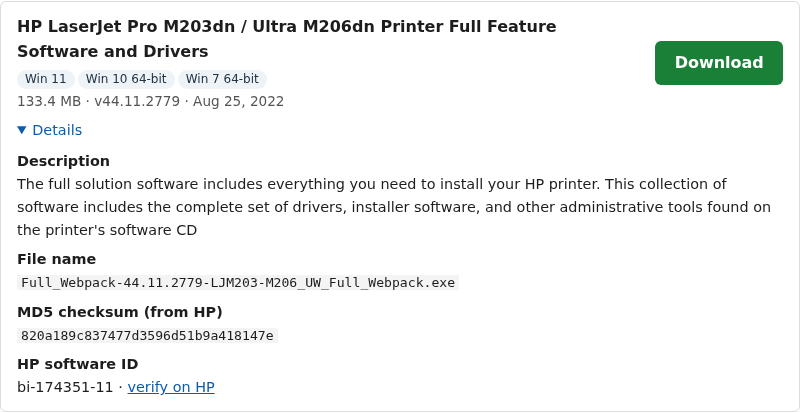
Every file on our driver pages lists the MD5 checksum the manufacturer publishes for it. You will find it under “Details” next to the download. If the checksum of your file matches, the file has not been changed or damaged.
On Windows
- Open your Downloads folder.
- Click the address bar, type
powershelland press Enter. - Run
Get-FileHash .\FILENAME -Algorithm MD5, using the real file name. - Compare the result with the checksum on the driver page. Upper or lower case does not matter.
On a Mac
- Open Terminal (Applications, then Utilities).
- Type
md5with a space, then drag the downloaded file into the window and press Enter. - Compare the result with the checksum on the driver page.
On Linux
Run md5sum FILENAME in a terminal and compare the result.
If the checksums do not match, delete the file and download it again. If it still does not match, please let us know on our contact page.
Make sure you clicked the right button
Our download buttons are always green and lead to the manufacturer’s own server, such as ftp.hp.com for HP. Our site is supported by ads, and some ads look like download buttons. If a button opens a different site or offers a “driver updater” tool, it is an ad. Close it and use the green button instead.
If a download link is down
Manufacturers sometimes move files. If a link does not work:
- Try again a little later. Manufacturer servers are sometimes busy.
- Search the Microsoft Update Catalog for your printer model. Microsoft publishes Windows drivers for many printers there. Each driver page on our site links to a search for that exact model.
- On Linux, most HP printers work with HP’s open-source HPLIP drivers, which many Linux systems already include.
- Report the broken link on our contact page so we can fix it.
Before you install
- Close other programs, especially other printer software.
- For a USB printer, connect the cable only when the installer asks you to.
- For a network printer, make sure the printer and the computer are on the same network before you start.
- Remove older drivers for the same printer if the new one does not install cleanly.
Each printer page also has install steps for that model. For full steps, see our printer driver install guide and troubleshooting guide. Read more about how we check drivers.