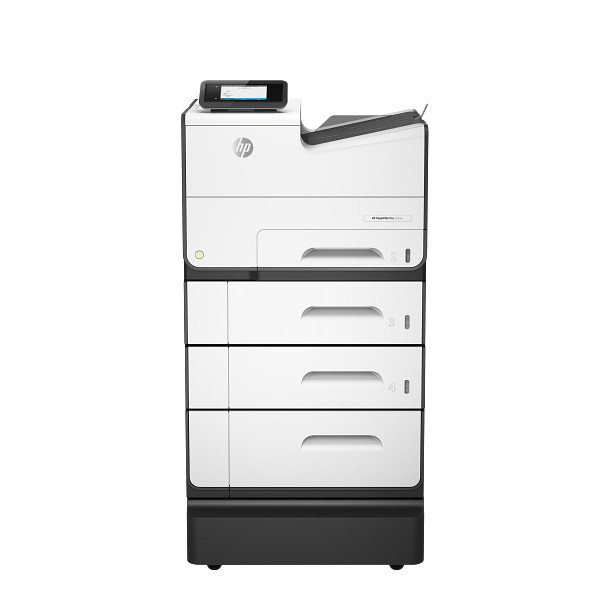
Prints color and black documents for small offices and workgroups that run 1000 to 6000 pages a month. The HP PageWide Pro 552dwk uses PageWide pigmented inks and reaches up to 70 ppm in General Office Mode. Automatic duplex and a 500-sheet tray keep busy teams moving.
HP PageWide Pro 552dw series PCL6 Full Software Solution
Win 11Win 10 64-bitWin 7 64-bit
On Windows, download HP PageWide Pro 552dw series PCL6 Full Software Solution (87.3 MB). On a Mac, download Install HP Easy Start (6.3 MB).
Quick install: download the recommended file above, run it, and connect the USB cable only when the installer asks, then print a test page. Full steps
HP PageWide Pro 552dwk driver for Windows
Full software and drivers
Win 11Win 10 64-bitWin 7 64-bit
Details
- File name
Full_Webpack-38.9.2003-PW552_DW_Full_Webpack.exe- MD5 checksum (from HP)
8e6af334b82a7f0507482a3ed4c194fd- Software ID (HP)
- ij-161378-5 · verify on HP
Basic driver only
Win 11Win 10 64-bitWin 7 64-bit
Details
- Description
- This basic feature software solution is a driver-only software solution intended for customers who only want a basic Print, Scan and Fax feature to…
- File name
Basic_Webpack_x64-38.9.2003-PW552_DW_Basicx64_Webpack.exe- MD5 checksum (from HP)
663b6767f01f2425a2aec12396291282- Software ID (HP)
- ij-161382-4 · verify on HP
Setup apps
Win 11Win 10 64-bitWin 7 64-bit
Details
- File name
HPEasyStart_17_6_15.exe- MD5 checksum (from HP)
d3c5840776dec9f1f7e1ba23499a15e8- Software ID (HP)
- mp-366488-3 · verify on HP
HP Universal Print Driver
Win 10 64-bitWin 7 64-bit
Details
- File name
upd-pcl6-win10-x64-8.2.0.26778.zip- MD5 checksum (from HP)
1311b735d1ada9b02676d32b5ba5b232- Software ID (HP)
- ds-99374-36 · verify on HP
- Release notes
- Read on HP
Win 10 64-bitWin 7 64-bit
Details
- File name
upd-ps-win10-x64-8.2.0.26778.zip- MD5 checksum (from HP)
626ec0b8d41d3be40357b3c825c3502d- Software ID (HP)
- ds-99376-35 · verify on HP
- Release notes
- Read on HP
Win 11
Details
- File name
upd-pcl6-win11-x64-8.2.0.26819.zip- MD5 checksum (from HP)
5660c16a00e21f11736fd003063d6d13- Software ID (HP)
- ds-365647-1 · verify on HP
- Release notes
- Read on HP
Win 11
Details
- File name
upd-ps-win11-x64-8.2.0.26819.zip- MD5 checksum (from HP)
d27ad643905526df8cc9a89b556dbf42- Software ID (HP)
- ds-365648-1 · verify on HP
- Release notes
- Read on HP
Win 11 ARM64
Details
- File name
upd-pcl6-win11-ARM64-8.2.0.26778.zip- MD5 checksum (from HP)
e270ca97f4ddb5139217621ccc205506- Software ID (HP)
- ds-359027-2 · verify on HP
- Release notes
- Read on HP
Firmware
Win 11Win 10 64-bitWin 7 64-bit
Details
- File name
PW552DW_2506A.exe- MD5 checksum (from HP)
af366fbd457af756d568dbf23d3ea049- Software ID (HP)
- ij-199983-20 · verify on HP
Win 11Win 10 64-bitWin 7 64-bit
Details
- File name
HP_PageWide_Pro_Series_Firmware_Readme_VR_1.18_001.2506A.pdf- MD5 checksum (from HP)
26fa7a397598f86c51f70c58b76e0832- Software ID (HP)
- ij-199973-23 · verify on HP
HP PageWide Pro 552dwk driver for macOS
macOS 26macOS 15
Details
- File name
HP_Easy_Start.app.zip- MD5 checksum (from HP)
19c1a5f786f5f93f9f778ad71ee444a3- Software ID (HP)
- mp-166618-27 · verify on HP
macOS 26macOS 15macOS 13
Details
- File name
HP_Easy_Admin.app.zip- MD5 checksum (from HP)
32c3c4edfb4e3bc519c3c1731542360e- Software ID (HP)
- mp-218629-7 · verify on HP
All files come straight from HP (ftp.hp.com). We checked them against HP’s list on Oct 25, 2026. Systems checked: Win 11, Win 10 64-bit, Win 7 64-bit, macOS 26, macOS 15, macOS 13, Linux. Older systems may have more files on HP’s page for this model.
HP PageWide Pro 552dwk driver support by operating system
64-bit
64-bit
Which HP PageWide Pro 552dwk driver should I choose?
The Full software and drivers package (87.3 MB) installs the driver plus HP's companion software. The Basic driver (48.7 MB) installs only the driver, which suits users who want nothing extra. Setup apps like HP Easy Start (26.5 MB on Windows) walk you through setup and fetch drivers online. Universal Print Drivers, around 20 MB each, are generic drivers for IT-managed setups. Update the firmware only if its ReadMe describes a problem you actually have.
Duplex printing is automatic. Paper capacity is a 500-sheet input tray plus a 50-sheet multi-purpose tray, with a 300-sheet output bin. For connections, you can use Ethernet 10/100, Hi-Speed USB 2.0, or built-in Wi-Fi 802.11b/g/n. A 4.3-inch touchscreen sits on the front.
How to install the HP PageWide Pro 552dwk driver
- Download the Full Software Solution (87.3 MB) from HP. It supports Windows 11, Windows 10 64-bit and Windows 7 64-bit.
- Run the downloaded file and follow the installer prompts.
- Choose the connection that matches your setup: Ethernet, USB, or Wi-Fi 802.11b/g/n.
- Finish the installation, then print a test page from any application.
- On a Mac, download Install HP Easy Start (6.3 MB) instead and follow its setup prompts.
Adding the printer by hand or installing on Linux? See our printer driver install guide.
HP PageWide Pro 552dwk specifications
Printing
Paper handling
Connectivity, supplies and size
Source: HP product specifications for the HP PageWide Pro 552dwk Printer.
Each file lists the MD5 checksum HP publishes. Our guide to checking a driver download shows how to compare it. If an HP link is down, try the Microsoft Update Catalog search for the HP PageWide Pro 552dwk.
HP PageWide Pro 552dwk driver troubleshooting
The computer cannot find the printer on the network
Confirm the computer and printer share the same network. Restart both the printer and your router, then retry. If Wi-Fi keeps failing, connect with an Ethernet or USB cable instead.
Pages print faded or with streaks
Check that the ink cartridges sit fully in place and replace any that are low. Print a test page afterward. Pigmented inks look best on plain or HP-branded paper.
Paper will not feed from the tray
Remove the stack and fan it. Reload it flat, with the sheets sized for that tray. Tray 2 handles Letter, statement, executive and No. 10 envelopes.
For “driver is unavailable”, offline printers and stuck print jobs, see our printer driver troubleshooting guide.
HP PageWide Pro 552dwk driver FAQ
Which Windows versions does the full driver support?
The Full Software Solution, version 38.9.2003, supports Windows 11, Windows 10 64-bit and Windows 7 64-bit. HP released it on Jan 27, 2022.
Which Mac versions work with HP Easy Start?
Install HP Easy Start, version 2.16.7.260722, supports macOS 26 and macOS 15. The download is 6.3 MB. HP also offers HP Easy Admin for macOS 26, 15 and 13.
What does the firmware update fix?
HP does not name specific fixes on the download page. Version 2506A, from Mar 28, 2025, is 71.9 MB. Read the ReadMe file for details before installing.
How fast does this printer print?
HP rates it at up to 50 ppm in Professional Mode and up to 70 ppm in General Office Mode, in both black and color. First page out takes as little as 6 seconds in black.
Drivers for similar HP printers
Owners of related models can find the matching downloads here: HP PageWide Pro 577z Multifunction driver.
Last checked: Oct 25, 2026. HP and HP PageWide Pro 552dwk are trademarks of HP Inc. This site is not affiliated with HP.
1 thought on “HP PageWide Pro 552dwk Driver Download”