Advertisement
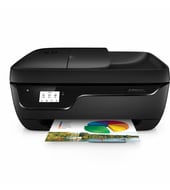
Paper handling is simple: a 60-sheet input tray, a 25-sheet output tray, and manual duplex with driver support. The HP OfficeJet 3830 All-in-One series prints, copies, scans, faxes and connects over Wi-Fi or USB. At 100 to 250 pages a month, it suits a home or small office.
HP OfficeJet 3830 series Print and Scan Driver and Accessories
Win 11Win 10 64-bitWin 7 64-bit
For Windows, download HP OfficeJet 3830 series Print and Scan Driver and Accessories (149.8 MB). On a Mac, download Install HP Easy Start (6.3 MB).
Quick install: download the recommended file above, run it, and choose Wi-Fi or USB when the installer asks, then print a test page. Full steps
HP OfficeJet 3830 All-in-One series driver for Windows
Full software and drivers
Win 11Win 10 64-bitWin 7 64-bit
Details
- File name
Full_Webpack-40.17.1248-OJ3830_Full_Webpack.exe- MD5 checksum (from HP)
8956dfcd53f258eef7fe8cabe7063fd4- Software ID (HP)
- mp-147826-5 · verify on HP
Basic driver only
Win 11Win 10 64-bitWin 7 64-bit
Details
- File name
Basic_Webpack_x64-40.17.1248-OJ3830_Basicx64_Webpack.exe- MD5 checksum (from HP)
9efac1d7d154a84f697ac4cbabb5455a- Software ID (HP)
- mp-242960-4 · verify on HP
Setup apps
Win 11Win 10 64-bitWin 7 64-bit
Details
- File name
HPEasyStart_17_6_15.exe- MD5 checksum (from HP)
d3c5840776dec9f1f7e1ba23499a15e8- Software ID (HP)
- mp-366488-3 · verify on HP
Win 11Win 10 64-bit
Details
- Software ID (HP)
- mp-366135-1 · verify on HP
Firmware
Win 11Win 10 64-bitWin 7 64-bit
Details
- File name
OJ3830_2223A.exe- MD5 checksum (from HP)
dd07cbb609e9055415f78cd9bafc263e- Software ID (HP)
- al-214909-5 · verify on HP
Utilities and other software
Win 10 64-bitWin 7 64-bit
Details
- File name
HPEPrintAppSetupx64.exe- MD5 checksum (from HP)
f47f746e9f3a0bf359c06d3a4d889b43- Software ID (HP)
- lj-166432-4 · verify on HP
HP OfficeJet 3830 All-in-One series driver for macOS
macOS 26macOS 15
Details
- File name
HP_Easy_Start.app.zip- MD5 checksum (from HP)
19c1a5f786f5f93f9f778ad71ee444a3- Software ID (HP)
- mp-166618-27 · verify on HP
macOS 26macOS 15macOS 13
Details
- Software ID (HP)
- mp-351535-1 · verify on HP
HP OfficeJet 3830 All-in-One series driver for Linux
Linux
Details
- Software ID (HP)
- mp-54524-1 · verify on HP
All files come straight from HP (ftp.hp.com). We checked them against HP’s list on Oct 25, 2026. Systems checked: Win 11, Win 10 64-bit, Win 7 64-bit, macOS 26, macOS 15, macOS 13, Linux. Older systems may have more files on HP’s page for this model.
HP OfficeJet 3830 All-in-One series driver support by operating system
| Download | Win 11 | Win 10 64-bit |
Win 7 64-bit |
macOS |
|---|---|---|---|---|
| Full software and drivers | ✓ | ✓ | ✓ | – |
| Basic driver only | ✓ | ✓ | ✓ | – |
| Setup apps | ✓ | ✓ | ✓ | ✓ |
| Firmware | ✓ | ✓ | ✓ | – |
| Utilities and other software | – | ✓ | ✓ | – |
Latest HP OfficeJet 3830 All-in-One series driver and firmware updates
- HP OfficeJet 3830 All-in-One Printer series Firmware Update v001.2223A (Aug 31, 2022): Control Panel, Embedded Web Server and Fax report improvements. Network Stack Update
Which HP OfficeJet 3830 All-in-One series driver should I choose?
Full software and drivers (149.8 MB) installs the driver plus accessories and suits most home users. The Basic driver (56.4 MB) is for IT professionals managing many PCs. Setup apps, such as HP Easy Start at 26.5 MB on Windows, guide setup and fetch drivers online. The utility category covers HP ePrint Software at 31.2 MB. Install the firmware update (4.8 MB) only if you hit a control panel, Embedded Web Server, fax report or network problem.
Duplex printing is manual, with driver support. The input tray holds 60 sheets and handles letter, legal, 4 x 6 in, 5 x 7 in, 8 x 10 in and No. 10 envelopes. Connect by Hi-Speed USB 2.0 or built-in Wi-Fi 802.11b/g/n.
How to install the HP OfficeJet 3830 All-in-One series driver
- Download HP OfficeJet 3830 series Print and Scan Driver and Accessories (149.8 MB, version 40.17.1248) from this page.
- Confirm your PC runs Windows 11, Windows 10 64-bit or Windows 7 64-bit.
- Run the downloaded file and follow the installer prompts.
- Pick a wireless or USB connection as the installer prompts you.
- Print a test page when the installation finishes.
- On a Mac, download Install HP Easy Start (6.3 MB) instead and follow its prompts to set up the printer.
Adding the printer by hand or installing on Linux? See our printer driver install guide.
HP OfficeJet 3830 All-in-One series specifications
| Functions | Print, copy, scan, wireless, fax |
|---|---|
| Print speed black | Normal: Up to 8.5 ppm |
| Print speed color | Up to 6 ppm |
| First page out (ready) | Black: As fast as 14 sec |
| Print quality black (best) | Black: Up to 1200 x 1200 rendered dpi Color: Up to 4800 x 1200 optimized dpi color (when printing from a computer on selected HP photo papers and 1200 input dpi) |
| Duty cycle (monthly, letter) | Up to 1000 pages |
| Recommended monthly page volume | 100 to 250 |
| Connectivity, standard | 1 Hi-Speed USB 2.0 |
| Wireless capability | Yes, built-in Wi-Fi 802.11b/g/n |
| Duplex printing | Manual (driver support provided) |
| Paper handling input, standard | 60-sheet input tray |
| Paper handling output, standard | 25-sheet output tray |
| Media sizes supported | Letter; legal; 4 x 6 in; 5 x 7 in; 8 x 10 in; No. 10 envelopes |
| Display | 2.2 in (5.5 cm) touch mono display with magic frame |
| Dimensions (W x D x H) | 17.72 x 14.33 x 8.54 in |
| Weight | 5.61 kg 12.37 lb |
| Manufacturer Warranty | One-year limited hardware warranty; For more info please visit us at http://support.hp.com |
| Multitasking supported | No |
| Print technology | HP Thermal Inkjet |
| Printer drivers included | HP PCL 3 GUI |
| Print languages | HP PCL 3 GUI; PCLm (HP Apps/UPD); URF (AirPrint) |
| Automatic paper sensor | Yes |
Source: HP product specifications for the HP OfficeJet 3830 All-in-One Printer series.
Each file lists the MD5 checksum HP publishes. Our guide to checking a driver download shows how to compare it. If an HP link is down, try the Microsoft Update Catalog search for the HP OfficeJet 3830 All-in-One series.
HP OfficeJet 3830 All-in-One series driver troubleshooting
The computer cannot find the printer over Wi-Fi
Restart the printer, router and computer. Confirm the PC and printer share one network. Still stuck? Connect a USB cable and finish setup that way.
Prints look faded or streaky
Check the cartridge ink levels. Replace any empty cartridge, then reprint. Streaks from a nearly empty cartridge often clear after replacement.
Color output or automatic configuration misbehaves
Install HP OfficeJet 3830 series Print and Scan Driver and Accessories, version 40.17.1248. HP lists fixes for the Color Option and Auto Configuration option in that release.
For “driver is unavailable”, offline printers and stuck print jobs, see our printer driver troubleshooting guide.
HP OfficeJet 3830 All-in-One series driver FAQ
Which Windows versions does the driver support?
The full Print and Scan driver supports Windows 11, Windows 10 64-bit and Windows 7 64-bit. HP Easy Start covers Windows 11 and Windows 10 64-bit, with a separate Windows 7 64-bit version.
Does HP offer a macOS download?
Yes. HP offers Install HP Easy Start, a 6.3 MB download for macOS 26 and macOS 15. It sets up the printer and prepares your Mac for printing.
What does the firmware update fix?
Version 001.2223A, dated Aug 31, 2022, is 4.8 MB. HP lists Control Panel, Embedded Web Server and Fax report improvements, plus a Network Stack update.
How fast does this printer print?
HP rates it at up to 8.5 ppm in black and up to 6 ppm in color. The first black page can come out in as little as 14 seconds.
Last checked: Oct 25, 2026. HP and HP OfficeJet 3830 All-in-One series are trademarks of HP Inc. This site is not affiliated with HP.
Advertisement