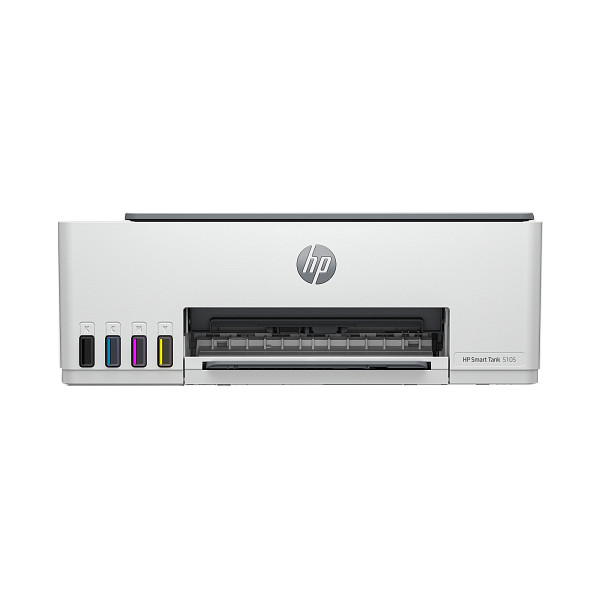
Home and small-office paperwork at 400 to 800 pages a month is what the HP Smart Tank 5105 All-in-One targets. It prints, copies and scans using HP Thermal Inkjet technology. A 100-sheet input tray and built-in Wi-Fi suit a shared desk or a small household.
HP Universal Scan – Full Feature Software and Driver
Win 11Win 10 64-bit
On Windows, download HP Universal Scan – Full Feature Software and Driver (436.2 MB). It supports Windows 11 and Windows 10 64-bit.
Quick install: download the recommended file above, run it, and choose Wi-Fi or USB when the installer asks, then print a test page. Full steps
HP Smart Tank 5105 All-in-One driver for Windows
Full software and drivers
HP Universal Scan - Full Feature Software and Driver (for Win 11, Win 10 64-bit)Win 11Win 10 64-bit
Details
- File name
Full_Webpack-63.8.6459-SJ0001_Full_Webpack.exe- MD5 checksum (from HP)
7e76f43e3ae4d4638f9271aa6235f8dc- Software ID (HP)
- cs-308747-11 · verify on HP
HP Universal Scan - Full Feature Software and Driver (for Win 7 64-bit)Win 7 64-bit
Details
- File name
Full_Webpack-51.7.5630-SJ0001_Full_Webpack.exe- MD5 checksum (from HP)
d5d076d9ab58d6bba996ab4af1149055- Software ID (HP)
- cs-292548-3 · verify on HP
HP Universal Scan - Full Feature Software and Driver (ARM 64)Win 11
Details
- File name
Full_Webpack-63.8.6459_ARM64-SJ0001_Full_Webpack.exe- MD5 checksum (from HP)
6d62a1c7a02013ab7ada7c43595e721c- Software ID (HP)
- cs-351749-3 · verify on HP
Basic driver only
HP Universal Scan - Basic Feature Software and Driver (for Win 11, Win 10 64-bit)Win 11Win 10 64-bit
Details
- File name
Basic_Webpack_x64-63.8.6459-SJ0001_Basicx64_Webpack.exe- MD5 checksum (from HP)
24c79852645f3dea63bb0a61b2ebd87d- Software ID (HP)
- cs-308746-11 · verify on HP
HP Universal Scan - Basic Feature Software and Driver (for Win 7 64-bit)Win 7 64-bit
Details
- File name
Basic_Webpack_x64-51.7.5630-SJ0001_Basicx64_Webpack.exe- MD5 checksum (from HP)
4a9275e44fbf3ad68f0edec713718f99- Software ID (HP)
- cs-292547-3 · verify on HP
HP Universal Scan - Basic Feature Software and Driver (ARM 64)Win 11
Details
- File name
Basic_Webpack_x64-63.8.6459_ARM64-SJ0001_Basicx64_Webpack.exe- MD5 checksum (from HP)
ff10299f0401ee28a1e09f0aecef6c3c- Software ID (HP)
- cs-351748-3 · verify on HP
Setup apps
HP Smart Tank 5100 EasyStart Printer Setup Software - Offline Use OnlyWin 10 64-bitWin 7 64-bit
Details
- File name
HPEasyStart-17.6.9-ST5100_57_2_1673_1_Webpack.exe- MD5 checksum (from HP)
5b7fec213000b8432e91289730a911ce- Software ID (HP)
- al-300011-3 · verify on HP
HP Smart Tank 5100 EasyStart Printer Setup Software with PSA - Offline Use OnlyWin 11
Details
- File name
HPEasyStart-17.6.9-ST5100_57_2_1673_Webpack.exe- MD5 checksum (from HP)
3ced48a9df3e21b2fdad8173f11f1a9e- Software ID (HP)
- al-369898-1 · verify on HP
HP Smart Tank 5100 EasyStart Printer Setup Software with PSA – Offline Use OnlyWin 11
Details
- File name
HPEasyStart-17.6.9-ST5100_57_2_1673_ARM64_Webpack.exe- MD5 checksum (from HP)
0a41d430a3bed80c25367d878e4f9f1d- Software ID (HP)
- al-369897-1 · verify on HP
Install HP app to complete setup and supportWin 11Win 10 64-bit
Details
- Software ID (HP)
- mp-366135-1 · verify on HP
HP Easy Start Printer Setup Software (Internet connection required for driver installation)Win 11Win 10 64-bitWin 7 64-bit
Details
- File name
HPEasyStart_17_6_15.exe- MD5 checksum (from HP)
d3c5840776dec9f1f7e1ba23499a15e8- Software ID (HP)
- mp-366488-3 · verify on HP
Firmware
HP Smart Tank 580-590/5100 Series Printer Firmware UpdateWin 11Win 10 64-bit
Details
- File name
HP_ST580_ST590_ST5100_2630C.exe- MD5 checksum (from HP)
0e0314868f07aec85bf12cdb07b54ebd- Software ID (HP)
- bi-303970-11 · verify on HP
Utilities and other software
ReadIRIS Advanced OCRWin 11Win 10 64-bit
Details
- File name
Readiris17-17.4.211_HP-cd25n005.exe- MD5 checksum (from HP)
f3e28efbe291bcfe97ecc279fc813dde- Software ID (HP)
- bi-355536-1 · verify on HP
ReadIRIS Advanced PDFWin 11Win 10 64-bit
Details
- File name
Readiris_PDF-27.0.577.2-HP.msi- MD5 checksum (from HP)
fefe270010c198ba0f4eaf0fa4b500d6- Software ID (HP)
- bi-355537-3 · verify on HP
HP Smart Tank 5105 All-in-One driver for macOS
Install HP app to complete setup and supportmacOS 26macOS 15macOS 13
Details
- Software ID (HP)
- mp-351535-1 · verify on HP
HP Smart Tank 580-590/5100 Series Printer Firmware UpdatemacOS 26macOS 15macOS 13
Details
- File name
HP_ST580_ST590_ST5100_2630C.dmg- MD5 checksum (from HP)
1ee7fe433a1be4cd67bdd875fa290817- Software ID (HP)
- bi-310604-9 · verify on HP
All files come straight from HP (ftp.hp.com). We checked them against HP’s list on Oct 25, 2026. Systems checked: Win 11, Win 10 64-bit, Win 7 64-bit, macOS 26, macOS 15, macOS 13, Linux. Older systems may have more files on HP’s page for this model.
HP Smart Tank 5105 All-in-One driver support by operating system
DownloadWin 11Win 10
64-bitWin 7
64-bitmacOSFull software and drivers✓✓✓–Basic driver only✓✓✓–Setup apps✓✓✓–Firmware✓✓–✓Utilities and other software✓✓––Which HP Smart Tank 5105 All-in-One driver should I choose?
Full software and drivers adds scan functions and is 436.2 MB. Basic driver is 113.9 MB and gives basic scanning with WIA and Twain support. Setup app downloads guide you through installation; HP Easy Start is 26.5 MB and needs an internet connection. Utilities such as ReadIRIS add OCR and PDF tools. Install the firmware update (14.7 MB) only to fix Wi-Fi connectivity or a security issue.
Duplex printing is manual, with driver support. The 100-sheet input tray and 30-sheet output tray handle letter, legal, 4 x 6 in, 5 x 7 in, 8 x 10 in and No. 10 envelopes. Wi-Fi runs on 2.4 GHz only. USB 2.0 and Wi-Fi Direct are also available.
How to install the HP Smart Tank 5105 All-in-One driver
- Download HP Universal Scan – Full Feature Software and Driver (436.2 MB) from this page.
- Open the downloaded file and follow the installer prompts.
- Switch on the printer before you connect it.
- Connect with a USB cable, or join the printer to your 2.4 GHz Wi-Fi network if the installer offers that option.
- Prefer guided setup? HP Easy Start (26.5 MB) installs drivers over the internet instead.
- Restart Windows if the installer asks for it.
Adding the printer by hand or installing on Linux? See our printer driver install guide.
Models supported by this HP Smart Tank 5105 driver page
These printers use the same driver files, so every download on this page fits each of them.
HP Smart Tank 5105How to Load an Original on the Scanner Glass
To scan or copy a page, start by lifting the scanner lid. Place the original face down on the glass and line it up with the corner shown on the printer. Then close the lid gently so the page stays flat and in position.
Besides that, check your paper settings. On Wi-Fi models, open the embedded web server, go to the Settings tab, choose Preferences, and select Tray and Paper Management. Adjust the options so they match the paper in the input tray, then click Apply. If prompted, enter the password.
Cleaning Printhead Contacts on Your HP Smart Tank 5105
Clean the contacts only when you must, for example when the printer cannot detect a printhead. Once setup is finished, leave the printhead cover shut unless told otherwise. First, make sure the printer is on, open the front door, and move the carriage to the center if needed.
Press the blue latch, then take out the printhead named in the error message. Hold it by the sides and wipe only the gold-colored dots with a dry swab or lint-free cloth. Do the same to the gold bumps inside the printer. Avoid smearing ink, and never touch the nozzles.
Protect Your Printheads While Cleaning
Time matters here. The whole job should take just a few minutes, so put the printheads back as soon as you can. However, HP advises against leaving them outside the printer for more than 30 minutes, because that could damage them.
Also, handle each printhead with care. Don't drop it, and don't let the electrical contacts or print nozzles touch any surface. Therefore, prepare your swab or cloth before you remove anything, and keep the work area clear so the job goes quickly and safely.
Moving the Printer Without Leaks or Damage
If you are moving the printer around your home or office, keep the printhead cover closed. Also keep the printer level and horizontal the whole way. These two habits help prevent damage and ink leaks while you carry it from one spot to another.
However, a move to a different location outside your home or office needs different steps. In that case, follow the instructions in the inbox manual that came with the printer. You can also visit hp.com/support/movingsmarttank for the full guidance on a longer journey.
Ordering HP Paper and Choosing the Right Type
The printer works well with most types of office paper, but HP paper gives the best print quality. You can order HP papers and other supplies at www.hp.com. Some parts of the website are currently available in English only, so keep that in mind.
For everyday documents, HP recommends plain paper with the ColorLok logo. These papers are independently tested for reliability and quality. In addition, they produce crisp, vivid color, bolder blacks and shorter dry times than ordinary plain paper. You can find them in many weights and sizes.
Create a Scan Shortcut and Fix Printhead Errors
In Windows, you can build your own scan shortcut, for example to save photos as PNG instead of JPEG. Place the original face down on the glass, open Scan in the HP printer software, and choose Scan a Document or Photo. Then click Create New Scan Shortcut, name it, and click Create.
If the Attention light and a Printhead icon blink, a printhead may be missing, badly seated, damaged or incompatible. Check that both are installed. Remove any orange plug or tape, then reinsert them firmly. Also confirm you are using the correct HP printheads, and don't open the cover unless instructed.
HP Smart Tank 5105 All-in-One specifications
Printing: HP Smart Tank 5105 All-in-One driver specs
FunctionsPrint, copy, scanPrint speed blackNormal: ISO speeds measured using ISO/IEC 24734, ISO/IEC 17629 or ISO/IEC 29183. In simplex mode. Excludes first page or first set of ISO test pages for PPM measurements. For details see http://www.hp.com/go/printerclaims . Exact speed…Print quality black (best)Black: Up to 1200 x 1200 rendered dpi Color: Up to 4800 x 1200 optimized dpi color (when printing from a computer and 1200 input dpi)Duty cycle (monthly, letter)Up to 3,000 pages Duty cycle is the maximum number of pages that can be printed in a month, but this page volume is not recommended on an ongoing basis.Recommended monthly page volume400 to 800 HP recommends the number of pages printed not exceed the recommended monthly page volume for optimum device performance.Multitasking supportedNoPrint speed black (ISO, A4)Up to 12 ppmPrint technologyHP Thermal InkjetPrinter drivers includedHP PCL 3 GUIPrint languagesHP PCL 3 GUI; HP PCLm (HP Apps/UPD); URF (AirPrint)Paper handling: HP Smart Tank 5105 All-in-One driver specs
Duplex printingManual (driver support provided)Paper handling input, standard100-sheet input trayPaper handling output, standard30-sheet output trayMedia sizes supportedLetter; legal; 4 x 6 in; 5 x 7 in; 8 x 10 in; No. 10 envelopesAutomatic paper sensorNoConnectivity, supplies and size: HP Smart Tank 5105 All-in-One driver specs
Connectivity, standard1 Hi-Speed USB 2.0 (device); 1 Wi-Fi 802.11b/g/n; 1 Wi-Fi DirectWireless capabilityYes, built-in Wi-Fi 2.4G, Wi-Fi DirectMobile printing capabilityHP app; Apple AirPrint; Mopria Print Service; HP Print Service Plugin (Android printing); Wi-Fi® Direct PrintingDisplay33 segments + 1.2-inch iCON LCD DisplayDimensions (W x D x H)17.11 x 14.23 x 6.19 inWeight5.03 kg 11.09 lbManufacturer WarrantyOne-year or 30,000 pages limited hardware warranty, whichever is earlier from the date of purchase. For more info please visit us at http://support.hp.comSource: HP product specifications for the HP Smart Tank 5105 All-in-One Printer.
Each file lists the MD5 checksum HP publishes. Our guide to checking a driver download shows how to compare it. If an HP link is down, try the Microsoft Update Catalog search for the HP Smart Tank 5105 All-in-One.
HP Smart Tank 5105 All-in-One driver troubleshooting
Windows cannot find the printer over Wi-Fi
Confirm your computer and printer share the same 2.4 GHz network, since the printer supports only 2.4G. Restart the printer and router. If it still fails, connect with a USB cable or use Wi-Fi Direct.
Printouts look faded or streaky
Check the ink supply and refill if it is low. Use HP software to run a cleaning cycle if it offers one. Then print again on plain letter paper to compare.
Wi-Fi connection drops after setup
Install HP Smart Tank 580-590/5100 Series Printer Firmware Update, version 001.2630C. HP lists Wi-Fi connectivity fixes in it. Restart the printer afterward, then reconnect and test a print.
For “driver is unavailable”, offline printers and stuck print jobs, see our printer driver troubleshooting guide.
HP Smart Tank 5105 All-in-One driver FAQ
Which Windows versions does the recommended download support?
HP Universal Scan – Full Feature Software and Driver (436.2 MB, version 63.8.6459) supports Windows 11 and Windows 10 64-bit. HP also offers ARM 64 builds for Windows 11 and an older build for Windows 7 64-bit.
How big is the basic driver compared with the full one?
The Basic Feature download is 113.9 MB. The Full Feature download is 436.2 MB. Both are version 63.8.6459 for Windows 11 and Windows 10 64-bit.
What does the firmware update fix?
HP lists Wi-Fi connectivity fixes and a security fix in firmware version 001.2630C. It is 14.7 MB on Windows and 17.8 MB on macOS.
How fast does this printer print black pages?
HP rates it at up to 12 ppm in black on A4 under ISO testing. Real speed varies with your system, software, driver and document complexity.
Drivers for similar HP printers
Owners of related models can find the matching downloads here: HP Smart Tank 5101 All-in-One driver, HP Smart Tank 5102 All-in-One driver, HP Smart Tank 5106 All-in-One driver, HP Ink Tank 110 series driver, HP Ink Tank 115 driver, HP Ink Tank 119 driver.
Last checked: Oct 25, 2026. HP and HP Smart Tank 5105 All-in-One are trademarks of HP Inc. This site is not affiliated with HP.