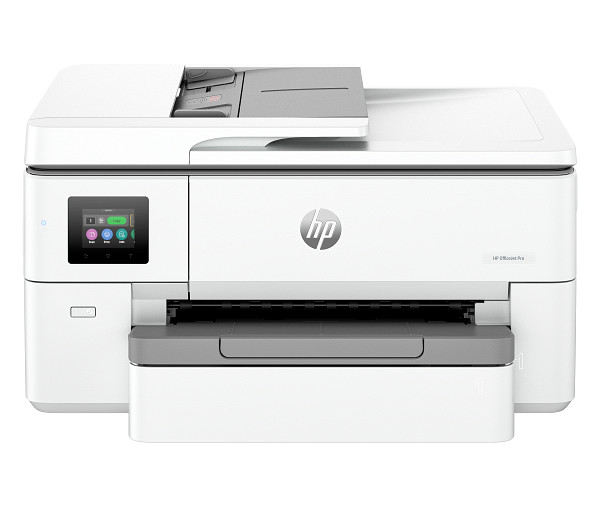
Thermal inkjet printing here means ink cartridges instead of toner, so you replace four HP 936 cartridges as each color runs low. This HP OfficeJet Pro 9720e Wide Format prints up to Tabloid (11×17 in) and duplexes automatically. HP recommends 250 to 1500 pages a month, which suits small offices and home workspaces.
HP Universal Scan – Full Feature Software and Driver
Win 11Win 10 64-bit
On Windows 11 or Windows 10 64-bit, download HP Universal Scan – Full Feature Software and Driver (436.2 MB). It is the download HP recommends for this printer.
Quick install: download the recommended file above, run it, and choose Wi-Fi or USB when the installer asks, then print a test page. Full steps
HP OfficeJet Pro 9720e Wide Format driver for Windows
Full software and drivers
Win 11Win 10 64-bit
Details
- File name
Full_Webpack-63.8.6459-SJ0001_Full_Webpack.exe- MD5 checksum (from HP)
7e76f43e3ae4d4638f9271aa6235f8dc- Software ID (HP)
- cs-308747-11 · verify on HP
Win 11
Details
- File name
Full_Webpack-63.8.6459_ARM64-SJ0001_Full_Webpack.exe- MD5 checksum (from HP)
6d62a1c7a02013ab7ada7c43595e721c- Software ID (HP)
- cs-351749-3 · verify on HP
Basic driver only
Win 11Win 10 64-bit
Details
- File name
Basic_Webpack_x64-63.8.6459-SJ0001_Basicx64_Webpack.exe- MD5 checksum (from HP)
24c79852645f3dea63bb0a61b2ebd87d- Software ID (HP)
- cs-308746-11 · verify on HP
Win 11
Details
- File name
Basic_Webpack_x64-63.8.6459_ARM64-SJ0001_Basicx64_Webpack.exe- MD5 checksum (from HP)
ff10299f0401ee28a1e09f0aecef6c3c- Software ID (HP)
- cs-351748-3 · verify on HP
Setup apps
Win 11Win 10 64-bit
Details
- File name
HPEasyStart_17_6_15.exe- MD5 checksum (from HP)
d3c5840776dec9f1f7e1ba23499a15e8- Software ID (HP)
- mp-366488-3 · verify on HP
Win 11Win 10 64-bit
Details
- Software ID (HP)
- mp-366135-1 · verify on HP
HP Universal Print Driver
Win 10 64-bit
Details
- File name
SUPD-6.03.1.4143-V4-Win10-x64.zip- MD5 checksum (from HP)
ec8dbcd2b7dfa2cc5582335555ae3cb2- Software ID (HP)
- ds-366408-2 · verify on HP
- Release notes
- Read on HP
Win 11
Details
- File name
SUPD-6.03.1.4143-V4-Win11-x64.zip- MD5 checksum (from HP)
d6636f9401a369de31a848ad697b52bb- Software ID (HP)
- ds-293277-10 · verify on HP
- Release notes
- Read on HP
Win 11Win 10 64-bitWin 7 64-bit
Details
- File name
HPSPARKTools-5.06.1.604.zip- MD5 checksum (from HP)
87d5eb9834b9e215749f48eb2dfe257e- Software ID (HP)
- ds-293279-11 · verify on HP
- Release notes
- Read on HP
Win 11 ARM64
Details
- File name
SUPD-6.03.1.4143-V4-ARM64.zip- MD5 checksum (from HP)
00df76b39a7cea25f44e5ff878ef5248- Software ID (HP)
- ds-293278-10 · verify on HP
- Release notes
- Read on HP
Firmware
Win 11Win 10 64-bit
Details
- File name
OJP9720_9720e_6.23.6.41.exe- MD5 checksum (from HP)
808b1663bf93606e4a4d95e35cab2278- Software ID (HP)
- mp-323848-11 · verify on HP
Utilities and other software
Win 11Win 10 64-bitWin 7 64-bit
Details
- File name
HPEasyStart-16.2.2-OJP9720_60_0_1882_Webpack.exe- MD5 checksum (from HP)
c5d44246ee03320d5314b00155cea19c- Software ID (HP)
- al-321057-1 · verify on HP
HP OfficeJet Pro 9720e Wide Format driver for macOS
macOS 26macOS 15macOS 13
Details
- Software ID (HP)
- mp-351535-1 · verify on HP
macOS 13
Details
- File name
OJP9720_9720e_6.23.6.41.dmg- MD5 checksum (from HP)
7a21c33c78c5b3259526a6cf23fb0ab1- Software ID (HP)
- mp-323847-9 · verify on HP
All files come straight from HP (ftp.hp.com). We checked them against HP’s list on Oct 25, 2026. Systems checked: Win 11, Win 10 64-bit, Win 7 64-bit, macOS 26, macOS 15, macOS 13, Linux. Older systems may have more files on HP’s page for this model.
HP OfficeJet Pro 9720e Wide Format driver support by operating system
64-bit
64-bit
Latest HP OfficeJet Pro 9720e Wide Format driver and firmware updates
- HP OfficeJet 9720-9720e/HP OfficeJet Pro 9720-9720e All-in-one Printer series Firmware Update v6.23.6.41 (Jul 08, 2026): Sulochana, Ravishankar Bhaskar (CPE_FW) 5625300.00000000 Sulochana, Ravishankar Bhaskar (CPE_FW)…
Which HP OfficeJet Pro 9720e Wide Format driver should I choose?
Full software and drivers (436.2 MB) installs the complete scan feature set, without OCR or cloud destinations. Basic driver (113.9 MB) gives minimum scanning with WIA and Twain support. HP Easy Start (26.5 MB) is the setup app, and it needs an internet connection to install drivers. Universal Print Driver is a generic driver for IT-managed setups. Install the firmware update (133.8 MB) only when you need to fix a specific problem.
Duplex printing is automatic for A4 and Letter. The 250-sheet input tray and 75-sheet output tray cover most office jobs. Connections include Ethernet, Hi-Speed USB 2.0 and dual-band Wi-Fi. The standard HP 936 Black cartridge (4S6V2LN) yields about 1,250 pages.
How to install the HP OfficeJet Pro 9720e Wide Format driver
- Download HP Universal Scan – Full Feature Software and Driver (436.2 MB) to your Windows 11 or Windows 10 64-bit PC.
- Open the downloaded file when it finishes.
- Follow the installer prompts as they appear.
- Connect the printer by Ethernet, USB or dual-band Wi-Fi, using whichever connection the installer offers.
- Finish by printing a test page to confirm the printer responds.
Adding the printer by hand or installing on Linux? See our printer driver install guide.
Models supported by this HP OfficeJet Pro 9720e Wide Format driver page
These printers use the same driver files, so every download on this page fits each of them.
HP OfficeJet Pro 9720e Wide Format specifications
Printing
Paper handling
Connectivity, supplies and size
Connectivity, supplies and size (continued)
Source: HP product specifications for the HP OfficeJet Pro 9720e Wide Format All-in-One Printer.
Each file lists the MD5 checksum HP publishes. Our guide to checking a driver download shows how to compare it. If an HP link is down, try the Microsoft Update Catalog search for the HP OfficeJet Pro 9720e Wide Format.
HP OfficeJet Pro 9720e Wide Format driver troubleshooting
The PC cannot find the printer on the network
Confirm the printer and PC share the same network. Restart the printer and router, then retry the install. If Wi-Fi keeps failing, connect with an Ethernet or USB cable instead.
Prints look faded or streaky
Check that the HP 936 cartridges still hold ink and replace any that are empty. Use original HP 936 cartridges, then reprint. Actual yield varies with page content.
Scanning feels slow
Install HP Universal Scan version 63.8.6459, which HP lists as optimizing scan speed. Download the Full Feature package (436.2 MB) or the Basic package (113.9 MB), then try the scan again.
For “driver is unavailable”, offline printers and stuck print jobs, see our printer driver troubleshooting guide.
HP OfficeJet Pro 9720e Wide Format driver FAQ
Which Windows versions does the recommended download support?
HP Universal Scan – Full Feature Software and Driver supports Windows 11 and Windows 10 64-bit. A separate ARM 64 build exists for Windows 11.
How big is the Full Feature download compared with the Basic one?
The Full Feature download is 436.2 MB. The Basic download is 113.9 MB and provides minimum scanning with WIA and Twain support.
Does HP offer a Mac download for this printer?
HP offers only a firmware update for macOS 13 (137.3 MB, version 6.23.6.41). It does not offer a Mac driver or setup app among these downloads.
How fast does this printer print?
In General Office Mode HP rates it up to 34 ppm in black and color. In Professional Mode it reaches up to 22 ppm black and 18 ppm color.
Drivers for similar HP printers
Owners of related models can find the matching downloads here: HP OfficeJet Pro 9015 All-in-One driver, HP OfficeJet Pro 9025e All-in-One driver, HP OfficeJet Pro 9125e All-in-One driver, HP OfficeJet Pro 9130e All-in-One driver.
Last checked: Oct 25, 2026. HP and HP OfficeJet Pro 9720e Wide Format are trademarks of HP Inc. This site is not affiliated with HP.