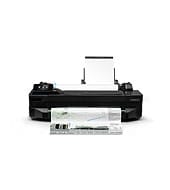
This 24-inch large-format printer prints technical drawings, posters and photos on sheets or rolls. It suits people who need CAD-style output at a desk-size footprint. HP Thermal Inkjet gives up to 1200 x 1200 optimized dpi. An automatic cutter trims roll media. Wi-Fi, Ethernet and USB cover most setups.
HP DesignJet and PageWide XL Windows Printer Driver installer
Win 11Win 10 64-bitWin 7 64-bit
On Windows, download the HP DesignJet and PageWide XL Windows Printer Driver installer (32.7 MB) for the HP DesignJet T120. On a Mac, download HP Click (674.3 MB).
Quick install: download the recommended file above, run it, and choose Wi-Fi or USB when the installer asks, then print a test page. Full steps
HP DesignJet T120 driver for Windows
Firmware
Win 11Win 10 64-bitWin 7 64-bitLinux
Details
- Description
- HP DesignJet T120 Printer and T520 Printer Series Guide for checking required firmware version
- File name
HP_DesignJet_T120_Printer_and_T520_Printer_Series_Firmware_upgrade.pdf- MD5 checksum (from HP)
634623cfa6ecd3c38e270c4307ef4598- Software ID (HP)
- pl-191733-2 · verify on HP
- Release notes
- Read on HP
Win 11Win 10 64-bitWin 7 64-bitLinux
Details
- Description
- This download includes the firmware file for your HP Designjet T120 and HP Designjet T520 ePrinter Series (Rev A) Firmware
- File name
amperexl_pr_AXP2CN2331AR_secure_signed_rbx.ful- MD5 checksum (from HP)
2023fcf1ce164760192291df43eb5f34- Software ID (HP)
- pl-114075-17 · verify on HP
- Release notes
- Read on HP
Win 11Win 10 64-bitWin 7 64-bitLinux
Details
- Description
- This download includes the firmware file for your HP Designjet T120 and HP Designjet T520 ePrinter Series (Rev B/C) Firmware
- File name
amperexl_plus_pr_APP2CN2023AR_secure_signed_rbx.ful- MD5 checksum (from HP)
1925b25ee17977908b3abaa5e5458d02- Software ID (HP)
- pl-189872-10 · verify on HP
- Release notes
- Read on HP
Utilities and other software
Win 11Win 10 64-bit
Details
- Description
- With HP Click printing software, in one click you can print the most common formats like PDF, JPEG, TIFF, and HP-GL/2 files. Enjoy real-print…
- File name
HPClick-64bit-Setup-4.12.26.exe- MD5 checksum (from HP)
2000365dd3d2d7fbf833388c3a43a8b2- Software ID (HP)
- pl-303315-28 · verify on HP
- Release notes
- Read on HP
Win 11Win 10 64-bit
Details
- File name
HPClick_Silent_x64-4.12.26.exe- MD5 checksum (from HP)
30afc7ee639d13b149e2d551ae61bdfd- Software ID (HP)
- pl-303314-27 · verify on HP
- Release notes
- Read on HP
Win 11Win 10 64-bit
Details
- Description
- This package contains the INF and necessary driver files for a manual installation using the Windows "Add printer wizard"
- File name
win-x64-pcl3-drv.exe- MD5 checksum (from HP)
20af1c1bdd5a0c5a36988a5cd3d3affc- Software ID (HP)
- pl-367048-2 · verify on HP
- Release notes
- Read on HP
Win 11Win 10 64-bitWin 7 64-bit
Details
- Description
- This software package installs the HP DesignJet Utility to be used with your HP DesignJet and PageWide XL printers. The HP Utility will allow you to…
- File name
HP_DesignJet_Utility_6.4.5.4879.exe- MD5 checksum (from HP)
3ab25e85b45e03874f7c6e054476e1c1- Software ID (HP)
- pl-234803-11 · verify on HP
More utilities and other software
Win 11Win 10 64-bitWin 7 64-bit
Details
- Description
- This is the best way to install the driver and software. The installer automatically selects the most suitable driver type based on your printer…
- File name
IntegratedInstaller.exe- MD5 checksum (from HP)
f0990d757f0755c34e1bacfcac28a86d- Software ID (HP)
- pl-234807-17 · verify on HP
Win 11Win 10 64-bitWin 7 64-bit
Details
- Description
- Keep your HP software updated and enjoy automated, effortless, and personalized support
- File name
HP_Support_Assistant.exe- MD5 checksum (from HP)
2c7960656d61c352640181baf4b7c911- Software ID (HP)
- pl-246467-1 · verify on HP
Win 7 64-bit
Details
- File name
HPClick-64bit-Setup.exe- MD5 checksum (from HP)
84139e585a888041f68ce8aab8f8dbd5- Software ID (HP)
- pl-175182-24 · verify on HP
- Release notes
- Read on HP
Win 7 64-bit
Details
- File name
HPClick-Silent_x64.exe- MD5 checksum (from HP)
f2683fec9765ab0c88a3d3817a0946d6- Software ID (HP)
- pl-232472-9 · verify on HP
- Release notes
- Read on HP
Win 7 64-bit
Details
- File name
win-x64-pcl3-drv.exe- MD5 checksum (from HP)
3bfcab4953330d61b3b20649ca6131fb- Software ID (HP)
- pl-295503-7 · verify on HP
- Release notes
- Read on HP
HP DesignJet T120 driver for macOS
Utilities and other software
macOS 13
Details
- Description
- This software will install the Raster driver that will allow you to print to your HP DesignJet printer from your Mac computer
- File name
Universal-Raster.dmg- MD5 checksum (from HP)
668c925aee1ea620f0b3f6aa96746ca6- Software ID (HP)
- pl-310860-2 · verify on HP
macOS 15
Details
- File name
Universal-Raster15-1.dmg- MD5 checksum (from HP)
a603417d46409a488ea3a3cdfa6ead0e- Software ID (HP)
- pl-345558-1 · verify on HP
macOS 26
Details
- File name
Universal-Raster26_1.dmg- MD5 checksum (from HP)
ba8ad91fbdf4d9496e4ee8b553fba770- Software ID (HP)
- pl-355268-2 · verify on HP
macOS 26macOS 15macOS 13
Details
- File name
HPClick-4.12.26.dmg- MD5 checksum (from HP)
a2bc474fdbac94a2f5bab0d56d5736e2- Software ID (HP)
- pl-320796-26 · verify on HP
- Release notes
- Read on HP
All files come straight from HP (ftp.hp.com). We checked them against HP’s list on Oct 25, 2026. Systems checked: Win 11, Win 10 64-bit, Win 7 64-bit, macOS 26, macOS 15, macOS 13, Linux. Older systems may have more files on HP’s page for this model.
HP DesignJet T120 driver support by operating system
64-bit
64-bit
Latest HP DesignJet T120 driver and firmware updates
- HP Click Silent Version (for Win 11, Win 10 64-bit) v4.12.26 (Oct 15, 2026): General Bug Fixing. Added support for MAC ARM devices. User Guide UI changed: The User Guide now will open…
- HP DesignJet and PageWide XL PCL3 Driver for Windows (for Win 11, Win 10 64-bit) v61.2606.1.100 (Jul 16, 2026): Fixed a bug were selecting one paper type would cause a different paper type to be saved when the OS was set…
- HP DesignJet Mac Raster Driver (for macOS 26) v59 (Mar 03, 2026): Added macOS 26 support for Raster devices. Bug fixes
- HP DesignJet and PageWide XL Windows Printer Driver installer v4.0.0.70 (Oct 15, 2025): Add alignment for HP DesignJet XL 3800. Add folding Styles for HP DesignJet XL 3800. Improvements in size…
- HP Designjet T120 and HP Designjet T520 ePrinter Series (Rev A) Firmware vAXP2CN2331AR (Feb 21, 2024): Security upgrades
Which HP DesignJet T120 driver should I choose?
HP offers two download categories here: Utility and Firmware. Utility downloads hold drivers and software. The 32.7 MB Windows installer picks the right driver for you, so most people should start there. The 8.9 MB PCL3 driver suits a manual install through the Windows Add printer wizard. Firmware files are 18.7 MB to 24.3 MB. Update firmware only when it fixes a problem you have. HP lists separate files for Rev A and Rev B/C printers.
The printer has 256 MB of memory and no internal storage. It takes rolls from 11 to 24 in wide, plus sheets from the input tray. Connect it by Wi-Fi, Fast Ethernet or USB 2.0. Its ink is dye-based for C, M and Y, and pigment-based for black.
How to install the HP DesignJet T120 driver
- Set up the printer first, following the setup poster, then turn it on.
- Turn on your computer. Close screen savers, virus protection programs and other running software.
- Download the HP DesignJet and PageWide XL Windows Printer Driver installer (32.7 MB) and save it to a folder you can find.
- Open the saved file in Windows Explorer by double-clicking it.
- Follow the installer instructions to finish. Pick your connection type when the installer asks.
- On a Mac, install HP Click (674.3 MB) from HP's download list instead.
Adding the printer by hand or installing on Linux? See our printer driver install guide.
HP DesignJet T120 specifications
Source: HP product specifications for the HP DesignJet T120 Printer.
Each file lists the MD5 checksum HP publishes. Our guide to checking a driver download shows how to compare it. If an HP link is down, try the Microsoft Update Catalog search for the HP DesignJet T120.
HP DesignJet T120 driver troubleshooting
Wrong paper type saved when Windows is set to Japanese
Install HP DesignJet and PageWide XL PCL3 Driver for Windows version 61.2606.1.100. HP fixed this bug there. It also corrected some Japanese media translations.
Computer cannot find the printer over Wi-Fi or Ethernet
Check that the printer is on and connected to the same network as your computer. Check the Ethernet cable and link light. Restart the printer and router, then run the installer again.
Prints show streaks or faded lines
Check that the printhead and ink cartridges are seated correctly. Confirm the paper type in the driver matches the loaded media. Reprint after reseating the parts.
For “driver is unavailable”, offline printers and stuck print jobs, see our printer driver troubleshooting guide.
HP DesignJet T120 driver FAQ
Which Windows versions does the recommended installer support?
The HP DesignJet and PageWide XL Windows Printer Driver installer, version 4.0.0.70, supports Windows 11, Windows 10 64-bit and Windows 7 64-bit. It is 32.7 MB.
Which driver works on macOS 26?
HP lists the HP DesignJet Mac Raster Driver version 59 for macOS 26. It is 97.7 MB. HP also recommends HP Click, which supports macOS 26, 15 and 13.
What does the latest firmware fix?
The Rev A firmware, AXP2CN2331AR from Feb 21, 2024, brings security upgrades. The Rev B/C firmware, APP2CN2023AR, is a network component update.
Can I print wirelessly from this printer?
Yes. HP lists Wi-Fi as standard, along with Fast Ethernet and Hi-Speed USB 2.0. HP also lists email printing, HP Designjet ePrint & Share and Apple AirPrint.
Last checked: Oct 25, 2026. HP and HP DesignJet T120 are trademarks of HP Inc. This site is not affiliated with HP.