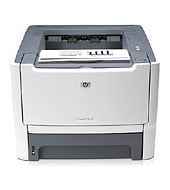
Buy a USB cable separately, because HP does not include one with the HP LaserJet P2015x. Network or wireless printing needs an optional HP Jetdirect print server. This black laser printer runs at up to 27 ppm and suits small offices printing 740 to 3000 pages a month.
HP Universal Print Driver for Windows PCL6 (64-bit)
Win 10 64-bitWin 7 64-bit
On Windows, download the HP Print Administrator Resource Kit (18.7 MB). HP marks it as the recommended download for this printer.
Quick install: download the recommended file above, run it, and choose Wi-Fi or USB when the installer asks, then print a test page. Full steps
HP LaserJet P2015x driver for Windows
HP Universal Print Driver
Win 10 64-bitWin 7 64-bit
Details
- File name
upd-pcl6-win10-x64-8.2.0.26778.zip- MD5 checksum (from HP)
1311b735d1ada9b02676d32b5ba5b232- Software ID (HP)
- ds-99374-36 · verify on HP
- Release notes
- Read on HP
Win 10 64-bitWin 7 64-bit
Details
- File name
upd-ps-win10-x64-8.2.0.26778.zip- MD5 checksum (from HP)
626ec0b8d41d3be40357b3c825c3502d- Software ID (HP)
- ds-99376-35 · verify on HP
- Release notes
- Read on HP
Win 10 64-bitWin 7 64-bit
Details
- Software ID (HP)
- ds-114621-1 · verify on HP
Win 11
Details
- File name
upd-pcl6-win11-x64-8.2.0.26819.zip- MD5 checksum (from HP)
5660c16a00e21f11736fd003063d6d13- Software ID (HP)
- ds-365647-1 · verify on HP
- Release notes
- Read on HP
Win 11
Details
- File name
upd-ps-win11-x64-8.2.0.26819.zip- MD5 checksum (from HP)
d27ad643905526df8cc9a89b556dbf42- Software ID (HP)
- ds-365648-1 · verify on HP
- Release notes
- Read on HP
More HP LaserJet P2015x driver downloads: HP Universal Print Driver
Win 11Win 10 64-bitWin 7 64-bit
Details
- File name
HP-PARK-v1.9.2.zip- MD5 checksum (from HP)
b7f948771a52c13721d963c6830ac7b5- Software ID (HP)
- ds-99433-30 · verify on HP
- Release notes
- Read on HP
Win 11 ARM64
Details
- File name
upd-pcl6-win11-ARM64-8.2.0.26778.zip- MD5 checksum (from HP)
e270ca97f4ddb5139217621ccc205506- Software ID (HP)
- ds-359027-2 · verify on HP
- Release notes
- Read on HP
HP LaserJet P2015x driver for Linux
Linux
Details
- Software ID (HP)
- mp-163323-1 · verify on HP
All files come straight from HP (ftp.hp.com). We checked them against HP’s list on Oct 25, 2026. Systems checked: Win 11, Win 10 64-bit, Win 7 64-bit, macOS 26, macOS 15, macOS 13, Linux. Older systems may have more files on HP’s page for this model.
HP LaserJet P2015x driver support by operating system
64-bit
64-bit
Which HP LaserJet P2015x driver should I choose?
Every download here falls in one category: Universal Print Driver. A Universal Print Driver is a generic driver that suits IT-managed setups with many printer models. The PCL6 drivers run 20.1 to 20.3 MB, and the PostScript drivers run 21.4 to 21.5 MB. The Print Administrator Resource Kit, at 18.7 MB, adds tools, scripts and documentation for print administrators. Pick the driver that matches your Windows version.
It has no display and no HP ePrint. The standard output bin holds 125 sheets, and maximum output capacity reaches 150 sheets. It handles letter, legal, executive, index cards and No. 10 or Monarch envelopes. HP gives a one-year, return to bench warranty.
How to install the HP LaserJet P2015x driver
- Download the HP Print Administrator Resource Kit (18.7 MB) from this page.
- Confirm your PC runs Win 11, Win 10 64-bit or Win 7 64-bit.
- Run the downloaded file and follow the on-screen prompts.
- Connect the printer with a USB cable, which you buy separately.
- Choose network or wireless only if you added an HP Jetdirect en3700 or ew2400 print server.
- Print a test page from any application to confirm the install.
Adding the printer by hand or installing on Linux? See our printer driver install guide.
HP LaserJet P2015x specifications
HP LaserJet P2015x driver specs: printing
HP LaserJet P2015x driver specs: paper handling
HP LaserJet P2015x driver specs: connectivity, supplies and size
Source: HP product specifications for the HP LaserJet P2015x Printer.
Each file lists the MD5 checksum HP publishes. Our guide to checking a driver download shows how to compare it. If an HP link is down, try the Microsoft Update Catalog search for the HP LaserJet P2015x.
HP LaserJet P2015x driver troubleshooting
Windows does not find the printer over USB
Try a different USB cable or port. Restart the printer and the PC. Then reinstall the driver with the printer connected and powered on.
The printer is unreachable on the network or wireless
Confirm you installed an HP Jetdirect en3700 or ew2400 print server. Power cycle the printer to restart it. Keep the PC on the same network as the printer.
Paper jams in the laser printer
Switch off the printer first. Remove the jammed sheet gently, pulling in the direction of paper travel. Use only supported media such as plain paper, labels or cardstock.
For “driver is unavailable”, offline printers and stuck print jobs, see our printer driver troubleshooting guide.
HP LaserJet P2015x driver FAQ
Which Windows versions does the recommended download support?
HP lists Win 11, Win 10 64-bit and Win 7 64-bit for the HP Print Administrator Resource Kit, version 1.9.2. The file is 18.7 MB.
Can the P2015x print wirelessly?
Only with an accessory. HP offers the HP Jetdirect ew2400 802.11g Wireless Print Server as an option. The en3700 adds Fast Ethernet instead.
Is there a driver for Windows 11 ARM64?
Yes. HP offers the HP Universal Print Driver for Windows PCL6 (ARM64-bit), version 8.2.0.26778, at 20.1 MB.
How fast is it, and what monthly volume does HP recommend?
HP rates it at up to 27 ppm, with the first page out in as fast as 8.5 seconds. HP recommends 740 to 3000 pages per month.
Drivers for similar HP printers
Owners of related models can find the matching downloads here: HP LaserJet P2035 driver, HP LaserJet P2035n driver.
Last checked: Oct 25, 2026. HP and HP LaserJet P2015x are trademarks of HP Inc. This site is not affiliated with HP.
le voyant est rouge au niveau de l’icone du bourrage.
Que faire pour imprimer?