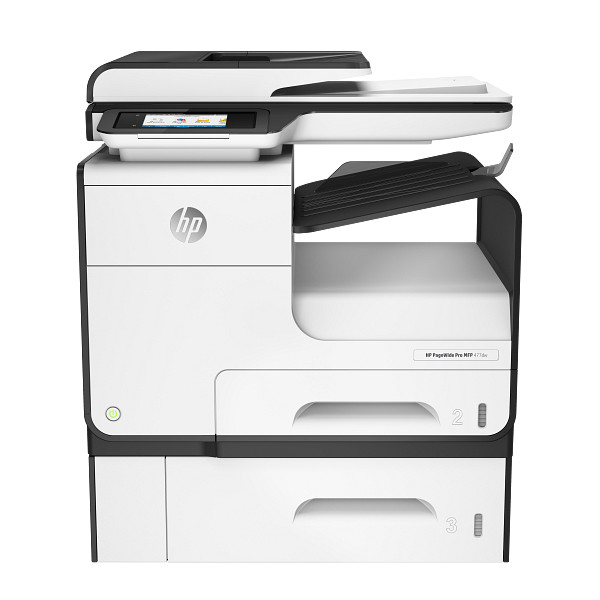
Print, copy, scan, and fax from one machine aimed at small offices and busy workgroups. The HP PageWide Pro 477dn prints up to 55 ppm in General Office Mode and does automatic duplex. HP recommends 750 to 4500 pages a month.
HP PageWide Pro 477dw Multifunction Printer series PCL6 Full Software Solution
Win 11Win 10 64-bitWin 7 64-bit
On Windows, download HP PageWide Pro 477dw Multifunction Printer series PCL6 Full Software Solution (114.9 MB). On a Mac, download Install HP Easy Start (6.3 MB).
Quick install: download the recommended file above, run it, and choose Wi-Fi or USB when the installer asks, then print a test page. Full steps
HP PageWide Pro 477dn driver for Windows
Full software and drivers
Win 11Win 10 64-bitWin 7 64-bit
Details
- File name
Full_Webpack-38.9.2003_1-PW477_DW_Full_Webpack.exe- MD5 checksum (from HP)
ac97326d72cefd1b8b2421e6609855ff- Software ID (HP)
- ij-161626-10 · verify on HP
Basic driver only
Win 11Win 10 64-bitWin 7 64-bit
Details
- File name
Basic_Webpack_x64-38.9.2003-PW477_DW_Basicx64_Webpack.exe- MD5 checksum (from HP)
40a104a6f53ec54bb21594f2cb6ee38b- Software ID (HP)
- ij-161536-8 · verify on HP
Setup apps
Win 11Win 10 64-bitWin 7 64-bit
Details
- File name
HPEasyStart_17_6_15.exe- MD5 checksum (from HP)
d3c5840776dec9f1f7e1ba23499a15e8- Software ID (HP)
- mp-366488-3 · verify on HP
HP Universal Print Driver
Win 10 64-bitWin 7 64-bit
Details
- File name
upd-pcl6-win10-x64-8.2.0.26778.zip- MD5 checksum (from HP)
1311b735d1ada9b02676d32b5ba5b232- Software ID (HP)
- ds-99374-36 · verify on HP
- Release notes
- Read on HP
Win 10 64-bitWin 7 64-bit
Details
- File name
upd-ps-win10-x64-8.2.0.26778.zip- MD5 checksum (from HP)
626ec0b8d41d3be40357b3c825c3502d- Software ID (HP)
- ds-99376-35 · verify on HP
- Release notes
- Read on HP
Win 11
Details
- File name
upd-pcl6-win11-x64-8.2.0.26819.zip- MD5 checksum (from HP)
5660c16a00e21f11736fd003063d6d13- Software ID (HP)
- ds-365647-1 · verify on HP
- Release notes
- Read on HP
Win 11
Details
- File name
upd-ps-win11-x64-8.2.0.26819.zip- MD5 checksum (from HP)
d27ad643905526df8cc9a89b556dbf42- Software ID (HP)
- ds-365648-1 · verify on HP
- Release notes
- Read on HP
Win 11 ARM64
Details
- File name
upd-pcl6-win11-ARM64-8.2.0.26778.zip- MD5 checksum (from HP)
e270ca97f4ddb5139217621ccc205506- Software ID (HP)
- ds-359027-2 · verify on HP
- Release notes
- Read on HP
Firmware
Win 11Win 10 64-bitWin 7 64-bit
Details
- File name
PW477DW_2506A.exe- MD5 checksum (from HP)
2aa888d9b5641ff56db51f152851ad78- Software ID (HP)
- ij-276384-10 · verify on HP
Win 11Win 10 64-bitWin 7 64-bit
Details
- File name
HP_PageWide_Pro_Series_Firmware_Readme_VR_1.18_001.2506A.pdf- MD5 checksum (from HP)
26fa7a397598f86c51f70c58b76e0832- Software ID (HP)
- ij-199973-23 · verify on HP
Utilities and other software
Win 11Win 10 64-bitWin 7 64-bit
Details
- File name
UFD_8.2-8.2.89-HPUFD_Driver_Files.exe- MD5 checksum (from HP)
a2d2308c62054d997ee6fb3208829aa4- Software ID (HP)
- ds-146586-21 · verify on HP
- Release notes
- Read on HP
HP PageWide Pro 477dn driver for macOS
macOS 26macOS 15
Details
- File name
HP_Easy_Start.app.zip- MD5 checksum (from HP)
19c1a5f786f5f93f9f778ad71ee444a3- Software ID (HP)
- mp-166618-27 · verify on HP
macOS 26macOS 15macOS 13
Details
- File name
HP_Easy_Admin.app.zip- MD5 checksum (from HP)
32c3c4edfb4e3bc519c3c1731542360e- Software ID (HP)
- mp-218629-7 · verify on HP
HP PageWide Pro 477dn driver for Linux
Linux
Details
- Software ID (HP)
- mp-163323-1 · verify on HP
All files come straight from HP (ftp.hp.com). We checked them against HP’s list on Oct 25, 2026. Systems checked: Win 11, Win 10 64-bit, Win 7 64-bit, macOS 26, macOS 15, macOS 13, Linux. Older systems may have more files on HP’s page for this model.
HP PageWide Pro 477dn driver support by operating system
64-bit
64-bit
Which HP PageWide Pro 477dn driver should I choose?
The Full software and drivers package installs the driver plus HP's full software, at 114.9 MB. The Basic driver (65.8 MB) installs only the print driver, for users who want nothing extra. Setup apps, such as HP Easy Start at 26.5 MB on Windows, guide you through setup and fetch drivers online. Universal Print Driver packages are generic drivers for IT-managed setups. Firmware 2506A is a separate download. Update it only to fix a specific problem.
Automatic duplex is standard. Paper handling includes a 500-sheet input tray, a 50-sheet multi-purpose tray, and a 300-sheet output bin. Connections include Ethernet, USB, and built-in Wi-Fi 802.11b/g/n, plus AirPrint and Mopria for mobile printing.
How to install the HP PageWide Pro 477dn driver
- Download HP PageWide Pro 477dw Multifunction Printer series PCL6 Full Software Solution (114.9 MB) from this page.
- Run the downloaded file on your Windows 11, Windows 10 64-bit, or Windows 7 64-bit PC.
- Follow the installer prompts and accept the license agreement.
- Pick the connection type the installer offers: Wi-Fi, Ethernet, or USB.
- Print a test page from any app to confirm the driver works.
- On a Mac, download Install HP Easy Start (6.3 MB) and run it instead.
Adding the printer by hand or installing on Linux? See our printer driver install guide.
Connect the HP PageWide Pro 477dn to a wired network
Plug the Ethernet cable into the printer and into your network, then switch the printer on. Next, wait a full 60 seconds. During that time the network recognizes the device and gives it an IP address or host name, so don't rush this step.
To find the address, open the control panel dashboard. Swipe the dashboard tab at the top of any screen downward, or touch the dashboard area on the home screen. However, if you would rather have it on paper, touch Print Details and the printer prints a page showing the IP address.
Use Quiet Mode to reduce printer noise
If the printer is too loud for your workspace, turn on Quiet Mode. You can enable it from the control panel or from the HP Embedded Web Server (EWS), whichever is more convenient for you at the time.
However, there is a trade-off: Quiet Mode slows the printer down. If you notice it hurting your productivity, simply turn the mode off again. Therefore, it makes sense to switch it on for quiet periods and leave it off when you have large jobs.
Save cartridge life with General Office mode
General Office mode gives slightly lighter printouts, which might help a cartridge last longer. For example, it suits everyday documents where very dark output isn't needed. To use it, choose Print from the File menu in your software program and make sure your printer is selected.
Next, open the Properties dialog box. The button may be named Properties, Options, Printer Setup, Printer Properties, Printer, or Set Preferences. In Windows, click Print Options and then Properties. On OS X, choose Copies and Pages from the pop-up menu. Then open the Paper/Quality tab and pick General Office under Print Quality.
Copy both sides of an ID card on one page
The ID card copy feature puts both sides of an identification card, or another small document, on one side of a single sheet. The printer asks you to copy the first side, then turn the card over on the glass and copy again. Both images print together on one page.
Place the card on the scanner glass, using the media mark at the back-left to orient it, and close the lid. Then touch the Copy folder and the ID Card icon. In Copy Settings, choose the tray, copy quality, and lightness or darkness. Finally, follow the control panel prompts.
Set up scan to a network folder in the EWS
You configure this feature in the EWS. Open it, go to the Scan tab, click Scan to Network Folder, and then click Network Folder Setup. On the setup page, follow the onscreen instructions to add network folder profiles, and click Next when you finish.
Next comes the authentication page, where you set up the credentials for logging into SharePoint. Click Next again afterward. Finally, the settings page lets you configure scan options such as paper size and scan resolution. Therefore, remember to click Save when you are done so the changes are kept.
Replace cartridges in the HP PageWide Pro 477dn
The printer has four cartridges, one each for yellow (Y), magenta (M), cyan (C), and black (K). To swap one, open the cartridge door and push the old cartridge inward to release it. Then grasp its edge and pull it straight out.
Avoid touching the metal contacts on the new cartridge, because fingerprints can cause connection errors. Slide the new cartridge into its slot and close the door. Also, never turn the printer off while a cartridge is missing. HP recommends replacing any missing cartridge with a genuine HP one quickly.
HP PageWide Pro 477dn specifications
HP PageWide Pro 477dn driver specs: printing
HP PageWide Pro 477dn driver specs: paper handling
HP PageWide Pro 477dn driver specs: connectivity, supplies and size
Source: HP product specifications for the HP PageWide Pro 477dwt Multifunction Printer and Tray.
Each file lists the MD5 checksum HP publishes. Our guide to checking a driver download shows how to compare it. If an HP link is down, try the Microsoft Update Catalog search for the HP PageWide Pro 477dn.
HP PageWide Pro 477dn driver troubleshooting
The installer cannot find the printer over Wi-Fi
Confirm the printer and your PC share the same network. Restart the printer and your router, then run the installer again. Ethernet or USB also works if Wi-Fi keeps failing.
Prints look streaky or faded
Reprint the page on plain paper first. Check that the ink cartridges sit fully in place. Try a different ream of paper, since pigmented inks respond to paper type.
Windows shows the printer as offline
Make sure the printer is powered on and connected by Wi-Fi, Ethernet, or USB. Restart the printer and then your PC. Reinstall the driver if the status stays offline.
For “driver is unavailable”, offline printers and stuck print jobs, see our printer driver troubleshooting guide.
HP PageWide Pro 477dn driver FAQ
Which Windows versions does the full software support?
HP lists Windows 11, Windows 10 64-bit, and Windows 7 64-bit for the Full Software Solution, version 38.9.2003_1, dated May 24, 2022.
How big is the basic driver?
The Basic Driver with Installer is 65.8 MB, version 38.9.2003. It installs the print driver only, without the extra software in the full package.
What does the firmware update fix?
HP does not state specific fixes on this page. It points to the ReadMe file for details. The firmware is version 2506A, dated Mar 28, 2025, and 79.6 MB.
Does this printer print on both sides automatically?
Yes. Automatic duplex printing is standard. The printer also supports HP ePrint, Apple AirPrint, Mopria, Wireless Direct Printing, and Google Cloud Print 2.0 for mobile printing.
Last checked: Oct 25, 2026. HP and HP PageWide Pro 477dn are trademarks of HP Inc. This site is not affiliated with HP.