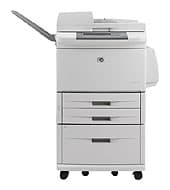
Automatic duplex printing is standard. Paper capacity is large: 100-sheet tray 1, two 500-sheet trays, a 2000-sheet tray 4 and a 100-sheet feeder. The HP LaserJet M9059 Multifunction series prints, copies, scans and digital sends, with optional fax.
HP Universal Print Driver for Windows PCL6 (64-bit)
Win 10 64-bitWin 7 64-bit
HP lists no model-specific driver for this printer. Download the generic HP Universal Print Driver for Windows PCL6 (64-bit): 20.2 MB for Win 11, 20.3 MB for Win 10 64-bit or Win 7 64-bit.
Quick install: download the recommended file above, run it, and connect the USB cable only when the installer asks, then print a test page. Full steps
HP LaserJet M9059 Multifunction series driver for Windows
HP Universal Print Driver
Win 10 64-bitWin 7 64-bit
Details
- File name
upd-pcl6-win10-x64-8.2.0.26778.zip- MD5 checksum (from HP)
1311b735d1ada9b02676d32b5ba5b232- Software ID (HP)
- ds-99374-36 · verify on HP
- Release notes
- Read on HP
Win 10 64-bitWin 7 64-bit
Details
- File name
upd-ps-win10-x64-8.2.0.26778.zip- MD5 checksum (from HP)
626ec0b8d41d3be40357b3c825c3502d- Software ID (HP)
- ds-99376-35 · verify on HP
- Release notes
- Read on HP
Win 10 64-bitWin 7 64-bit
Details
- Software ID (HP)
- ds-114621-1 · verify on HP
Win 11
Details
- File name
upd-pcl6-win11-x64-8.2.0.26819.zip- MD5 checksum (from HP)
5660c16a00e21f11736fd003063d6d13- Software ID (HP)
- ds-365647-1 · verify on HP
- Release notes
- Read on HP
Win 11
Details
- File name
upd-ps-win11-x64-8.2.0.26819.zip- MD5 checksum (from HP)
d27ad643905526df8cc9a89b556dbf42- Software ID (HP)
- ds-365648-1 · verify on HP
- Release notes
- Read on HP
More HP LaserJet M9059 Multifunction series driver downloads: HP Universal Print Driver
Win 11Win 10 64-bitWin 7 64-bit
Details
- File name
HP-PARK-v1.9.2.zip- MD5 checksum (from HP)
b7f948771a52c13721d963c6830ac7b5- Software ID (HP)
- ds-99433-30 · verify on HP
- Release notes
- Read on HP
Win 11 ARM64
Details
- File name
upd-pcl6-win11-ARM64-8.2.0.26778.zip- MD5 checksum (from HP)
e270ca97f4ddb5139217621ccc205506- Software ID (HP)
- ds-359027-2 · verify on HP
- Release notes
- Read on HP
Utilities and other software
Win 10 64-bit
Details
- File name
Dot4x64.msi- MD5 checksum (from HP)
0eacd9b44879a4cdb528b66938b29139- Software ID (HP)
- fp-148007-1 · verify on HP
All files come straight from HP (ftp.hp.com). We checked them against HP’s list on Oct 25, 2026. Systems checked: Win 11, Win 10 64-bit, Win 7 64-bit, macOS 26, macOS 15, macOS 13, Linux. Older systems may have more files on HP’s page for this model.
HP LaserJet M9059 Multifunction series driver support by operating system
64-bit
64-bit
Which HP LaserJet M9059 Multifunction series driver should I choose?
HP lists no model-specific driver for this printer, only generic drivers and utilities. Universal Print Driver downloads are generic drivers that suit IT-managed setups. PCL6 is the type to pick first, while the PS version (21.4 MB for Win 11) adds PostScript emulation. The Print Administrator Resource Kit (18.7 MB) gives admins tools and scripts. The Utility download, a 1.5 MB USB DOT4 driver, handles two-way USB communication on Windows 10 64-bit.
Duplex printing is automatic as standard. Connections include Hi-Speed USB 2.0, Gigabit Ethernet and an embedded hard disk, while wireless is optional and needs a hardware accessory. The replacement cartridge is the HP LaserJet Smart print cartridge CE266C.
How to install the HP LaserJet M9059 Multifunction series driver
- Download HP Universal Print Driver for Windows PCL6 (64-bit), choosing the listing that matches Windows 11 or Windows 10.
- Open the HP Universal Print Driver System Administrator's Guide, which holds HP's steps for installing or upgrading the driver.
- Run the downloaded file and follow the guide's steps for your Windows version.
- Connect the printer by Hi-Speed USB 2.0 or Gigabit Ethernet, whichever your setup uses.
Adding the printer by hand or installing on Linux? See our printer driver install guide.
HP LaserJet M9059 Multifunction series specifications
HP LaserJet M9059 Multifunction series driver specs: printing
HP LaserJet M9059 Multifunction series driver specs: paper handling
HP LaserJet M9059 Multifunction series driver specs: connectivity, supplies and size
Source: HP product specifications for the HP LaserJet M9059 Multifunction Printer series.
Each file lists the MD5 checksum HP publishes. Our guide to checking a driver download shows how to compare it. If an HP link is down, try the Microsoft Update Catalog search for the HP LaserJet M9059 Multifunction series.
HP LaserJet M9059 Multifunction series driver troubleshooting
Windows cannot find the printer on the network or over USB
Confirm the printer is on and the Ethernet or USB cable is firmly seated. Restart the printer, then the computer. For USB, plug straight into the computer instead of a hub.
Pages print faint or streaky
Reseat the cartridge and make sure it still has toner. If prints stay faint, replace it with the HP LaserJet Smart print cartridge CE266C.
Pages print as garbled text or the wrong output
Switch to the PCL6 driver, which HP recommends here. Remove the old driver entry first, then reinstall it following the HP Universal Print Driver System Administrator's Guide.
For “driver is unavailable”, offline printers and stuck print jobs, see our printer driver troubleshooting guide.
HP LaserJet M9059 Multifunction series driver FAQ
Which Windows versions have a driver download?
HP offers Universal Print Driver downloads for Win 11, Win 11 ARM64, Win 10 64-bit and Win 7 64-bit. HP lists no macOS download in these facts.
Is there a driver made only for this printer?
No. HP lists no model-specific driver here, only the generic HP Universal Print Driver packages and utilities. HP recommends the PCL6 (64-bit) version for Windows.
How big is the recommended download?
HP Universal Print Driver for Windows PCL6 (64-bit) is 20.2 MB for Win 11. The Win 10 64-bit and Win 7 64-bit version is 20.3 MB.
Does this printer print on both sides automatically?
Yes. HP lists automatic duplex printing as standard. It handles letter, legal, executive and tabloid from trays 2, 3 and 4, and uses PCL 6, PCL 5e and PostScript level 3 emulation.
Last checked: Oct 25, 2026. HP and HP LaserJet M9059 Multifunction series are trademarks of HP Inc. This site is not affiliated with HP.